www.usaprocom.com
200307-01E20
1/2
Opening
Height
1/2
Opening
Height
Yellow
Tipping
Figure 23 - Correct Burner Flame Pattern
Figure 24 - Incorrect Burner Flame
Pattern
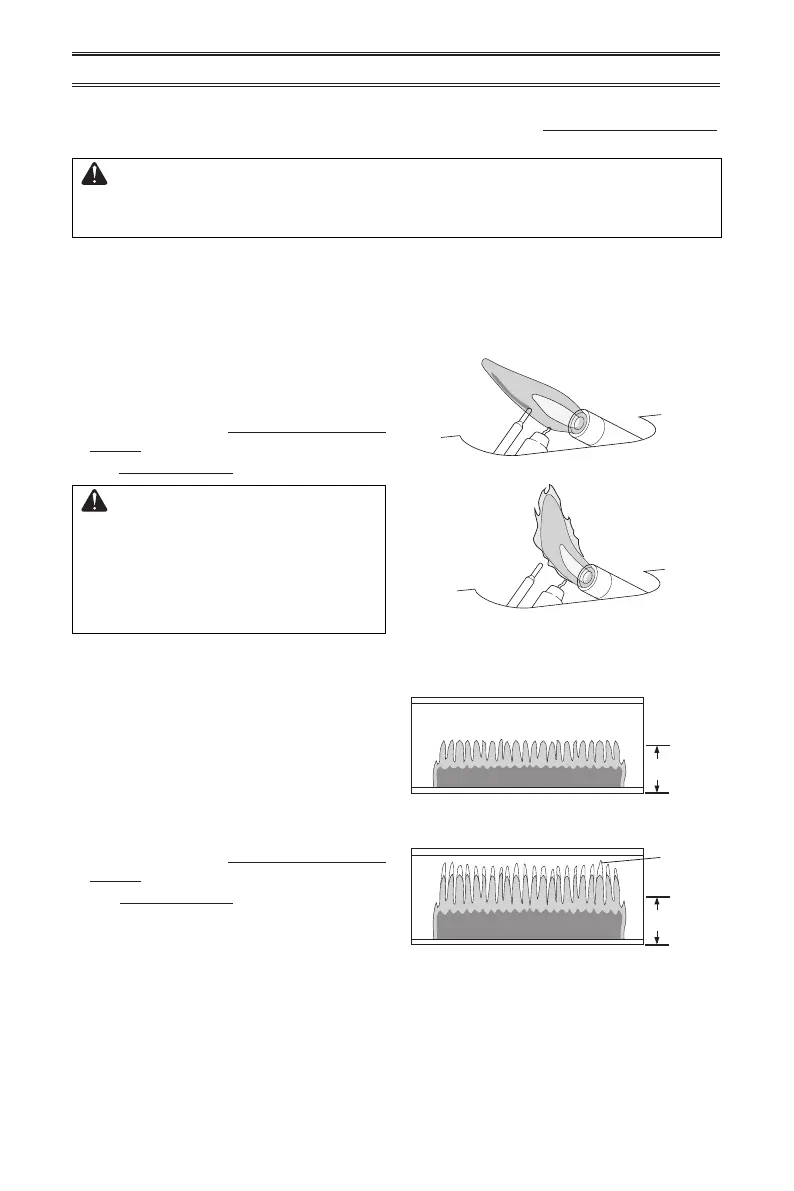
Figure 21 shows a correct pilot ame pattern.
Figure 22 shows an incorrect pilot ame pat-
tern. The incorrect pilot ame is not touching
the thermocouple. This will cause the ther-
mocouple to cool, which shuts the heater off.
If pilot ame pattern is incorrect, as shown
in Figure 22
• turn heater off (see To Turn Off Gas to Ap-
pliance, page 19)
• see Troubleshooting pages 22 through 24.
WARNING: If yellow tipping
occurs, your heater could pro-
duce increased levels of carbon
monoxide. If the burner ame
pattern shows yellow tipping,
follow instructions below.
Figure 21 - Correct Pilot Flame Pattern
Figure 22 - Incorrect Pilot Flame Pattern
IMPORTANT: Owner’s should check pilot ame pattern and burner ame pattern often.
Incorrect ame patterns indicate the need for cleaning (see Care and Maintenance,
page 21) or service.
WARNING: Only a qualied service person should service and
repair heater. This includes maintenance requiring replacement or
alteration of components.
PILOT FLAME PATTERN
BURNER FLAME PATTERN
Figure 23 shows a correct burner ame pat-
tern. Figure 24 shows an incorrect burner
ame pattern. The incorrect burner ame
pattern shows yellow tipping of the ame. It
also shows the ame higher than 1/2 the heat
shield height.
If burner ame pattern is incorrect, as shown
in Figure 24
• turn heater off (see To Turn Off Gas to Ap-
pliance, page 19)
• see Troubleshooting pages 22 through 24.
INSPECTING BURNERS
Notice: Do not mistake orange ames with
yellow tipping. Dirt or other ne particles enter
the heater and burn causing brief patches of
orange ame.



 To Next Page