CONSOLE DIAGRAM
f
,"%
2J 2J" []
[] []
[] []
TIME [] m
, _,U mu m
D STANCE SPEED
PRIORITY
DISPLAY
@
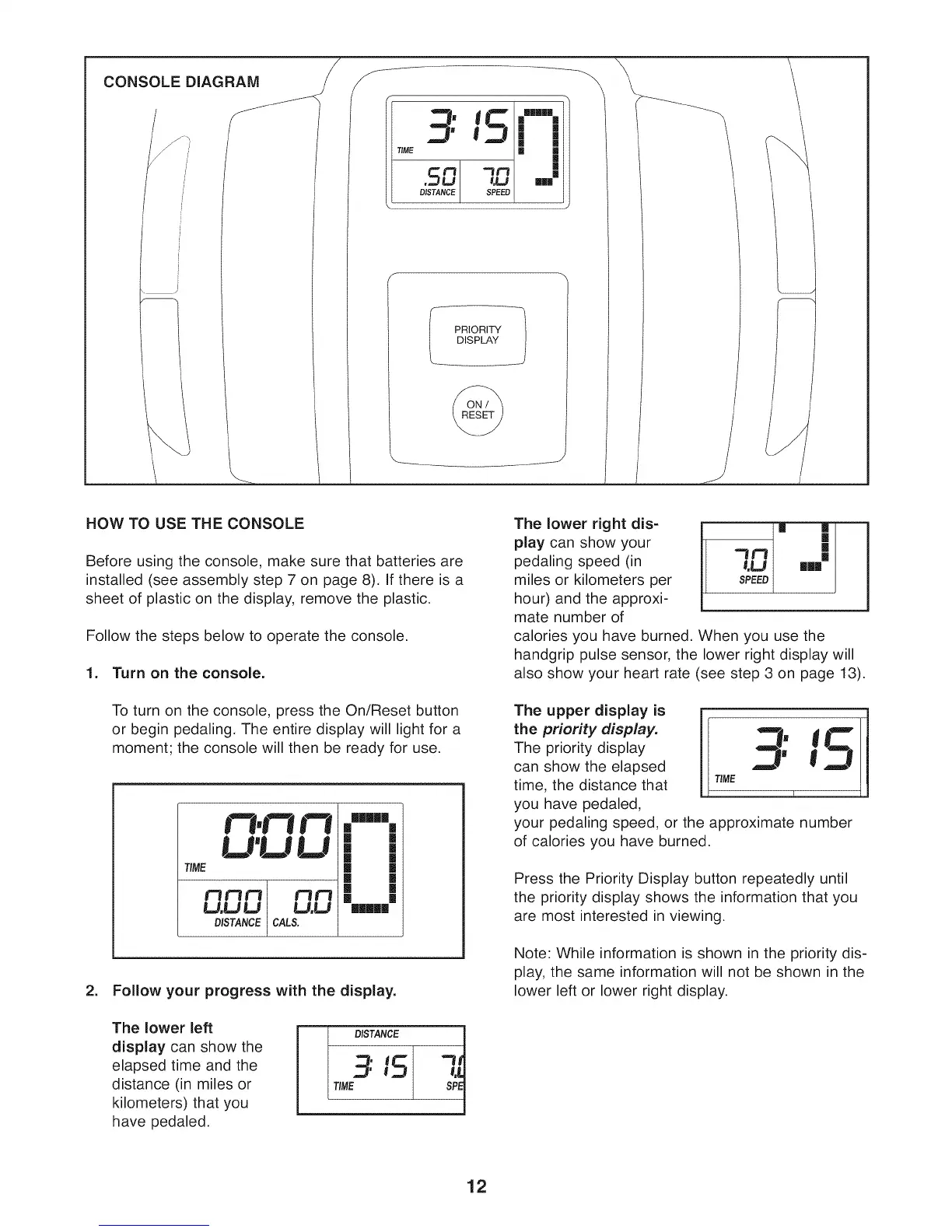
HOW TO USE THE CONSOLE
Before using the console, make sure that batteries are
installed (see assembly step 7 on page 8). If there is a
sheet of plastic on the display, remove the plastic.
Follow the steps below to operate the console.
1. Turn on the console.
To turn on the console, press the On/Reset button
or begin pedaling. The entire display will light for a
moment; the console will then be ready for use.
F'!
U'U LJ
TIME
U, UU U.U
DIS_NCE CALS,
Illl|
[] |
[] |
[] |
[] |
[] |
[] |
[] |
[] 1
11111
2. Follow your progress with the display.
The lower left F="=
display can show the
elapsed time and the
distance (in miles or
kilometers) that you
have pedaled.
DISTANCE
3:15 7.t
TIME SPE
The lower right dis-
play can show your
pedaling speed (in
miles or kilometers per
hour) and the approxi-
mate number of
t.U nm
SPEED
calories you have burned. When you use the
handgrip pulse sensor, the lower right display will
also show your heart rate (see step 3 on page 13).
The upper display is
the priority display.
The priority display
can show the elapsed
time, the distance that
you have pedaled,
your pedaling speed, or the approximate number
of calories you have burned.
Press the Priority Display button repeatedly until
the priority display shows the information that you
are most interested in viewing.
Note: While information is shown in the priority dis-
play, the same information will not be shown in the
lower left or lower right display.
12



 To Next Page