ADJUSTING THE REED SWITCH
If the console does not display correct feedback, the
reed switch should be adjusted.
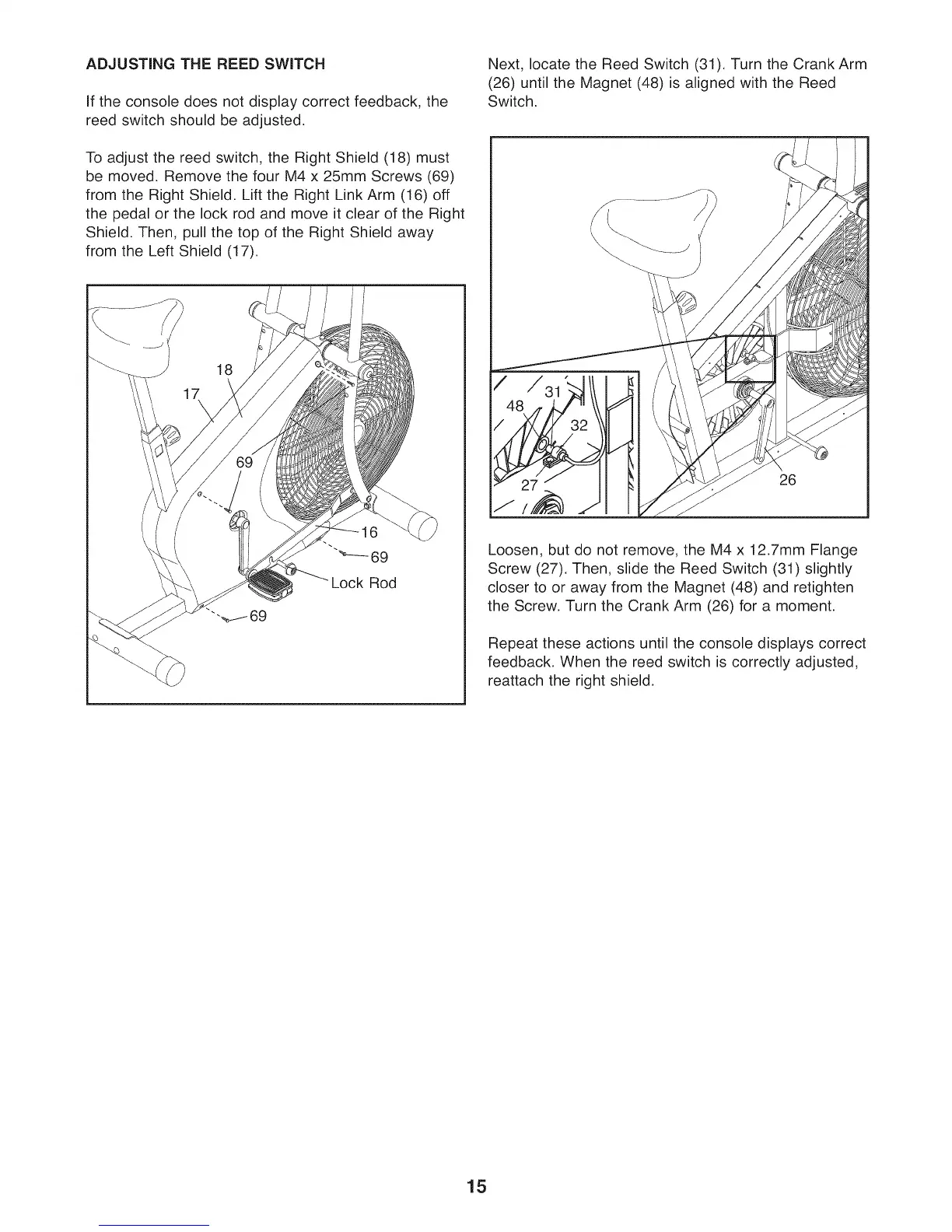
To adjust the reed switch, the Right Shield (18) must
be moved. Remove the four M4 x 25mm Screws (69)
from the Right Shield. Lift the Right Link Arm (16) off
the pedal or the lock rod and move it clear of the Right
Shield. Then, pull the top of the Right Shield away
from the Left Shield (17).
18
16
"_--- 69
Lock Rod
Next, locate the Reed Switch (31). Turn the Crank Arm
(26) until the Magnet (48) is aligned with the Reed
Switch.
J
26
Loosen, but do not remove, the M4 x 12.7mm Flange
Screw (27). Then, slide the Reed Switch (31) slightly
closer to or away from the Magnet (48) and retighten
the Screw. Turn the Crank Arm (26) for a moment.
Repeat these actions until the console displays correct
feedback. When the reed switch is correctly adjusted,
reattach the right shield.
15



 To Next Page