5
CROMOBEAM250
1. MOVING HEAD;
2. ROTARY ARM;
3. DMX OUT (3-pole XLR):
1= ground, 2 = DMX -, 3 = DMX +;
4. DMX IN (3-pole XLR):
1 = ground, 2 = DMX-, 3 = DMX+;
5. POWER IN mains plug for connection to a
socket (100-240V~/50-60Hz) via the supplied
mains cable. The support for he mains fuse is
located near the mains plug. Only replace a
blown fuse by one of the same type;
6. ON/OFF SWITCH;
7. VENTILATION OPENINGS: the openings let the
air ow in. Do not obstruct them;
8. MENU button: exits from the current menu or
function;
9. ENTER button: enables the currently displayed
menu or sets the currently selected value into
the current function;
10. DOWN button: navigates downwards through
the menu list and decreases the numeric val-
ue when in a function;
11. UP button: navigates upwards through the
menu list and increases the numeric value
when in a function;
12. LCD DISPLAY;
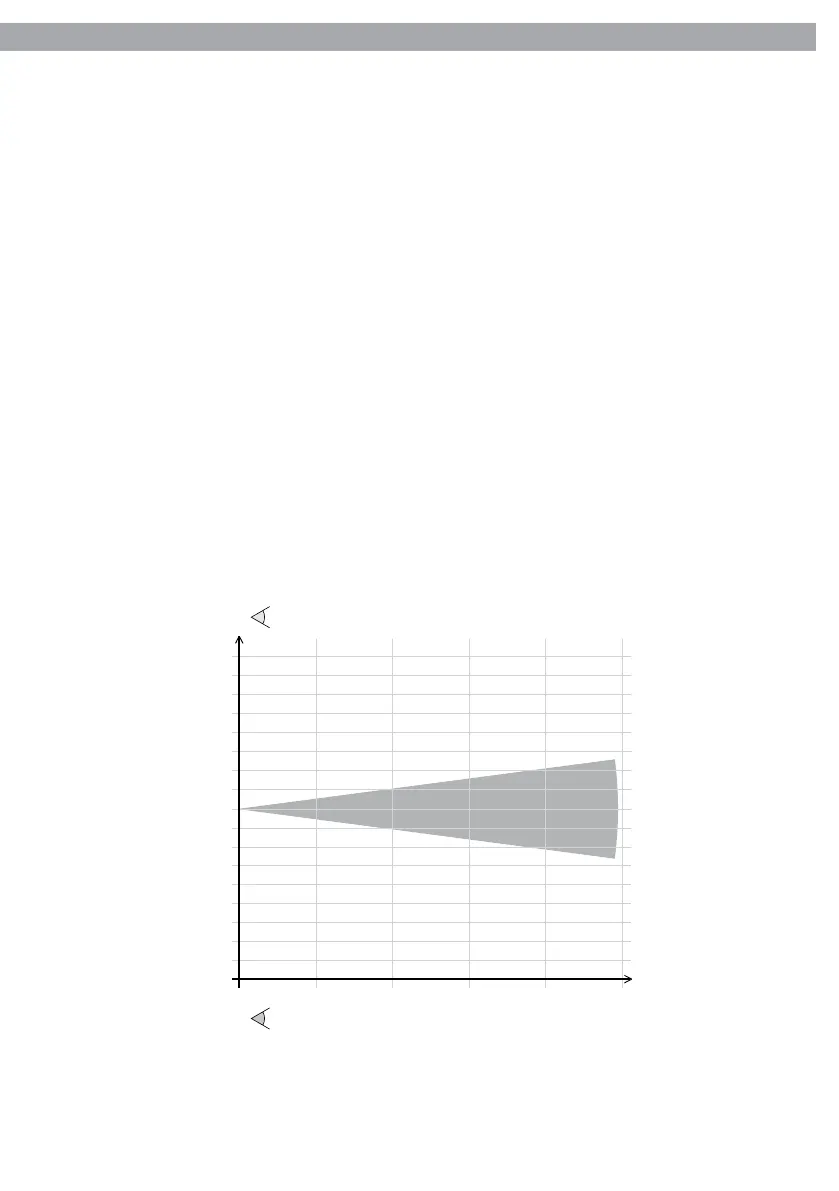
Beam Diameter (mt.)
0 2 4
6
8Dist.(mt)
Diam.(mt)
Lux Center
0,5 1,1 1,7 2,2
30000 7800 2800 1560
6°
6°
10
2,8
6°
880
4
3
2
1
0
1
2
3
4
Photometric data
Fig.2



 To Next Page