3-7. Operation Mode/Status Description
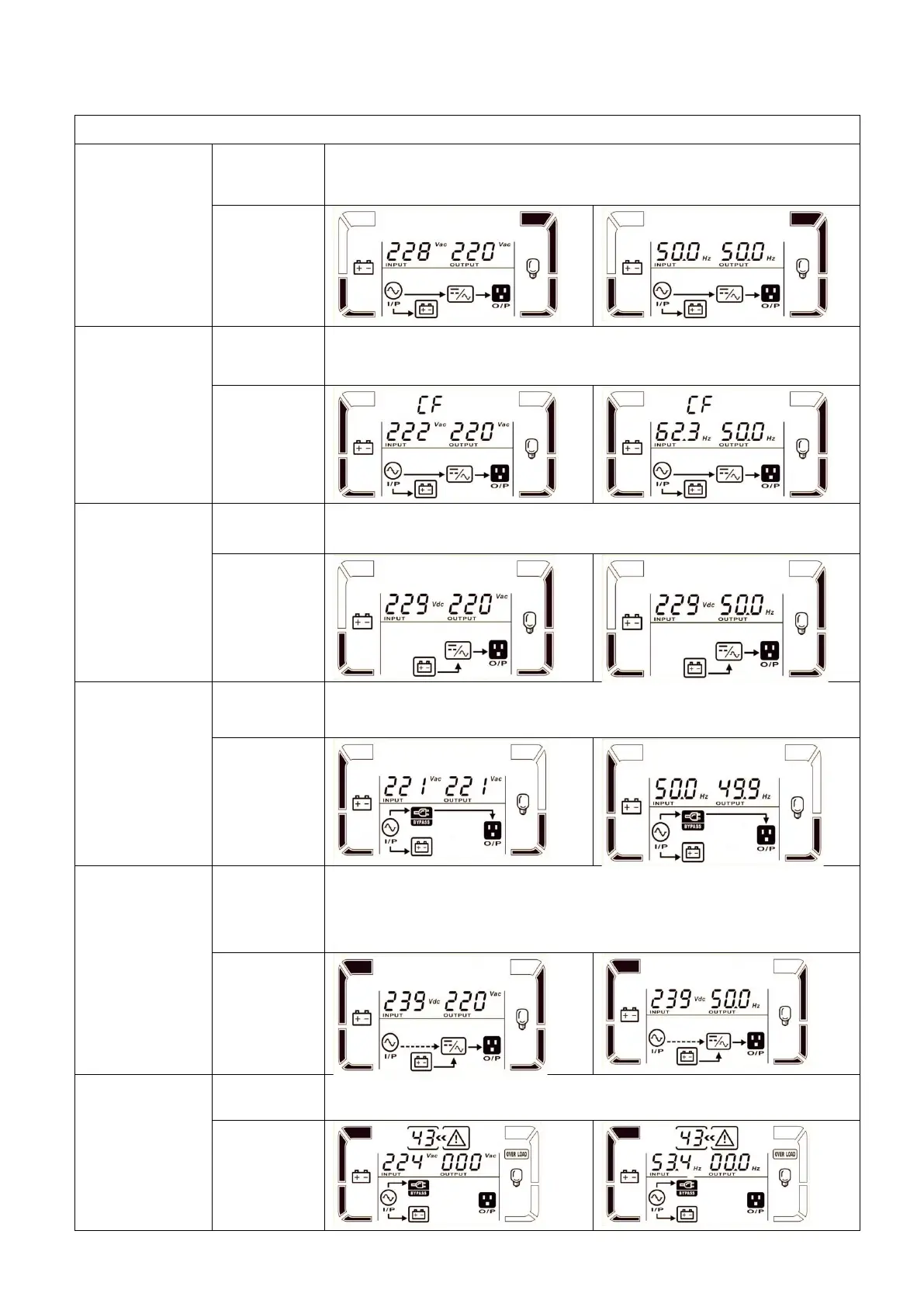
When the input voltage is within an acceptable range, the UPS will provide
pure and stable AC power to the output. The UPS will also charge the
battery in AC mode.
When the input frequency is in the range of 46 to 64Hz, the UPS can be set
at a constant output frequency, 50 Hz or 60 Hz. The UPS will still charge
the battery in this mode.
When the input voltage is outside the acceptable range or
The power goes out, the UPS will back up power from the battery and the
alarm will beeps every 4 seconds.
When the input voltage is within the acceptable range and bypass is
enabled, turn off the UPS and the UPS will enter Bypass mode. Alarms
sound every two minutes.
When the UPS is in AC mode or CVCF mode, press the "Test" button for
more than 1 second. Then the UPS will beep once and start the "Battery
Test". The line between the I/P icon and the inverter will flash to alert the
user. This operation is used to check the battery status.
When the UPS encounters an error, it will display an error message on the
LCD panel.



 To Next Page
 Loading...