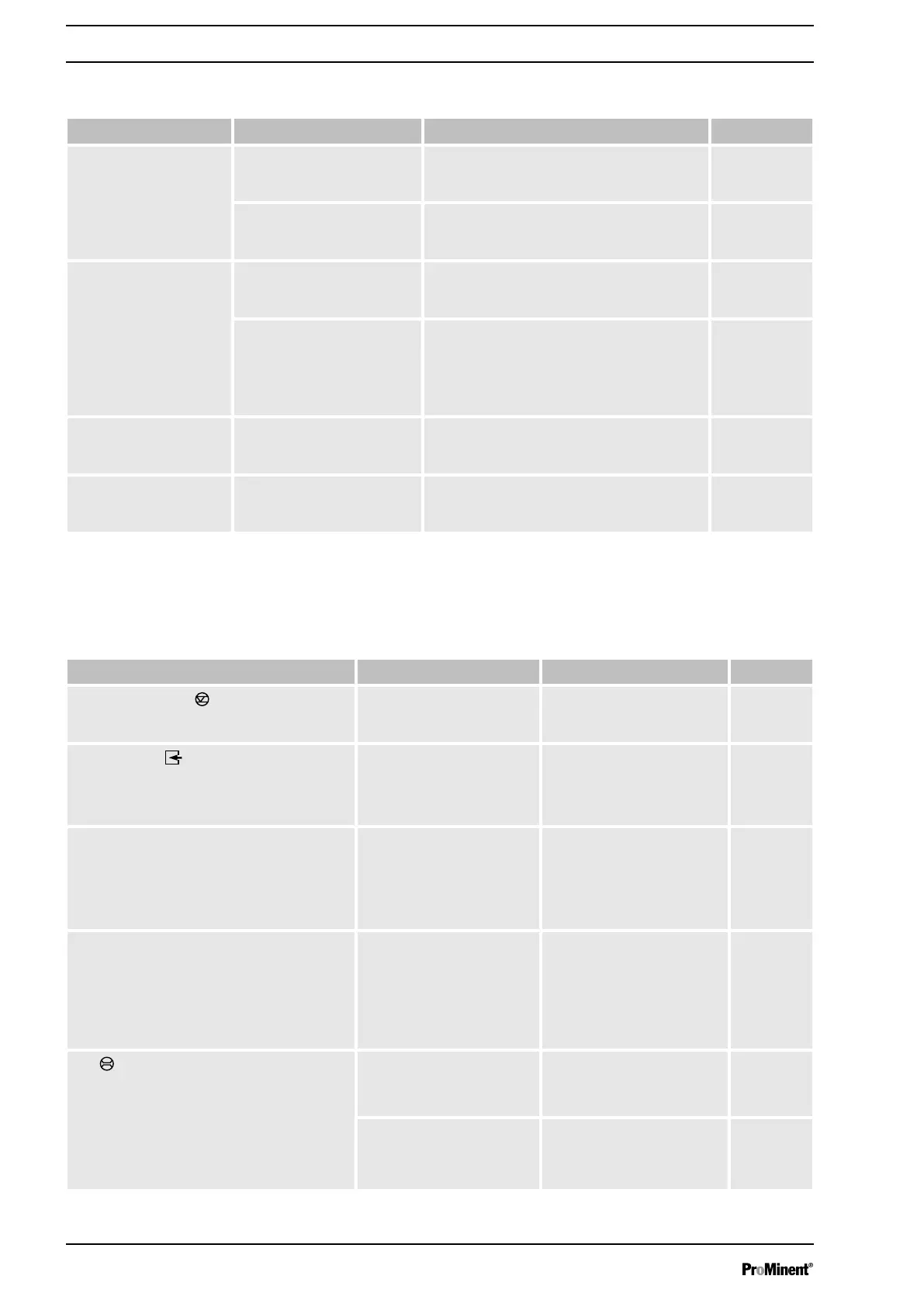
14.2 Faults without error message
Fault description Cause Remedy Personnel
Pump does not prime
despite full stroke motion
and venting.
Minor crystalline deposits on
the ball seat due to the
valves drying out.
Take the suction hose out of the supply tank
and thoroughly flush out the liquid end.
Technical per‐
sonnel
Serious crystalline deposits
on the ball seat due to the
valves drying out.
Dismantle the valves and clean them - refer
to the "Repair" chapter.
Technical per‐
sonnel
Fluid escapes from the
backplate.
The screws in the dosing
head are too loose.
Tighten the screws in the dosing head in a
diagonal pattern - referring to the "Mainte‐
nance" chapter for the tightening torque.
Technical per‐
sonnel
The metering diaphragm is
not leak-tight.
Replace the diaphragm - refer to the
"Repair" chapter.
If a diaphragm rupture has been indicated,
clean the diaphragm rupture indicator - see
the "Repair" chapter.
Technical per‐
sonnel
The CAN LED flickers
after the HMI has been
connected to the pump.
The software version of the
pump differs from that of the
HMI.
Wait. In the long term, arrange for Service to
update the pump software.
Customer
Service
department
Green LED display
(operating indicator)
does not light up.
The wrong supply voltage or
no supply voltage is con‐
nected.
Connect the pump correctly to the specified
mains voltage - according to the specifica‐
tion on the nameplate.
Electrician
14.3 Fault messages
Fault description Cause Remedy Personnel
The "Level" symbol appears flashing on
the LCD screen, plus the error message
‘Level error’
33, and the pump stops.
The fluid level in the supply
tank has reached "Liquid
level low 2nd stage".
Top up the supply tank. Technical
personnel
The "External"
MEM symbol appears
flashing on the LCD screen plus the
‘Memory overflow’
34 error message, and
the pump stops.
The stroke tank has over‐
flowed.
Rectify the cause, then
Press
[P/OK]
(think through
the consequences for the
process!).
Technical
personnel
The i < 4mA symbol appears flashing on the
LCD screen plus the error message
‘4 mA
undershot’
35, and the pump stops.
The pump is in
‘Analog’
‘operating mode’
, a fault
behaviour has been pro‐
grammed in the
‘ANALOG’
menu and the control cur‐
rent has fallen below 4 mA.
Eliminate the cause of the
low control current or
Technical
personnel
The i > 20mA symbol appears flashing on
the LCD screen plus the error message
‘20
mA exceeded’
36, and the pump stops.
The pump is in
‘Analog’
‘operating mode’
, a fault
behaviour has been pro‐
grammed in the
‘ANALOG’
menu and the control cur‐
rent has risen above 23
mA.
Eliminate the cause of the
high control current or
Technical
personnel
The
FLOW symbol appears flashing on
the LCD screen plus the error message
‘Defective stroke met.’
37, and the pump
stops.
The metering monitor is not
correctly connected.
Connect the metering mon‐
itor correctly and
Press
[P/OK]
.
Electrician
The metering monitor
reported too few strokes –
more than are set in the
‘FLOW’
menu.
Press
[P/OK]
.
Investigate and clear the
cause
Technical
personnel
Red "Fault indicator" LED display lights
up.
Troubleshooting
76



 To Next Page