19 Q80S_2014
PROTECO S.r.l. Via Neive, 77 - 12050 Castagnito (CN) ITALY Tel. +39 0173 210111 - Fax +39 0173 210199 info@proteco.net - www.proteco.net
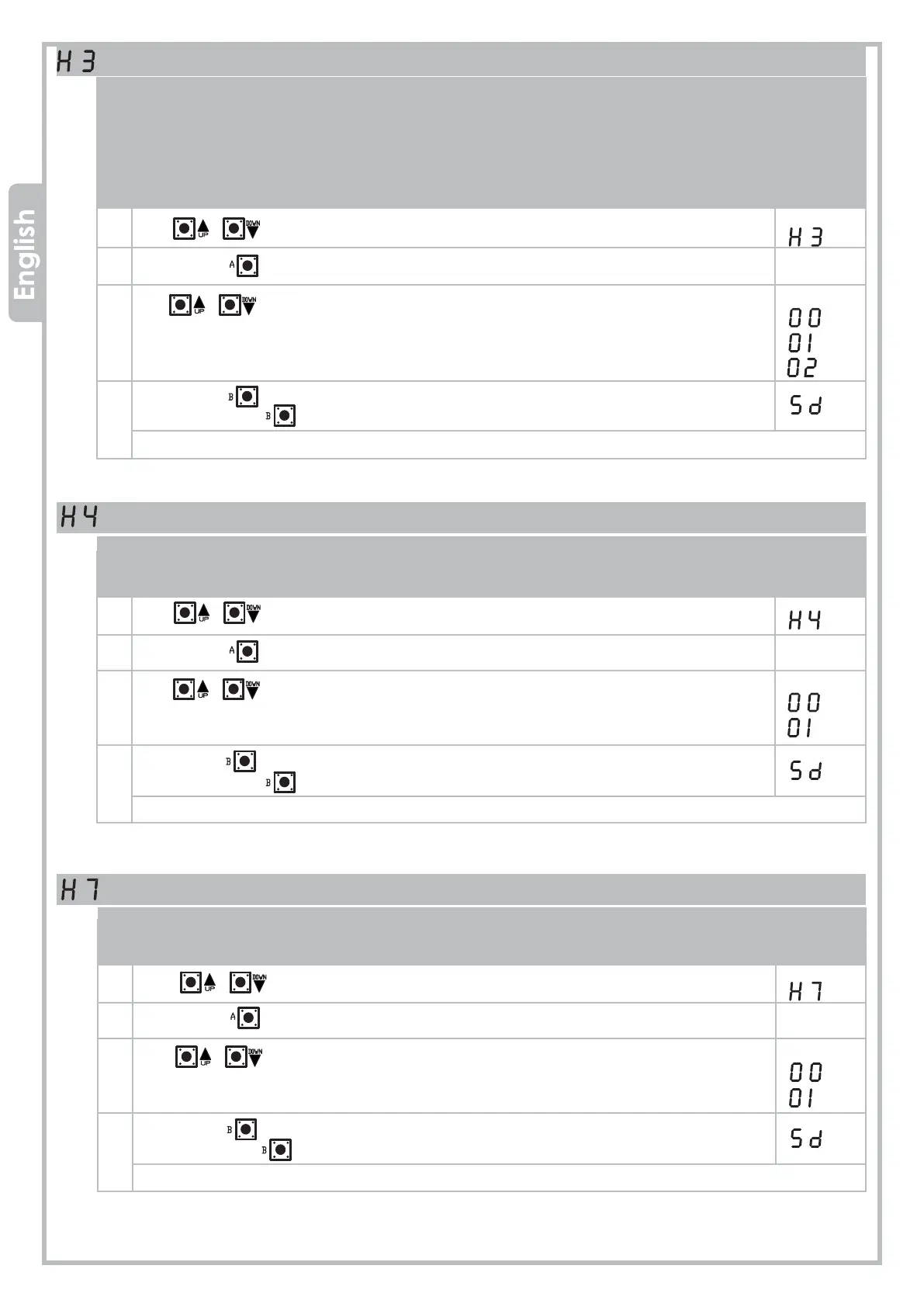
DECELERATION Function
This function decelerates the leafs at the end of the opening/closing cycle.
Two modes for deceleration can be chosen:
• Standard DECELERATION
(the gate directly slows down from standard travel to decelerated speed)
• Soft DECELERATION
(the gate gradually slows down from standard travel to decelerated speed)
1 Use buttons to move inside the menu, till the display shows:
2 Press button to confirm.
3 Use buttons to select:
DECELERATION Function OFF
DECELERATION Function ON
Soft DECELERATION function ON
4 Press button to go back to the top level menus,
then press button again till the display shows:
or wait the timeout (20 seconds) to exit.
PHOTOCELLS TEST Function
If this function is enabled, the control panel performs a quick start-up test with the photocells to make
sure that they are in operation.
1 Use buttons to move inside the menu, till the display shows:
2 Press button to confirm.
3 Use buttons to select:
PHOTOCELLS TEST Function OFF
PHOTOCELLS TEST Function ON
4 Press button to go back to the top level menus,
then press button again till the display shows:
or wait the timeout (20 seconds) to exit.
START PULSE Function
This setting makes the motor operate full power for 1 second when starting opening to overcome
gate inertia due to cold weather or long inactivity.
1 Use buttons to move inside the menu, till the display shows:
2 Press button to confirm.
3 Use buttons to select:
START PULSE Function OFF
START PULSE Function ON
4 Press button to go back to the top level menus,
then press button again till the display shows:
or wait the timeout (20 seconds) to exit.


 To Next Page