11
Using Your Display for the First Time
When you turn on your LCD for the first time, you will need to set up the display for proper
operation by scanning the television spectrum for available channels.
Setting up Digital Television Channels
Once the HDTV signal is connected to the display, you should scan all channels to find strong
signals. This will make it much easier to navigate through the channels.
To scan all channels:
1. Turn the display on using the power button.
2. Press SOURCE until the signal source is set to DTV.
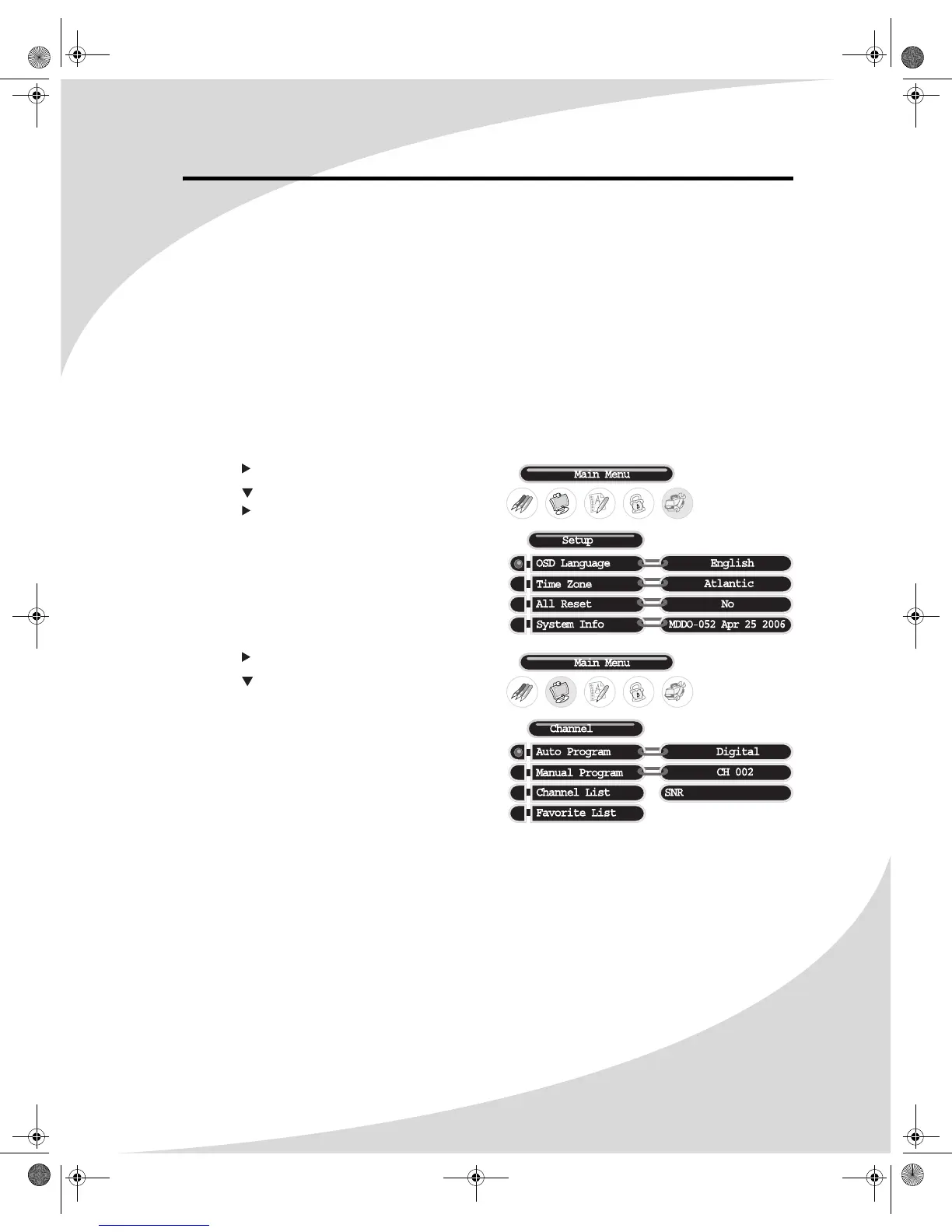
3. Press MENU to bring up the On-Screen Display (OSD).
4. Press until the Setup menu shows.
5. Press until Time Zone is highlighted, then
press until the correct time zone is selected
and press ENTER.
6. Press until the Channel menu shows.
7. Press until Auto Program is highlighted
and then press ENTER twice to begin
scanning for available television channels.
OMPLTV3250-1.book Page 11 Monday, July 17, 2006 8:15 PM


 To Next Page