Configuring the Display
23
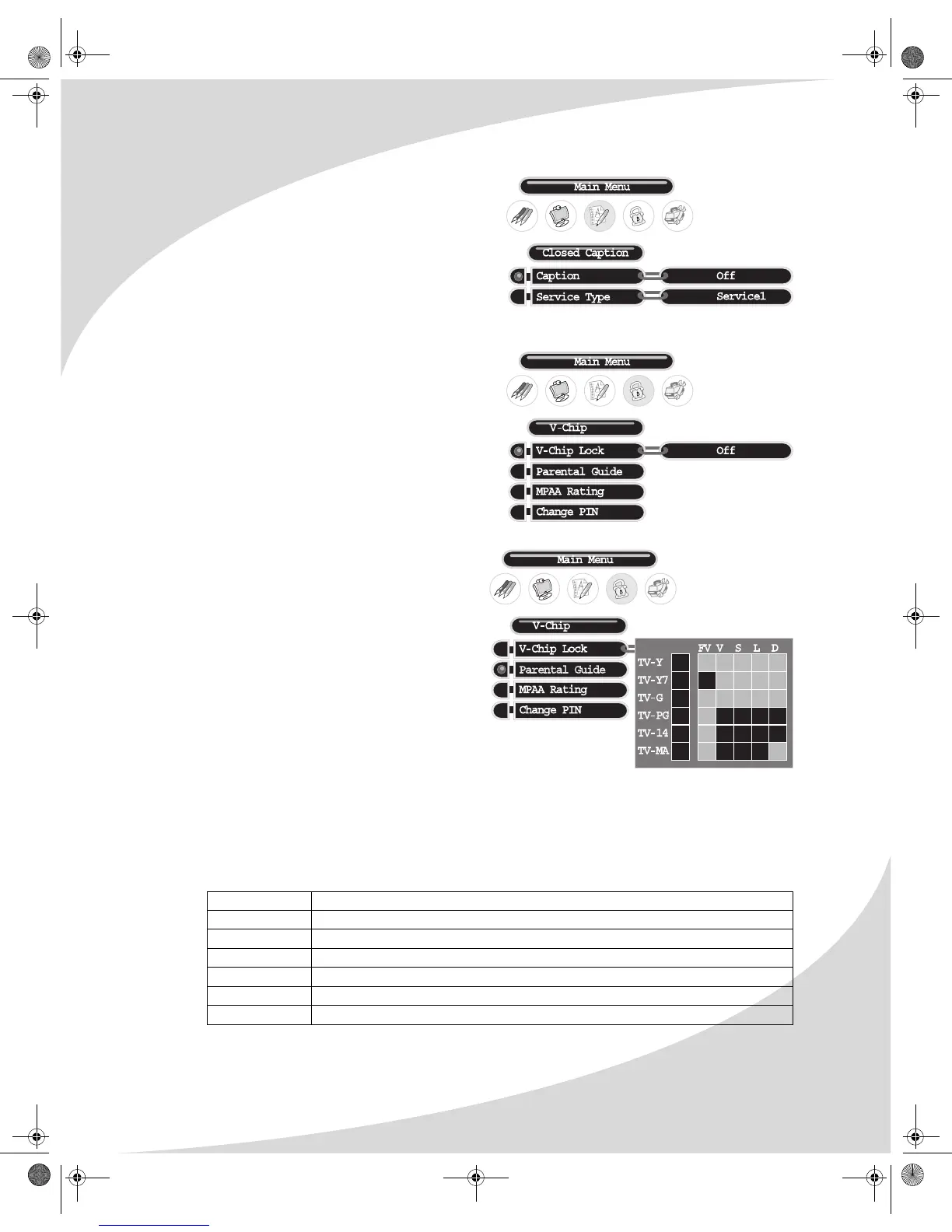
Closed Caption (DTV)
Configures digital TV closed captioning. The
options are as follows:
Caption
Turns closed captioning on and off.
Service Type
Selects the closed caption channel to be displayed: Service1–6 (digital) or CC1–4 (analog).
V-Chip (DTV)
Configures parental controls for digital TV
programming, allowing you to block individual
channels.
Upon attempting to enter the menu, the display
will ask for the current password. Once you
enter the password, the menu will display.
The factory-default password is '1234'.
The following menu items are available:
Parental Guide
A sub-menu that sets the TV PG rating
level (listed on the left) the V-Chip will
block without a password.
Specific types of mature content (listed
across the top) can be blocked for some
of the ratings. For example, programs
rated TV-Y7 with violent content can be
blocked.
Blocking a particular rating will
automatically block all ratings above that
level. Similarly, unblocking a rating will
automatically unblock all ratings below
that level.
Select a rating using the arrow controls on the remote, then press ENTER to block/unblock it.
Press MENU to exit this sub-menu.
The ratings are as follows:
Rating Level Significance
TV-Y All children
TV-Y7 Children 7 years and older
TV-G General audience
TV-PG Parental guidance suggested
TV-14 Parents strongly cautioned
TV-MA Mature audience only
OMPLTV3250-1.book Page 23 Monday, July 17, 2006 8:15 PM


 To Next Page