Configuring the Display
22
• Parental Lock—Turns V-Chip protection on and off.
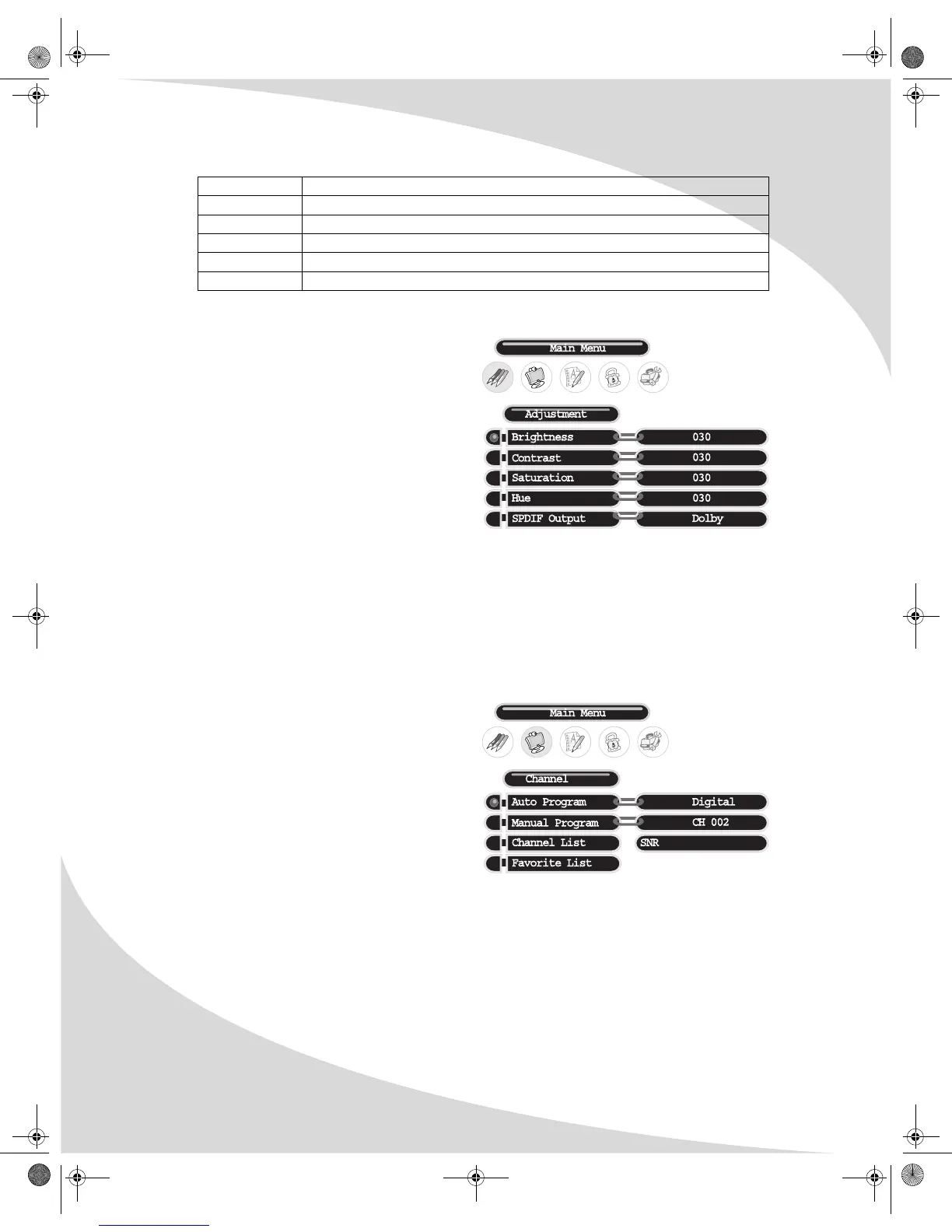
Adjustment (DTV)
The Adjustment menu sets general video and
audio options for digital TV. The following
settings are available:
Brightness
Sets the brightness of the display image.
Contrast
Sets the variation between light and dark
colors.
Saturation
Sets the saturation of color in the display image.
Hue
Sets the intensity of color in the display image.
SPDIF Output
Selects the type of S/PDIF audio put out on the optical S/PDIF output: Dolby, PCM, or Off.
Channel (DTV)
The Channel menu allows you to select which
digital television channels are available for
viewing, manually or automatically, and create a
list of your favorite channels. It contains the
following menu items:
Auto Program
Automatically scans all channels for strong
signals and disables any channels with weak
signals.
Manual Program
Allows you to select channels individually and view their signal-to-noise ratios (SNR).
Channel List
Displays a list of available channels.
Favorite List
Displays a list of your most-viewed channels.
TV Youth 7 Children 7 years and older
TV-G General audience
TV-PG Parental guidance suggested
TV-14 Parents strongly cautioned
TV-MA Mature audience only
Rating Level Significance
OMPLTV3250-1.book Page 22 Monday, July 17, 2006 8:15 PM


 To Next Page