16
Configuring the Display
The On-Screen Display (OSD) allows you to configure the operation of the LCD. You can change
video and audio settings, activate and configure closed captioning, select television channels,
control access to mature programming, and configure other general display behavior.
Note: When the source is set to DTV, there is a different set of OSD menus than for other
sources.
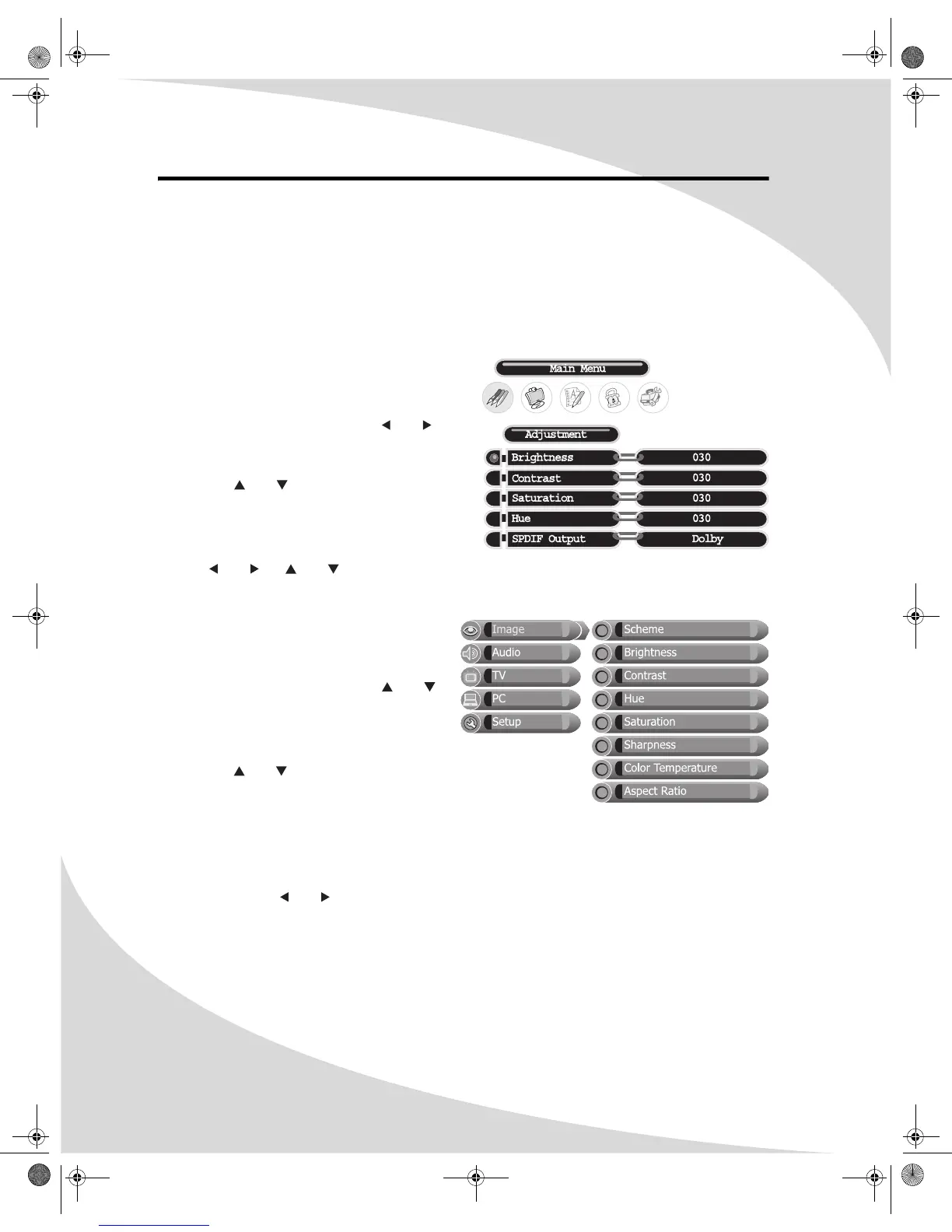
To use the OSD (DTV):
1. Press the MENU button on the remote or
the top of the display.
2. Once the OSD appears, use the and
buttons to navigate the menus represented
by icons at the top of the OSD.
3. Use the and buttons to navigate the
menu items.
4. Press the ENTER button to select the desired
item.
5. Use and (or and for sub-menus) to adjust the value and then press ENTER to accept.
6. Press MENU to exit a menu.
To use the OSD (other sources):
1. Press the MENU button on the remote or
the top of the display.
2. Once the OSD appears, use the and
buttons to navigate the menus.
3. Press the ENTER button to enter the
selected menu.
4. Use the and buttons to navigate the
menu items.
5. Press the ENTER button to select the
desired item.
6. If a sub-menu appears upon pressing ENTER, repeat steps 4 and 5 to select an item on the
sub-menu.
Otherwise, use and to adjust the parameter and then press ENTER to accept the value.
7. Press MENU to exit a menu and then, finally, to exit the OSD.
OMPLTV3250-1.book Page 16 Monday, July 17, 2006 8:15 PM


 To Next Page