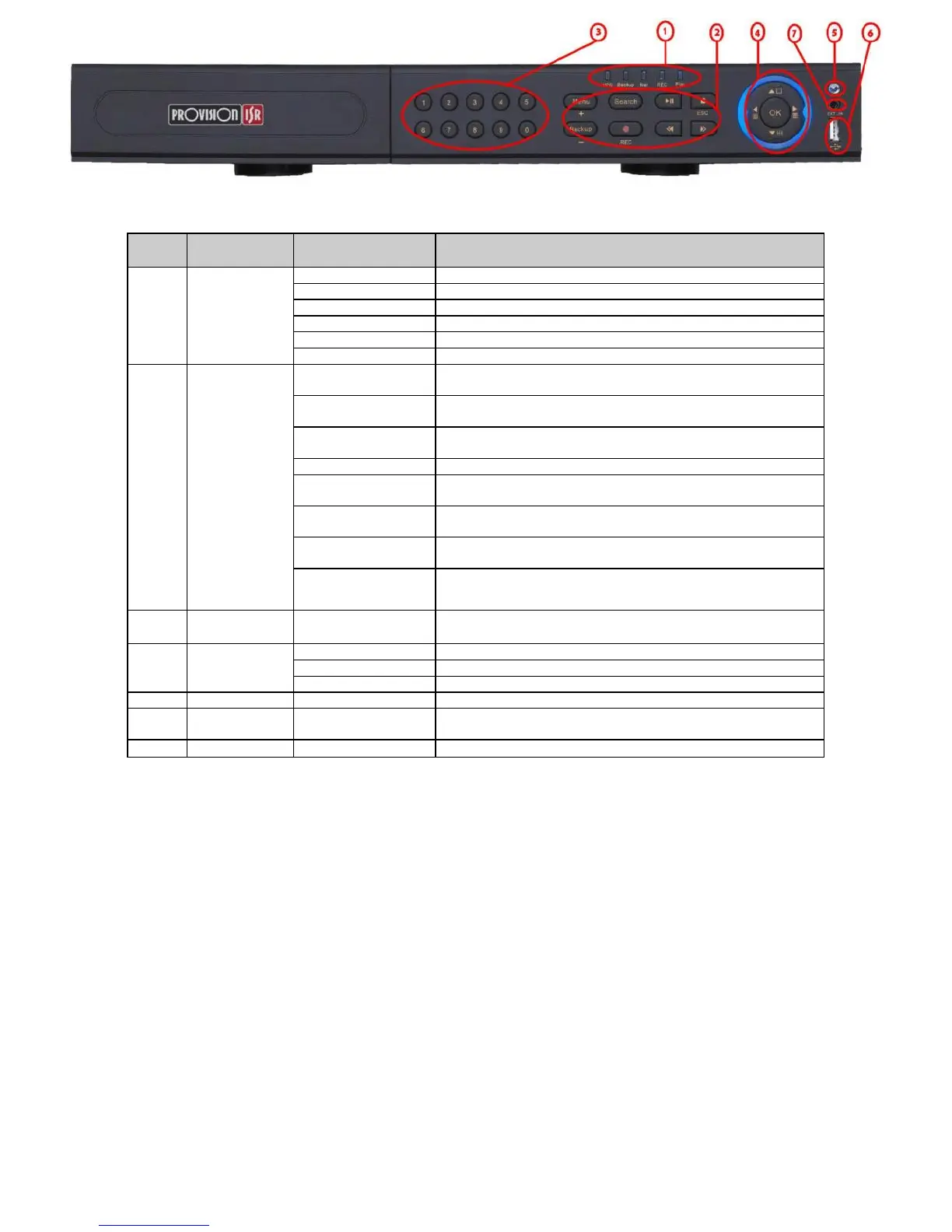
Power indicator, when connection , the light is blue
When HDD is writing and reading , the light is blue
When access to network , the light is blue
When backup files and data, the light is blue
When playing video, the light is blue
When recording, the light is blue
1. Enter menu in live
2. Increase the value in setup
1. Decrease the value in setup
2. Enter backup mode in live
2. FOCUS function enables at PTZ mode.
1. Rewind key 2. SPEED function enables at PTZ mode
2.ZOOM function enables at PTZ mode.
2. IRIS function enables at PTZ mode
2. Enter PTZ mode in live
2. Exit the current interface or status
1. Input number 1-9 or choose camera / Input number0, 10 and the above
number together with other digital keys
Change direction to select items
Change screen display mode like1/4/9 channel
external USB devices (USB flash, USB HDD for backup, update firmware,
USB mouse)
Extension for the IR receiver


 To Next Page