Tsunami
®
800 & 8000 Series - Software Management Guide 35
·
In the Internet Explorer, to get best results, click on Tools > Internet Options > General. Click Settings in the
Browsing History and select “Every visit to the webpage”.
3.2.1 Home Page
Upon successful logon, the device home page appears.
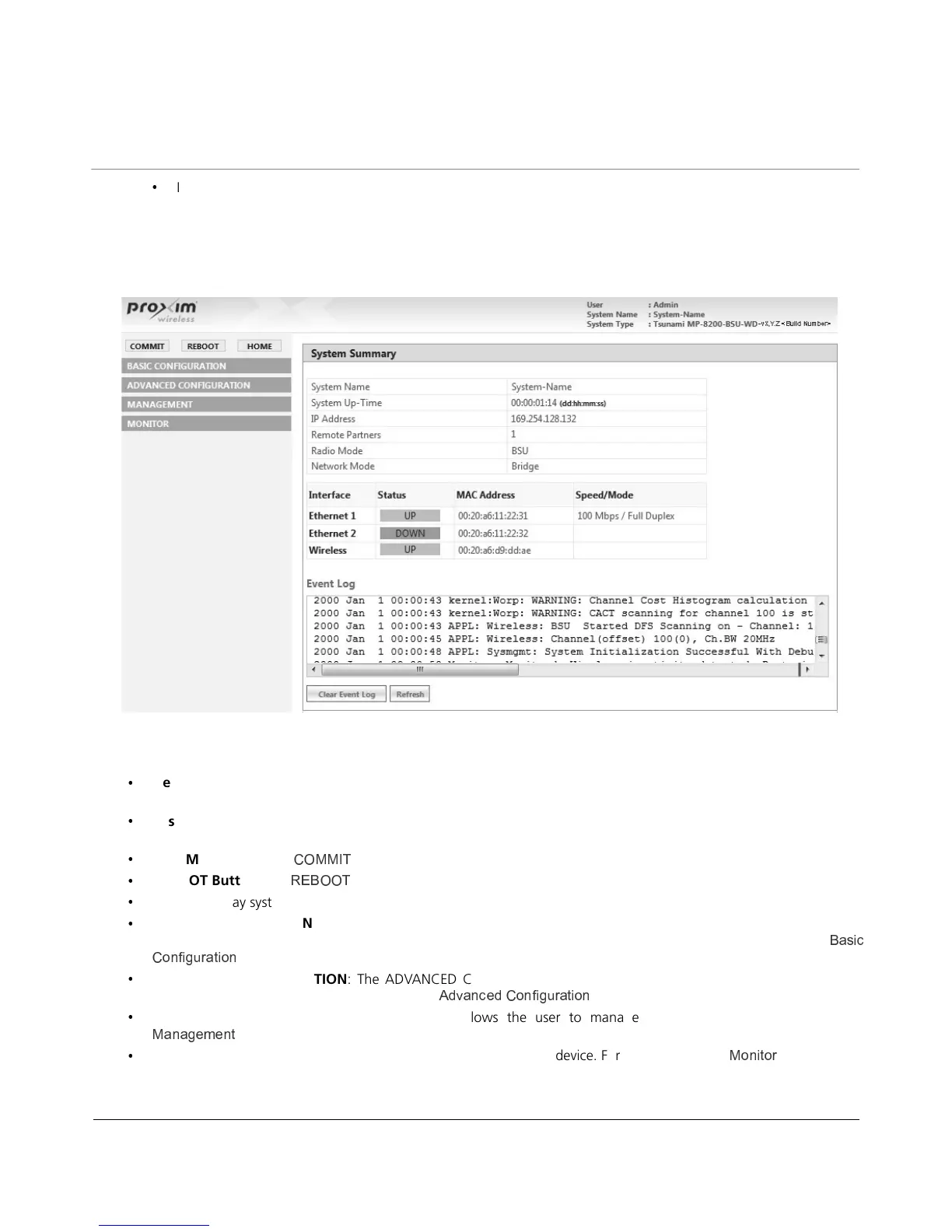
Figure 3-6 Home Page
The home page contains the following information:
·
Device Description: The device description is displayed on the top-right corner of the home page. It displays the
logged in user type and the device name along with the latest firmware version and build number.
·
System Summary: The System Summary screen displays the summary of system information such as System Name, IP
Address, Radio Mode, Interface Status, Event Log and so on.
·
COMMIT Button: See
C C v
·
REBOOT Button: See
·
HOME: Display system summary screen.
·
BASIC CONFIGURATION: The BASIC CONFIGURATION tab allows the user to configure the minimum set of
parameters required for a device to be operational and establish a link on the network. For more details, see
k
| k
.
·
ADVANCED CONFIGURATION: The ADVANCED CONFIGURATION tab allows the user to configure the advanced
parameters of the device. For more details, see
} { y k {
| k
.
·
MANAGEMENT Tab: The MANAGEMENT tab allows the user to manage the device. For more details, see
C k k
.
·
MONITOR Tab: The MONITOR tab allows the user to monitor the device. For more details, see
C
.


 To Next Page
 Loading...