PUDU T300 Operation Guide
Version: V1.0.2 Operation Guide
17
Settings Description
Delivery Speed The robot's scheduled driving speed to the destination can be configured, with a
setting range of 0.2m/s~1.2m/s.
4.3.2 Cruise mode
Cruise mode means cruising in a specific environment and running in a loop. Some voice and
music can be played during the cruise.
4.3.2.1 The main processes of delivery mode
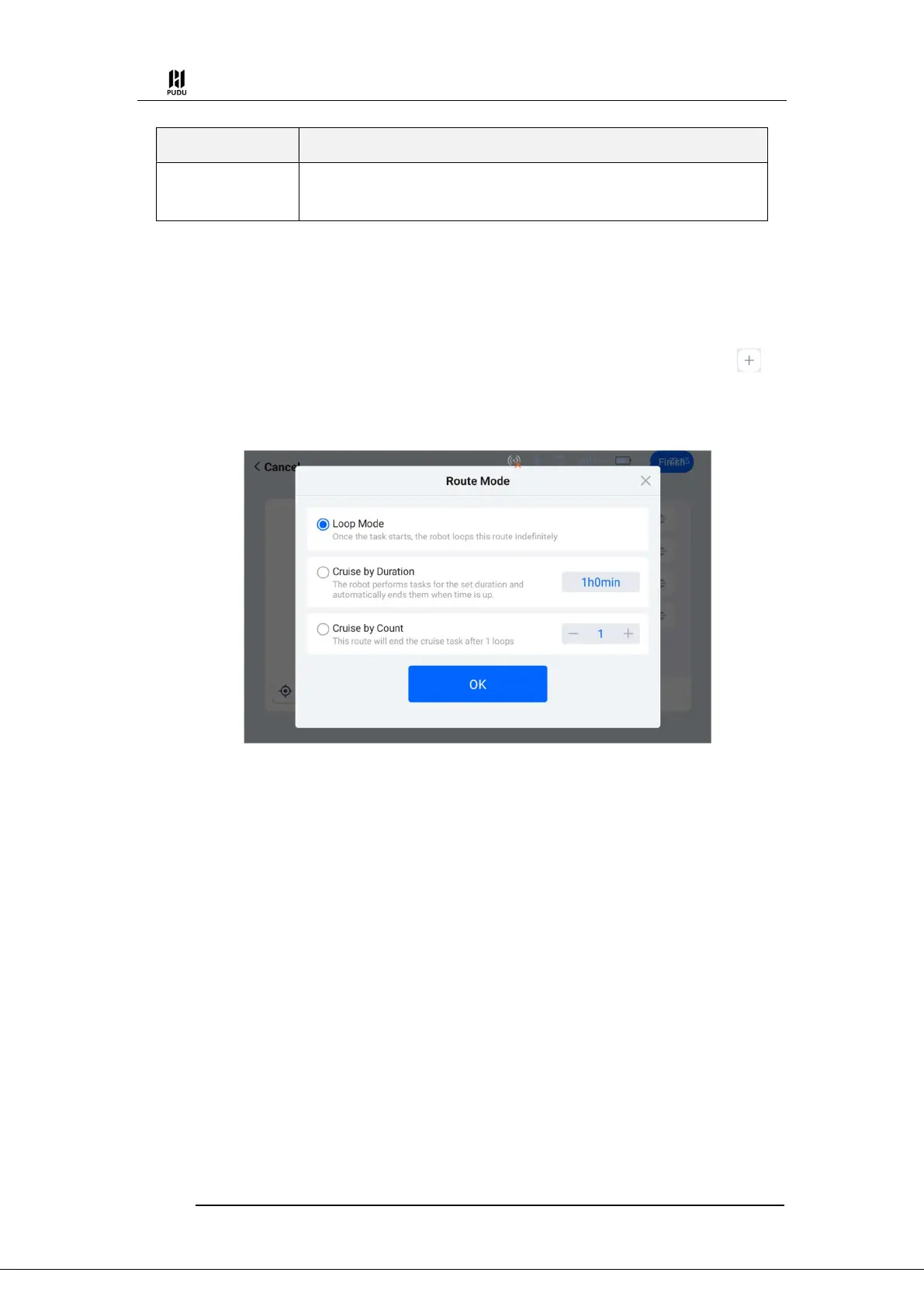
Step 1 Select "Cruise" on the homepage. Enter the cruise mode interface and click " " to
add a cruise path according to the instructions. There are three types of cruise paths that can be
added:
Loop Mode:After the cruise task starts, it will continue to cruise along the set cruise path;
Cruise by Duration:Cruise according to the set time, and automatically end the task after
the cruise ends;
Cruise by Count:After the robot cruises a specified number of laps, it will automatically
end the cruise task.
Step 2 After setting the cruise route, select the cruise route you want to use and click "Start".
The robot starts to run in a cycle along the cruise route.


 To Next Page