EasyManua.ls Logo

Pulsafeeder MicroVision - Installation Guide; Opening the Controller Enclosure

Pulsafeeder MicroVision
43 pages
Print Icon
To Next Page IconTo Next Page
To Previous Page IconTo Previous Page
Loading...
72-910-16 Rev. N
Page 7 of 43
3. INSTALLATION
Input power cord must be disconnected from power source prior to opening the
product’s enclosure.
3.1 Opening The Enclosure
1
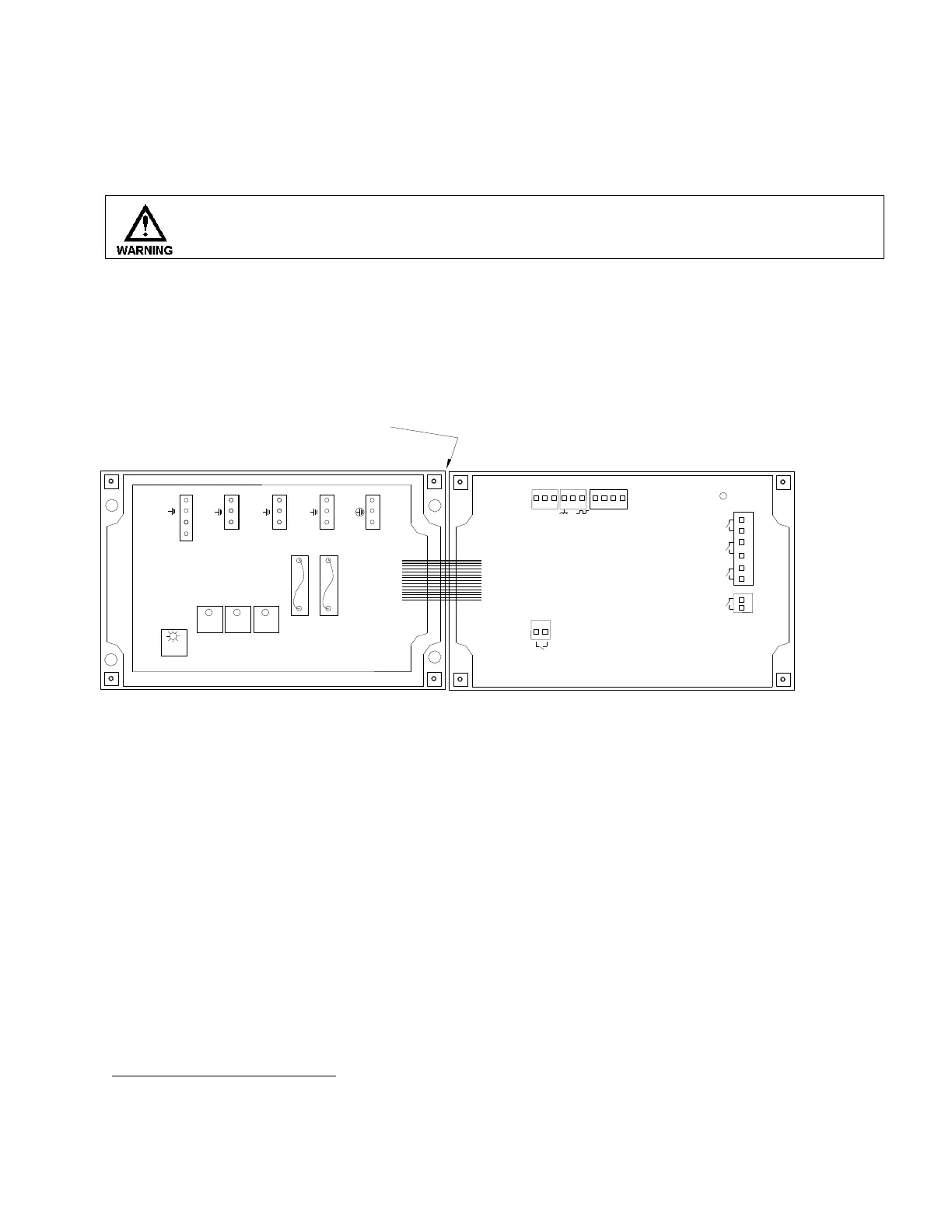
Loosen the four (4) screws on the front of the controller and carefully swing the top of the
case to the right (Fig. 2).
J10
J4
J5
J8
J3
J2
+5V
BLK
W METER
ALARM
ORG
BRN
RED
DRUM LEVEL
INHIB
BIO A
BIO B
FLOW
HINGE
BOTTOM HALF TOP HALF
(SWINGS OPEN
TO THE RIGHT)
4-20mA
BLEED
INHIB
BIO A BIO B SUPPLY
BLEED
INHIB
BIO A BIO B
5A
F2
5A
F1
HOT
RET
HOT
RET
HOT
RET
HOT
RET
HOT
RET
HOT
RET
PL2
PL3
PL4
PL5
HOT
no
nc
Fig. 2
1
Trained service personnel are required for all electrical connections. This product does not contain operator
serviceable parts.

Related product manuals