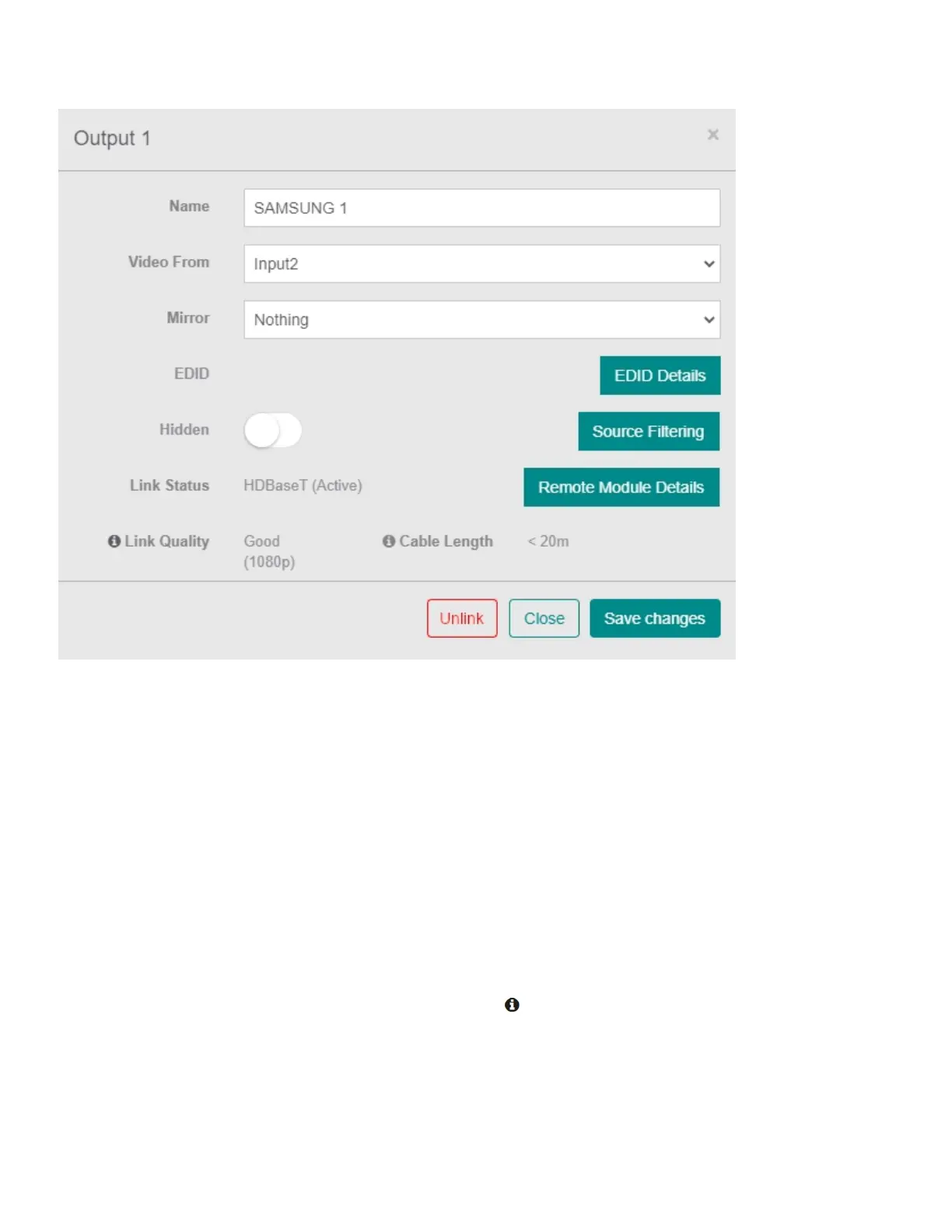
OUTPUTOPTIONS
Name:Changethenameoftheselectedoutput.
VideoFrom:Adropdownlistshowingthesourcetheoutputiscurrentlydisplaying.
Mirror:Selectanoutputfromthelisttomirrorthedisplay.
EDIDDetails:ThiswillbringupapagedetailingtheselectedEDIDinformation.
Hidden:Thetoggleswitchcanbeturnedontohidetheselectedoutputfromtheenduser'sweb
interface.
SourceFiltering:Toggleswitchestochoosewhichinputscanbedisplayedontheselectedoutput
display.
RemoteModuleDetails:Thiswilldisplayapopupdetailingtheoutput'sremoteenddetails.
LinkStatus:Indicatesifthelinkisactive.
LinkQuality:Indicatedthequalityofthelink.Clickthe icontoviewLinkQualityTestTool.
CableLength:IndicatesthelengthoftheCATcableinsertedintotheoutput.Thisisanestimatebase
oncable'sperformanceandmaynotbeaccurate.
VideoSignal:Willindicatethesignalofconnection.
LinkedDevice:Adropdownlistofdevicesthatcanbelinkedtotheoutput(i.e.,ProAmp).
ConnectedDevice:Thisoptionwilldisplaywhenanadditionaldeviceislinkedtotheoutput.


 To Next Page