Anotherwaytocheckthelinkqualityremotelyisbyloggingintoyourinstalleraccountat
monitoring.pulse-eight.com
CLOUDCONNECTIONTAB
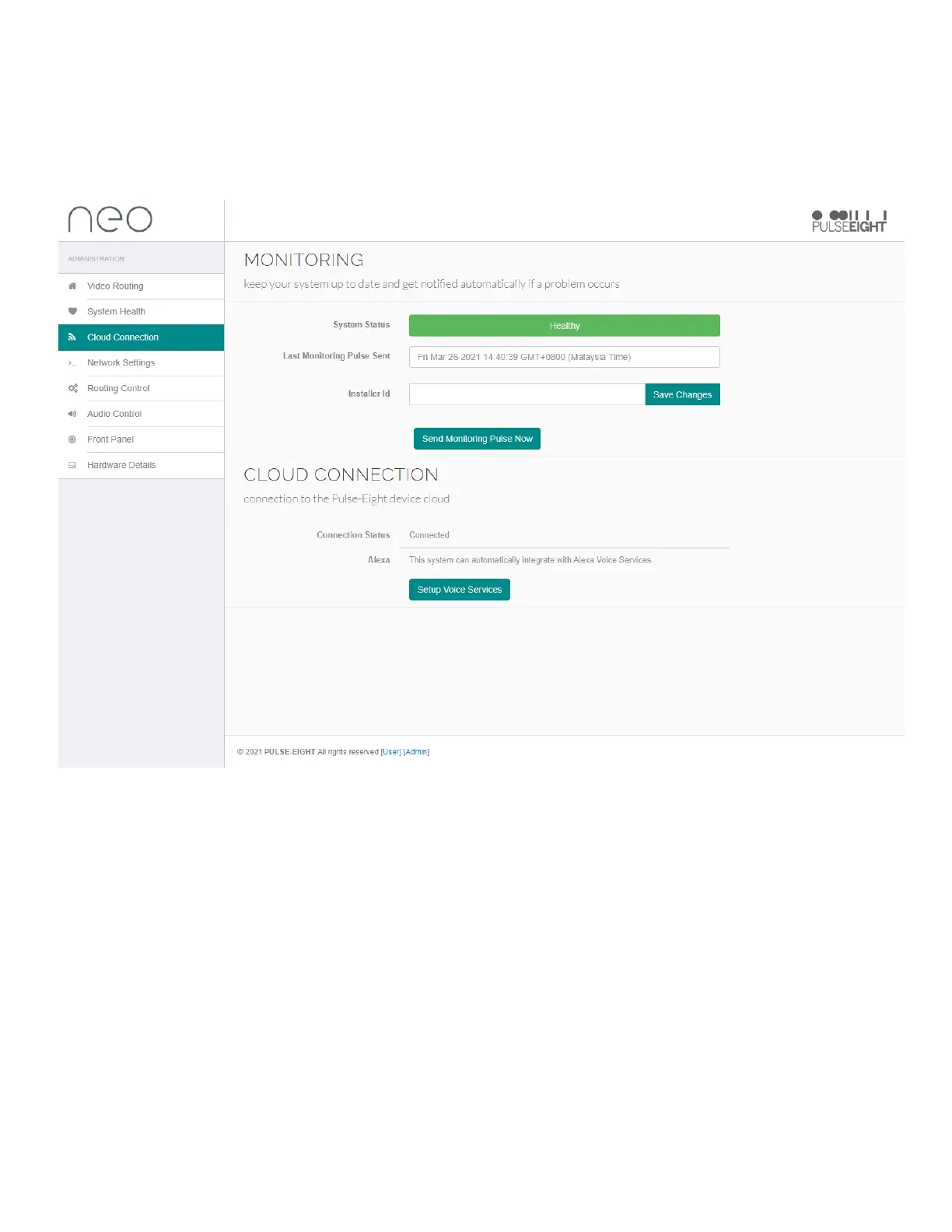
UndertheCloudConnectiontabyouwillseebasicmonitoringinformation:
SystemStatus:Thiscolourcodedstatuswillnotifyyouifthesystemishealthyorifthereisanissue.
LastMonitoringPulseSent:Thiswilldetailwhenthematrixlast'phonedhome'.
InstallerID:EnteryourInstallerIDtolinktothePulse-EightMonitoringPortal.
Note: If you do not know your Installer ID, please check your cloud monitoring portal or contact your
Pulse-Eight sales representative.
ConnectionStatus:ThiswilldetailifthematrixisconnectedtothePulse-EightMonitoringPortal.
Alexa:ThismatrixcanbecontrolledbyAlexavoicecontrol,setthisupbyclickingonthe'SetupVoice
Services'button.Seenextsectionforfurtherdetails.


 To Next Page