Recover data from USB disk when the SATA disk of TS-101 fails:
When the SATA disk of TS-101 fails, you can recover data from a backup disk if
the disks have been previously configured as Q-RAID 1. Please follow the steps
below to recover data from a backup USB disk to TS-101.
1. Replace the failed SATA disk with a new one.
2. Format the new disk by clicking Format now in Device Configuration-SATA
Disk page.
3. Connect a USB disk to TS-101.
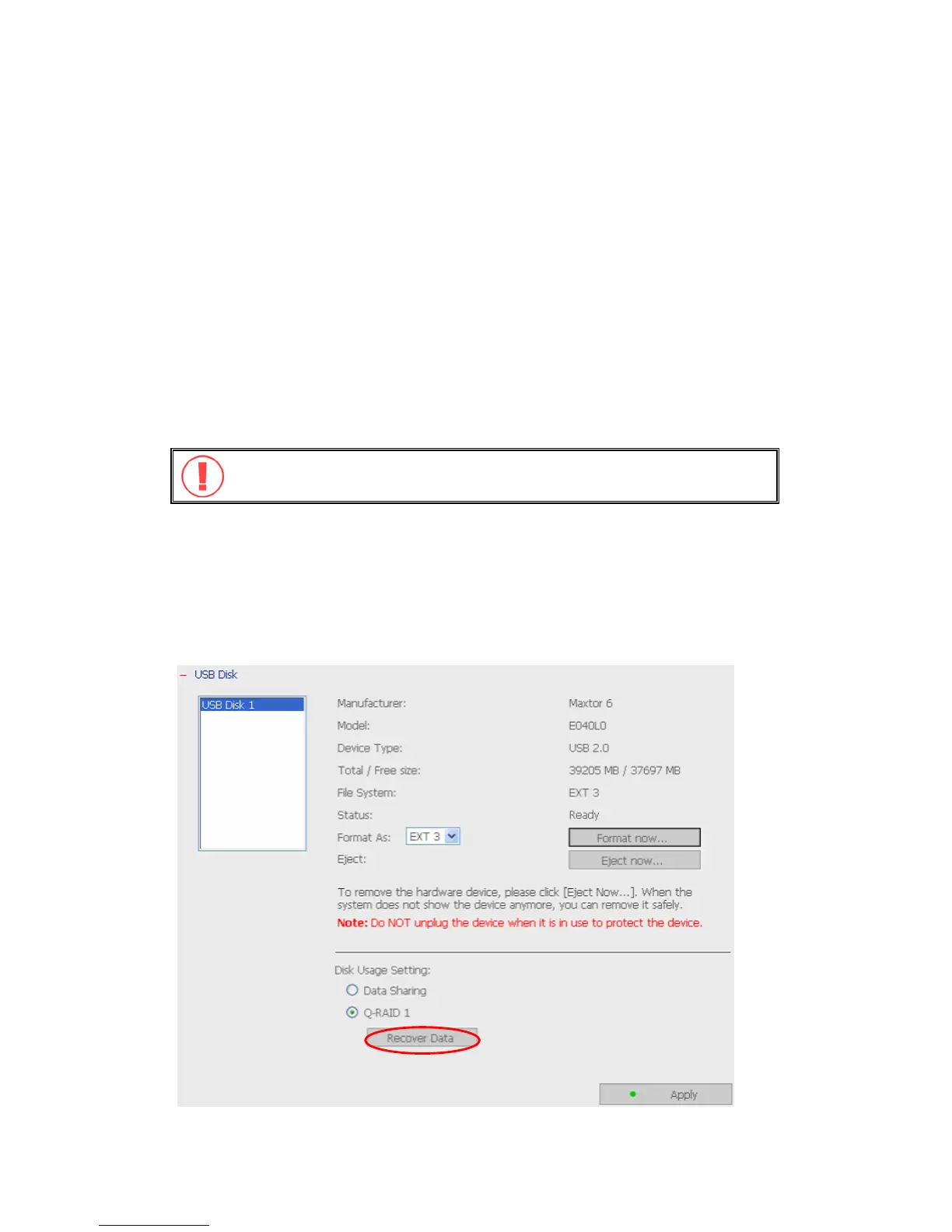
4. Go to Device Configuration-USB Disk page. Click the Recover Data button*
under Disk Usage Setting. All data on the USB disk will be recovered to the
new SATA disk.
Warning: After executing this function, all data different from the USB
disk will be removed from the SATA disk of TS-101.
*This button will appear when the following conditions are all met:
a. The usage of the plugged in USB disk has been configured as Q-RAID 1.
b. The SATA disk in TS-101 has been changed or the plugged in USB disk has been
configured as Q-RAID 1 in other servers.
c. No Q-RAID1 disk is currently running on TS-101.
- 72 -



 To Next Page
 Loading...