Chapter 6: LEDDescriptions
LEDs for 56-Drive RAID Chassis (4U56)
QX and QXS Setup Guide 182
Note:QXS-3, QXS-4, and QXS-6 Series systems offer a SAS and a CNC controller I/O module (FC
and iSCSI). The QXS-1200, QXS-2400, and QXS-5600 use only a FC controller I/O module.
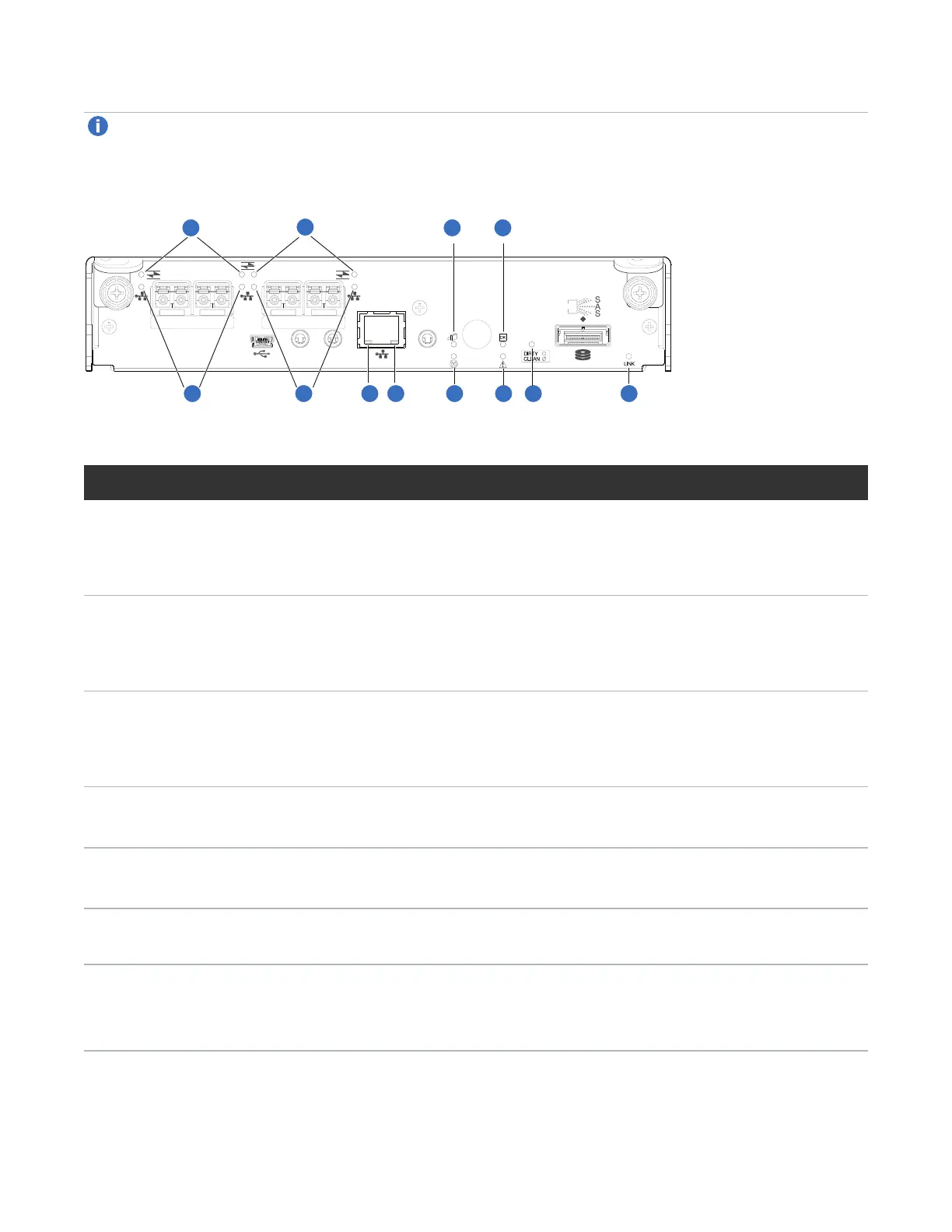
Figure129:LEDs: controller module (FC and 10GbE SFPs)
CACHE
CLI
CLI
LINK
ACT
6Gb/s
SERVICE−1SERVICE−2
PORT 0 PORT 1 PORT 2 PORT 3
1
2
3 4
5
6
7
8
9 10
1
2
LED Description Definition
1 Host 4/8/16
Gb FC
1
Link Status/
Link Activity
Off — No link detected.
Green — The port is connected and the link is up.
Blinking green — The link has I/O or replication activity.
2 Host 10GbE
iSCSI
2,3
Link Status/
Link Activity
Off — No link detected.
Green — The port is connected and the link is up.
Blinking green — The link has I/O or replication activity.
3 Network Port
Link
Active
Status
4
Off — The Ethernet link is not established, or the link is down.
Green — The Ethernet link is up (applies to all negotiated link speeds).
4 Network Port
Link Speed
4
Off — Link is up at 10/100base-T negotiated speeds.
Amber — Link is up and negotiated at 1000base-T.
5 OK to
Remove
Off — The controller module is not prepared for removal.
Blue — The controller module is prepared for removal.
6 Unit Locator Off — Normal operation.
Blinking white — Physically identifies the controller module.
7 FRU OK Off — Controller module is not OK.
Blinking green — System is booting.
Green — Controller module is operating normally.
Table58:Controller module LEDs



 To Next Page