63
©2006 Sunrise Medical
QUICKIE ELECTRONICS SECTION
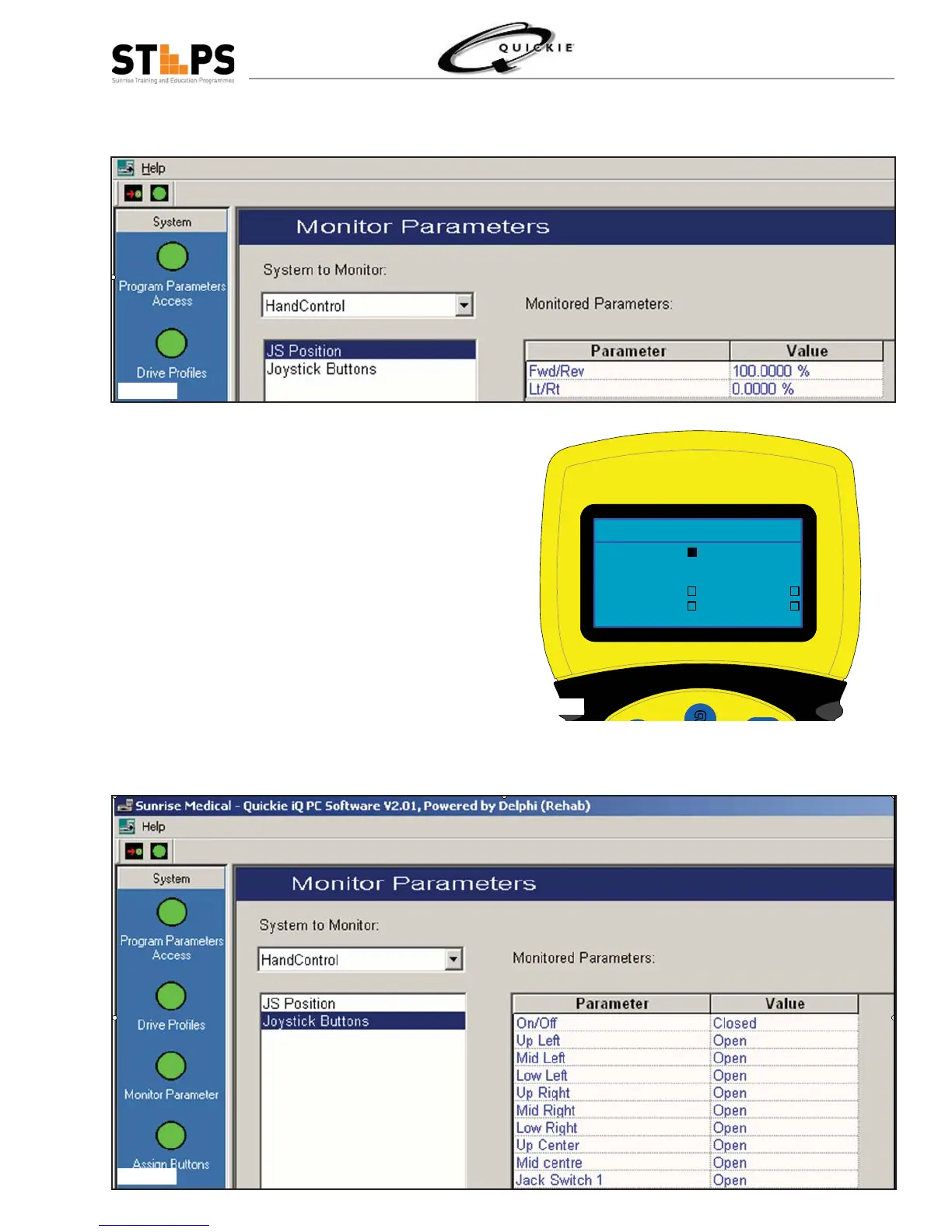
If using the Quickie iQ, select Monitor Parameter followed by selecting Hand Control, then JS Position. (fi g 5.
2.23.18)
Slowly move the joystick forward and verify that 6.
the Joystick Position increases smoothly to 100%.
Repeat the test in the reverse direction.
Verify that the joystick returns to neutral in both 7.
directions.
Slowly move the joystick to the right and verify that 8.
the Joystick Position increases smoothly to 100%.
Repeat the test for the left position.
Verify that the joystick returns to neutral in both 9.
directions.
If the previous tests fail, calibrate the joystick us-10.
ing either the HHP or Quickie iQ. Refer to the
HHP or Quickie iQ Operation manuals.
If using the HHP, select Buttons/SW. (fi g 2.23.18) 11.
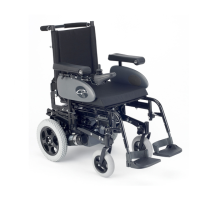
If using the Quickie iQ, select Joystick Buttons. 12.
Monitor the screen on either the HHP or Quickie
iQ. (fi g 2.23.19)
Button/SW
+ + -
ON/OFF
Current ON/OFF Jack
Voltage Mode Jack
Rotary Pot 100
Fig 2.23.17
Fig 2.23.18
Fig 2.23.19



 To Next Page