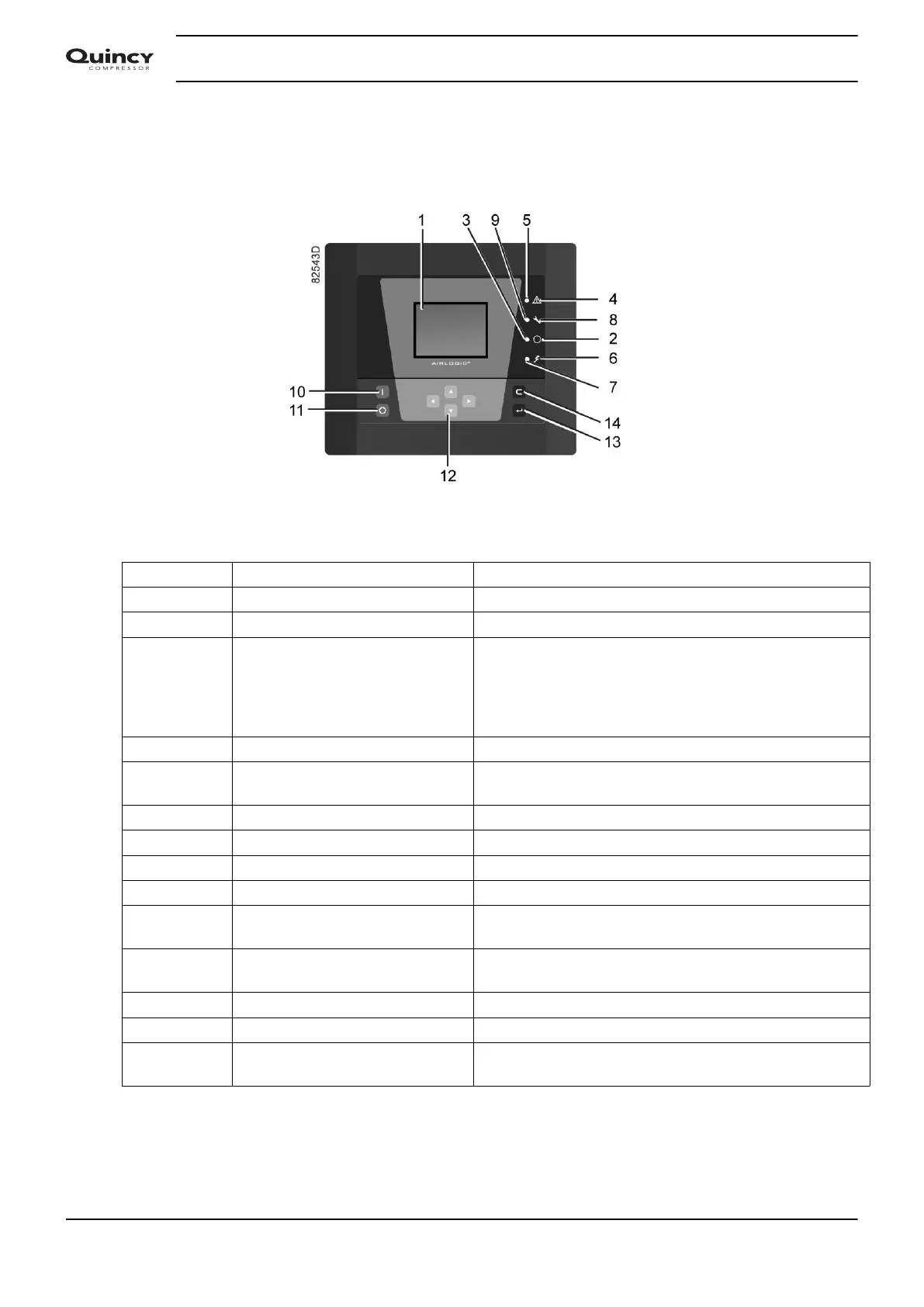
3.2 Control panel
Detailed description
Function keys of the controller
Reference Designation Function
1 Display Shows icons and operating conditions.
2 Automatic operation symbol
3 LED, Automatic operation Indicates that the regulator is automatically controlling
the compressor: the compressor is loaded, unloaded,
stopped and restarted depending on the air
consumption and the limitations programmed in the
regulator.
4 Warning symbol
5 LED, Warning Flashes in case of a shutdown, is lit in case of a warning
condition.
6 Voltage symbol
7 LED, Voltage on Indicates that the voltage is switched on.
8 Service symbol
9 LED, Service Is lit when service is needed.
10 Start button This button starts the compressor. Automatic operation
LED (3) lights up. The controller is operative.
11 Stop button This button is used to stop the compressor. Automatic
operation LED (3) goes out.
12 Scroll buttons Use these buttons to scroll through the menu.
13 Enter button Use this button to confirm the last action.
14 Escape button Use this button to go to previous screen or to end the
current action.
Instruction book
28 2920 7190 02






 To Next Page