17
Subject to technical change without notice
09.2003 09.2003
31
32
31.1
3.4 Function screen
”RATE” <R>
3.4.1 Display seed rate
The function screen ”RATE” makes a wide
range of information available on the current
seed rate and its modication. To reach this
screen, just press the <R> key.
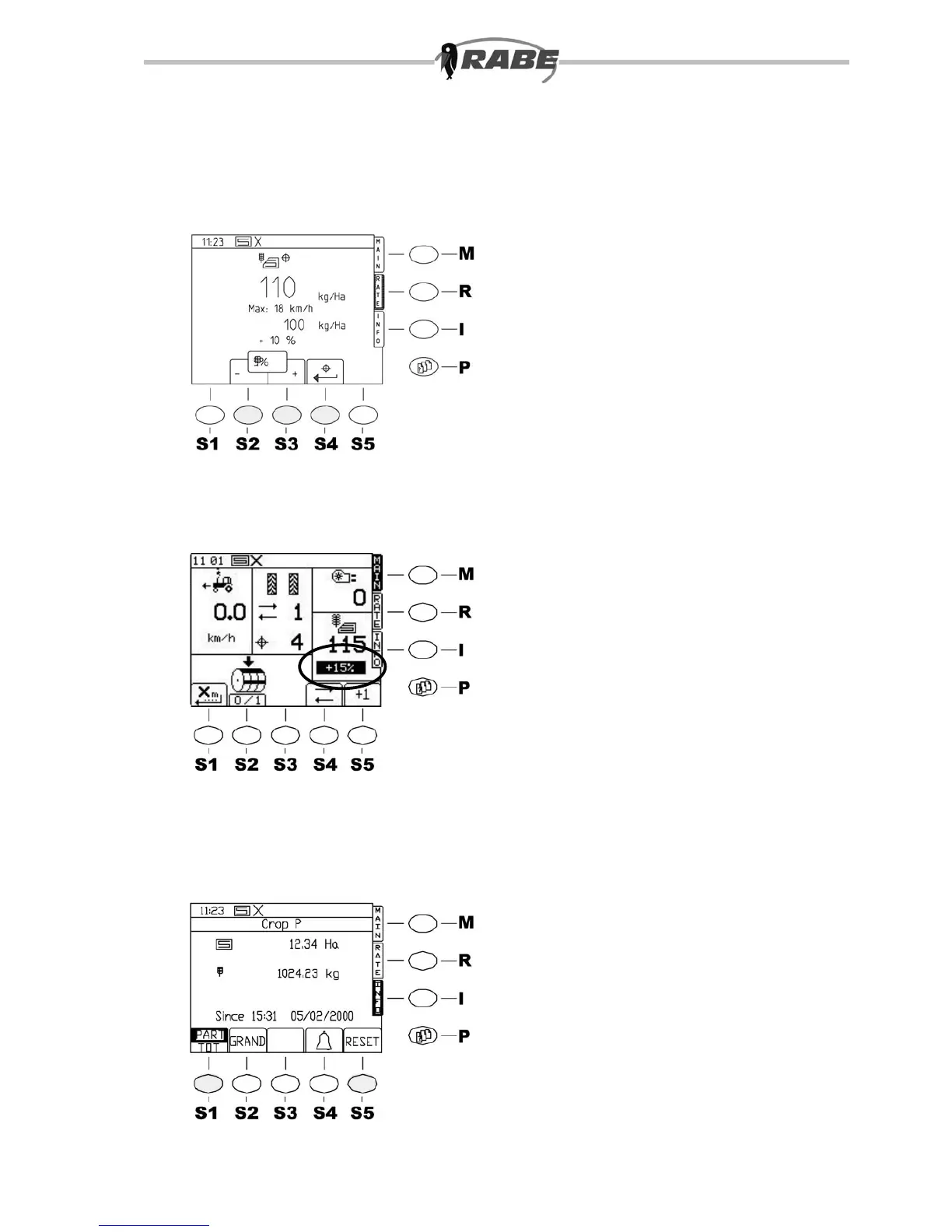
The following screen appears (Fig. 31):
The large display is the current seed rate.
The maximum permitted speed of travel is
displayed as a second gure (this may be
appreciably less than 18 km/h for high seed
rates).
Below this is the calibrated seed rate in kg/
ha (as a reference).
The nal value is the deviation in % of the
current seed rate from the calibrated value.
3.4.2 Changing the rate on the
move
Use the +/- keys (<S2>, <S3>) (g. 31)
to increase or reduce the seed rate in the
preset displayed step (e.g. 5%).
The range is from -50% to +50% of the
calibrated quantity (g. 31.1).
Use the <S4> key to return directly to
the calibrated quantity. The increased or
reduced quantity is displayed in % in the
main screen.
3.5 INFO screen <I>
3.5.1 Display values
To reach the INFO screen, press the <I>
key on the right hand side of the screen.
The following screen appears (g. 32).
The display shows the area, seed quantity
applied to this area, and date and time from
which these values are counted.



 To Next Page