27
Subject to technical change without notice
09.2003 09.2003
50
51
52
53
4.2 DRILL
CONFIGURATION
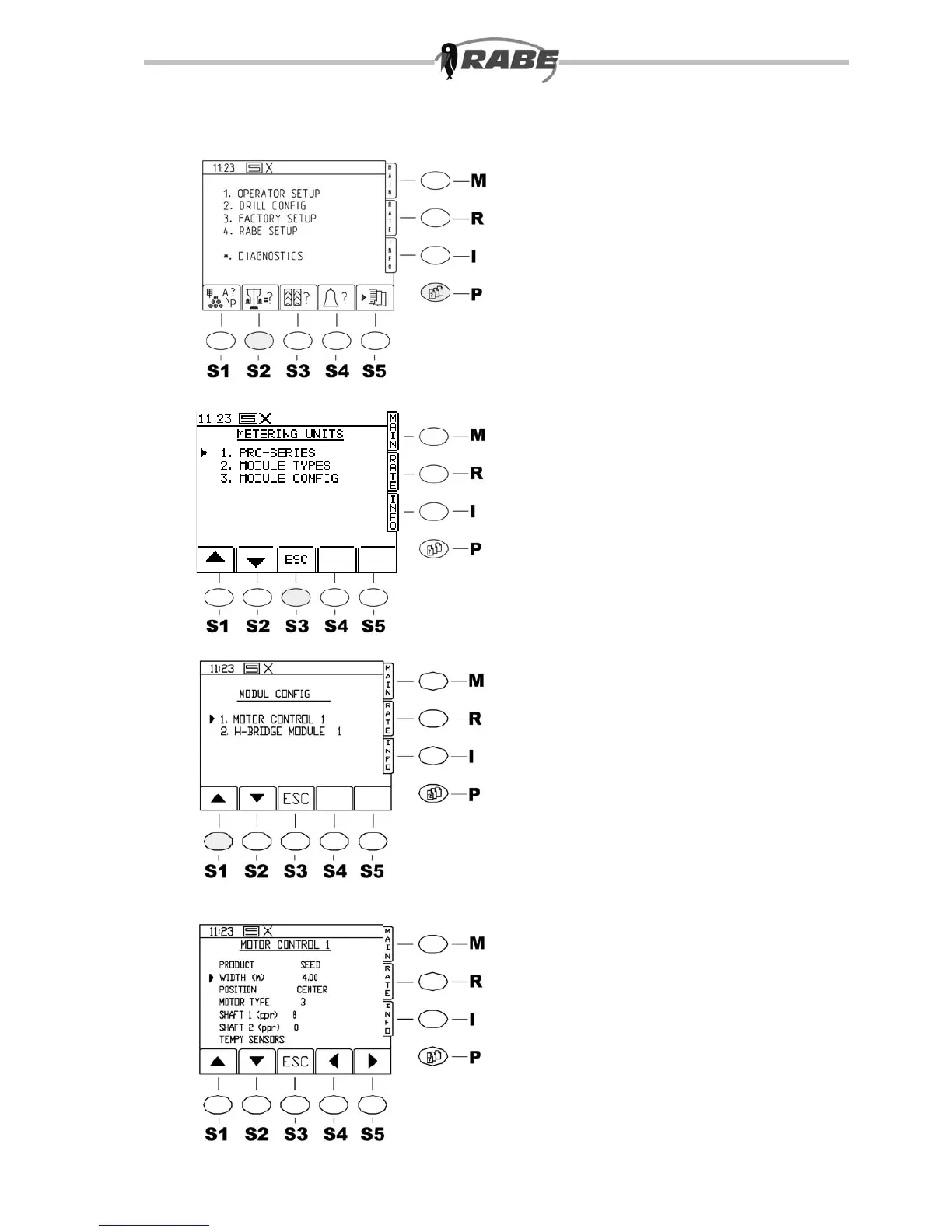
Take option <2> in the parameter menu
to adjust the DRILL conguration.
4.2.1 PRO SERIES
Do not make any modications here.
4.2.2 MODULE TYPES
Do not make any modications here.
4.2.3 MODULE CONFIG (set
working width)
”Set working width”
By pressing the <P> key for the
parameter menu screens, the screen in g.
50 appears. After this, press key <2> on
the numerical pad to get to DRILL CONFIG
(g. 51). Settings 4.2.1 to 4.2.3 are
possible.
Motor control 1
Press the <3> key to get into MODULE
CONFIG (g. 52). Press <1> again to get
to the Motor Control 1 menu (g. 53).
This is where to set the working width.
Use the arrow keys to move to the line
WIDTH (m). Enter the correct working
width from the numerical pad, and conrm
with Return.
The correct setting is very important,
otherwise the machine will never
function correctly.
Return with <ESC>.
It is not possible to change other settings
here.



 To Next Page