Getting ‘on air’ with your Radioddity GD-73 v1.0
4e. Bundling of channels into zones
A zone is a collection or group of channels. They may be grouped any way you wish,
for example a zone for each geographic area, or a zone with different talkgroups for
one repeater, or any other way you find useful or convenient. Once you have defined
your channels, you are ready to bundle them into zones for later use. Up to 16 radio
channels can be stored in one zone of your GD-73. A total of up to 64 zones are
possible. It makes sense to bundle channels according to their use. For example, it
makes sense to bundle all channels of a DMR repeater within one zone. Another zone
could contain all analogue radio channels of a geographical region.
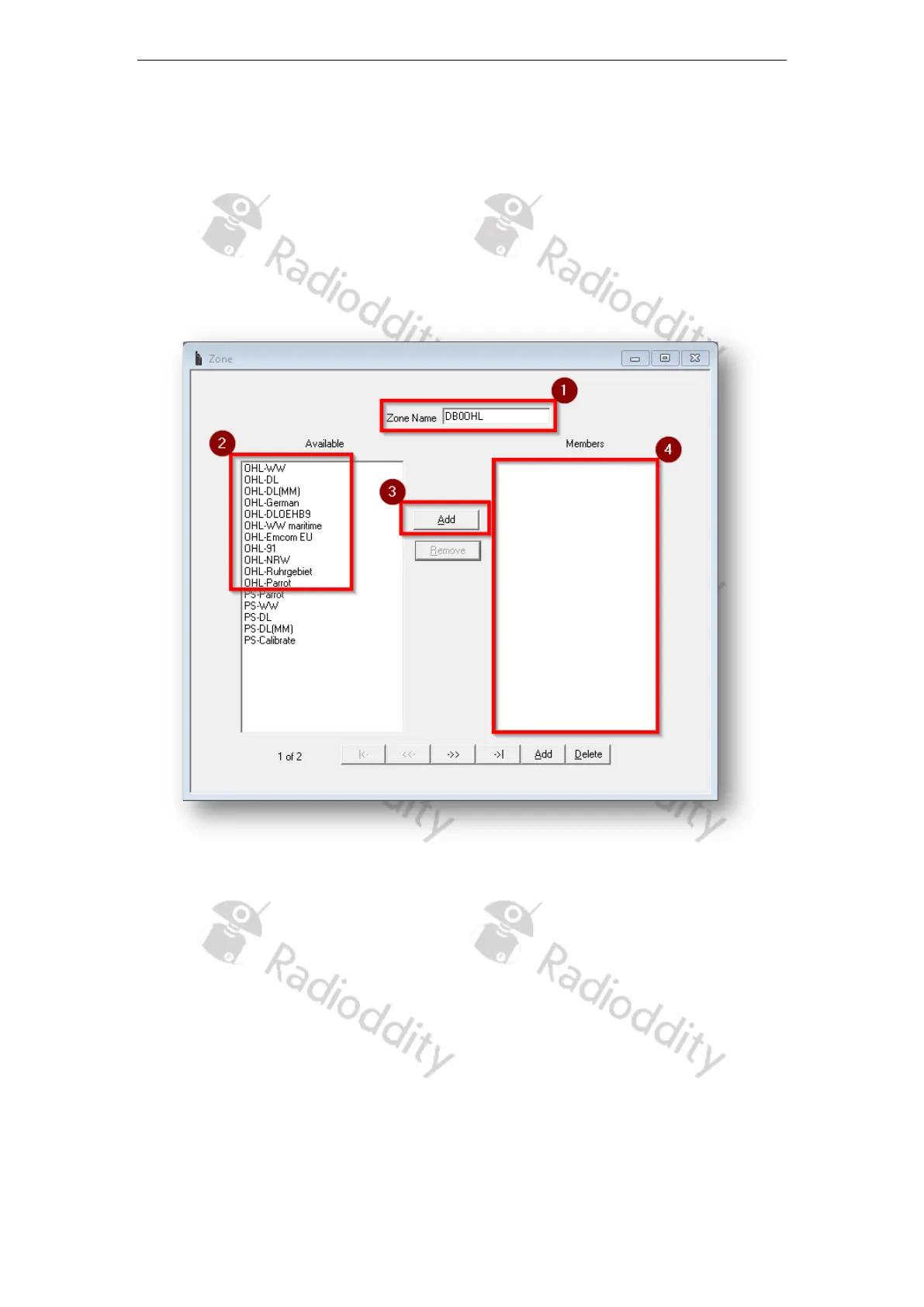
1. First give the zone a meaningful name (1), such as the identification of the
repeater whose channels you want to store in the zone.
2. Then select from the list of available radio channels (2) on the left all those you
want to bundle in that zone.
3. Click the ‘Add’ button (3) to accept each channel.
4. The added channels will then be listed in the right window (4) under the
heading ‘Members’.
That is all what is required.
Page 19 of 23










 To Next Page