3D PRINTER MANUAL- RAISE3D PRO2 SERIES
- 37-
www.raise3d.com
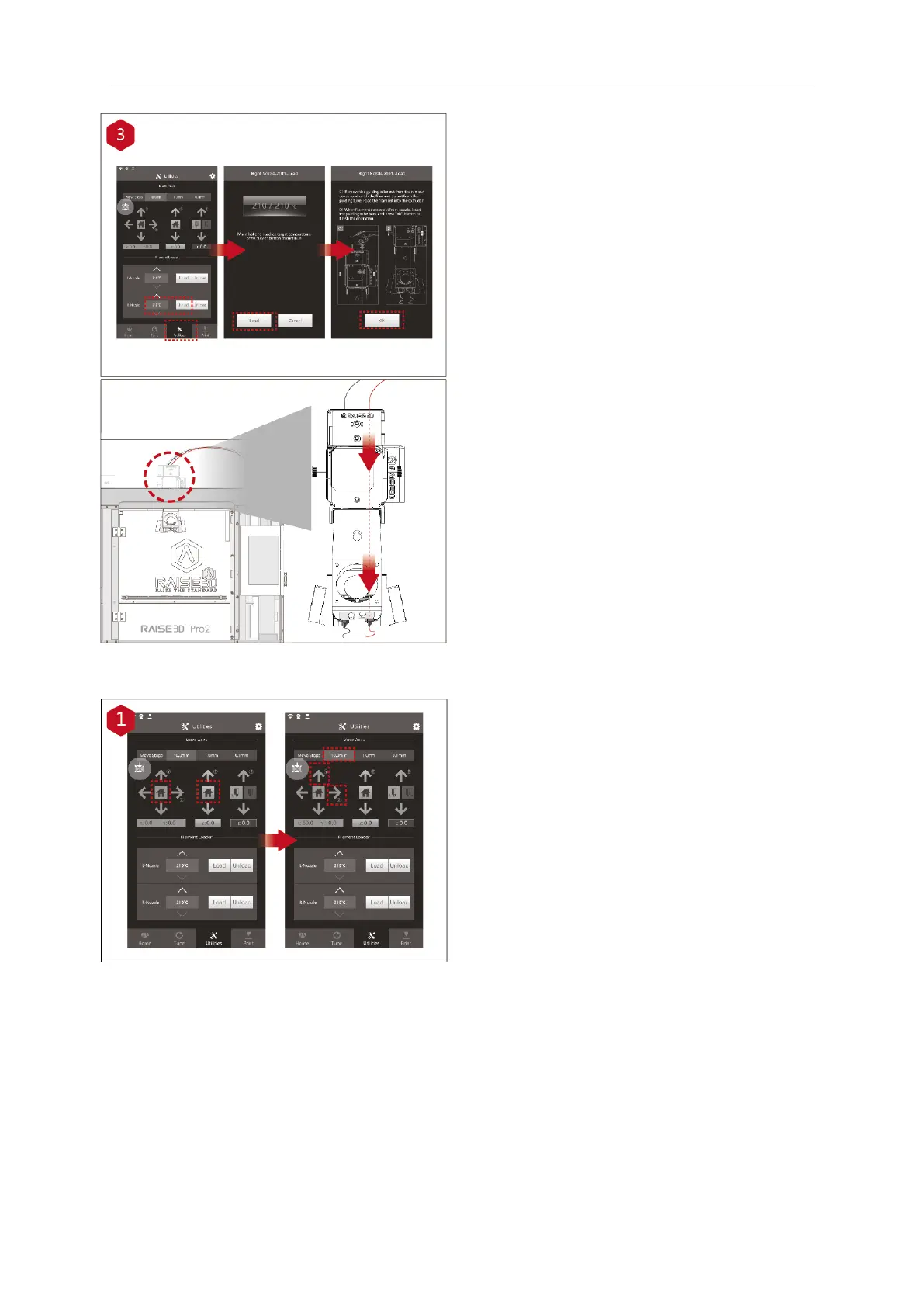
Open the “Utilities” tab on the screen and set
the temperature of the right nozzle for the
filament you're using, then press the “Load”
button. Finish the feeding operation step by
step according to the instructions on the
screen.
NOTE: This document is set based on the
Raise3D PLA filament, delivered with the
printer.
We advise that using the Raise3D PLA for this
initial setup and testing.
⚫ Dual-Extruder Print - Start First Print
The Pro2/Pro2 Plus units are pre-leveled in
the factory, but we recommend verifying that
the z-offset has not changed during shipping.
First, home the X/Y Axis by selecting the
"home" button, then Z axis "home" button. If
the homing procedures complete without
issues, reposition the print head.
Select "10mm" for "Move Steps" and move X
to
50mm, Y to 10mm.



 To Next Page