EasyManua.ls Logo

Raise3D Pro2 - Dual-Extruder Print - Hardware Installation; Dual-Extruder Print - Start First Print

Raise3D Pro2
42 pages
Print Icon
To Next Page IconTo Next Page
To Previous Page IconTo Previous Page
Loading...
3D PRINTER MANUAL- RAISE3D PRO2 SERIES
- 36-
www.raise3d.com
Dual-Extruder Print - Hardware Installation
The following steps show how to feed the right nozzle. For the other hardware installations steps please
see with Part Hardware Installation in this guide.
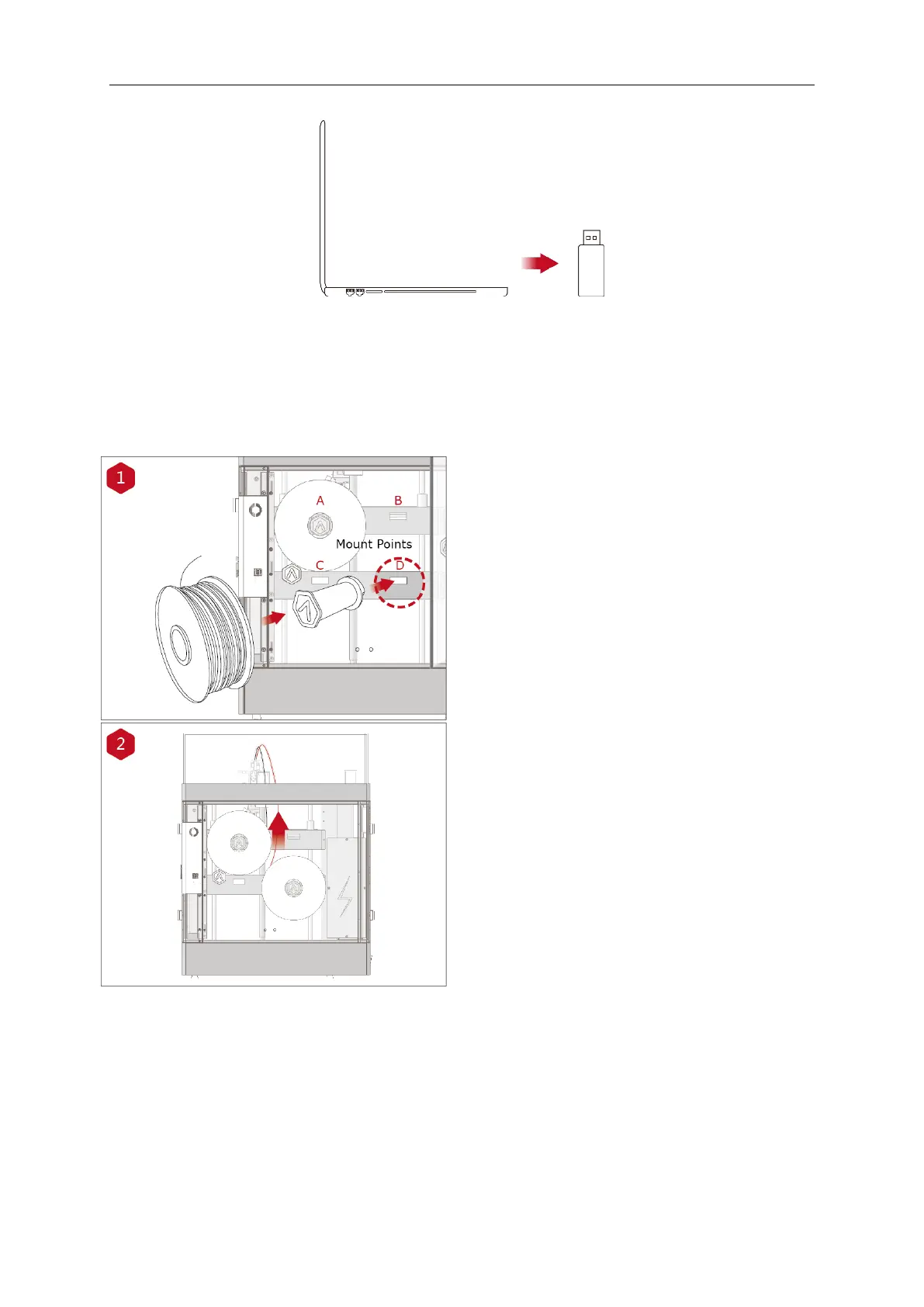
Install the filament holder in the mount point
on the side of the printer and place a spool of
filament on the holder.
NOTE: The direction of filament spool should
be placed to rotate in clockwise at mount
points B and D and counterclockwise at mount
points A and C.
Feed the filament through the guide tube.

Other manuals for Raise3D Pro2

Related product manuals