EN
Page 26 of 91
INSTRUCTION, USE AND
MAINTENANCE MANUAL
Installation of BTRemotePrinter on PC
TO INSTALL THE BTREMOTE-
PRINTER PROGRAM YOU MUST BE
CONNECTED TO INTERNET.
To install BTRemotePrinter, follow the instructions
given below:
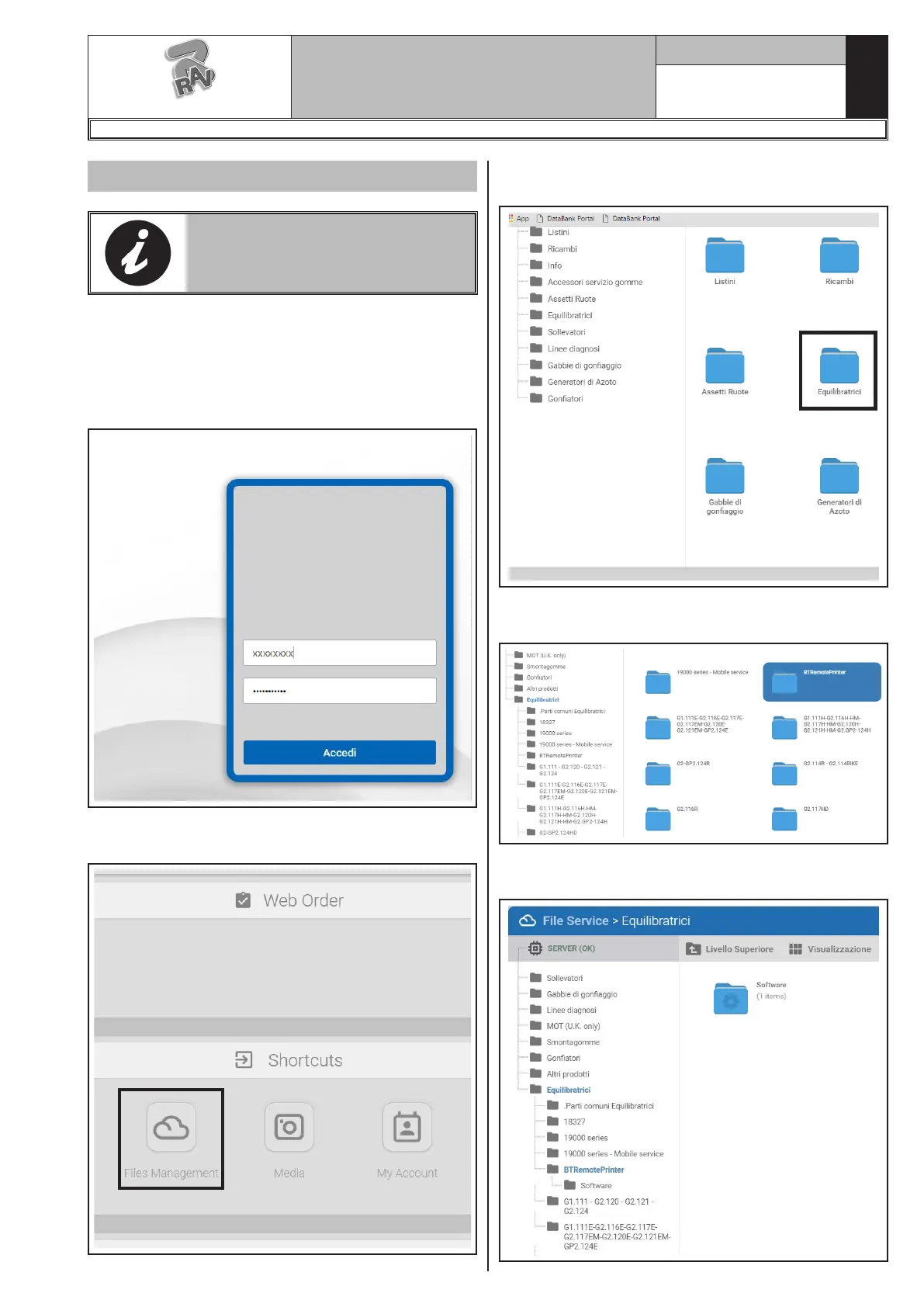
- from the “Group” “Home” page, click on “Support”
to enter the After-Sales website. On the monitor, the
following screen appears where you can enter the
password and the user number:
- After entering the user number and password, the
following page will be displayed:
- Press the “Files Management” highlighted icon to
enter the following screen page:
- Press the “Wheel Balancers” highlighted icon to enter
the following screen page:
- Press the “BTRemotePrinter” highlighted icon to
enter the following screen page:
G3.150 - GP3.150 - G3.150S - GP3.150S - G3.150WS - GP3.150WS - G3.150WSPLUS - GP3.150WSPLUS - G3.150SA - G3.150WSA
RAVAGLIOLI S.p.A.
1297-M058-00



 To Next Page