INSTRUCTION, USE AND
MAINTENANCE MANUAL
EN
Page 27 of 91
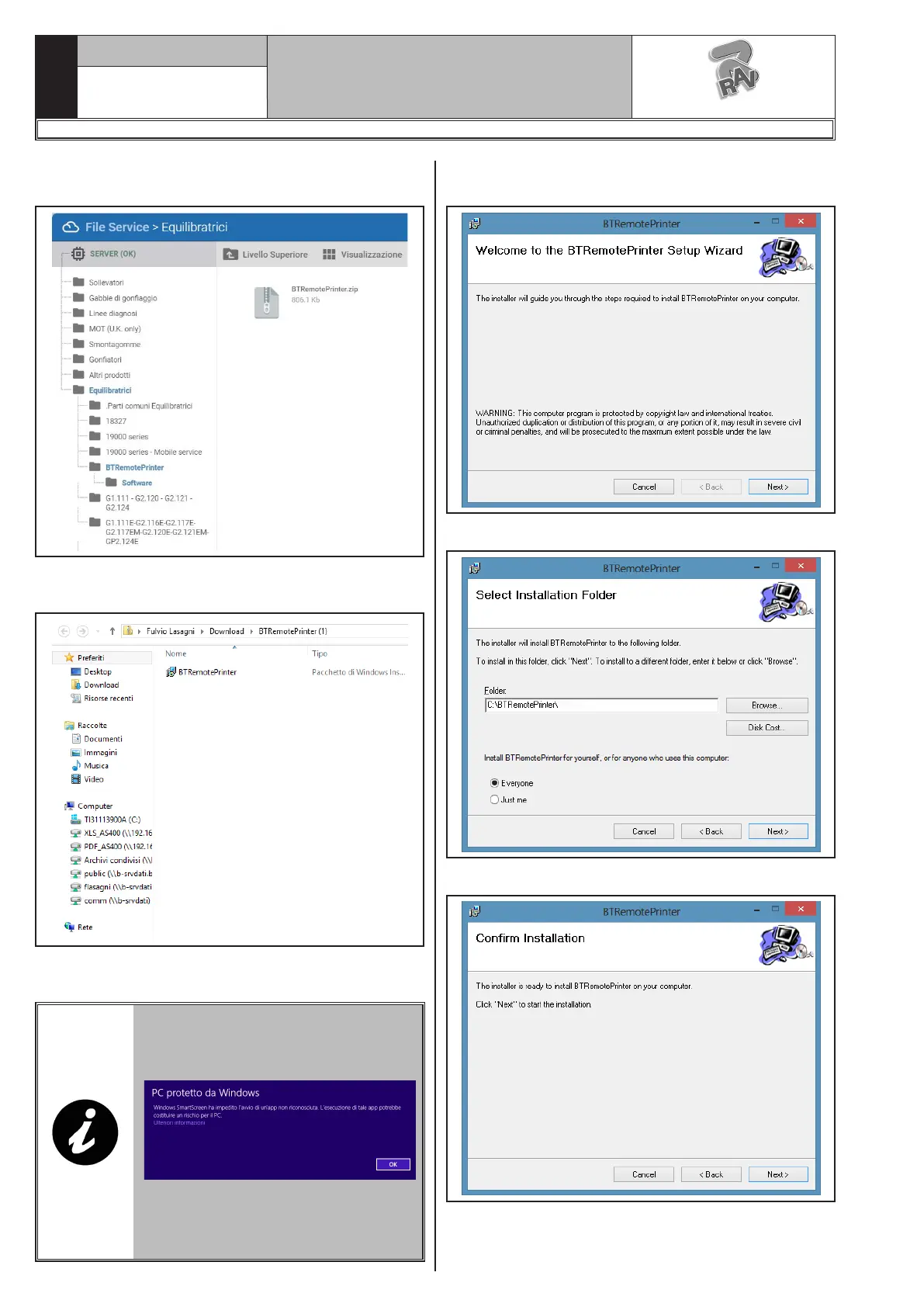
- Press the “Software” highlighted icon to enter the
following screen page:
- Press the “BTRemotePrinter.zip” folder to enter the
following screen page:
- Proceed with the installation of the program, by click-
ing on “BTRemotePrinter”.
WARNING: THE FOLLOWING
WARNING SCREEN PAGE COULD
BE DISPLAYED DURING THE IN-
STALLATION:
IN CASE IT APPEARS, CLICK ON
“FURTHER INFORMATION” AND IN
THE FOLLOWING SCREEN PAGE
ON “PROCESS ANYWAY”.
- Proceed with the installation. You will see the follow-
ing screen:
- Press “Next”. You will see the following screen:
- Press “Next”. You will see the following screen:
1297-M058-00
G3.150 - GP3.150 - G3.150S - GP3.150S - G3.150WS - GP3.150WS - G3.150WSPLUS - GP3.150WSPLUS - G3.150SA - G3.150WSA
RAVAGLIOLI S.p.A.


 To Next Page
 Loading...