INSTRUCTION, USE AND
MAINTENANCE MANUAL
EN
Page 31 of 91
Net configuration
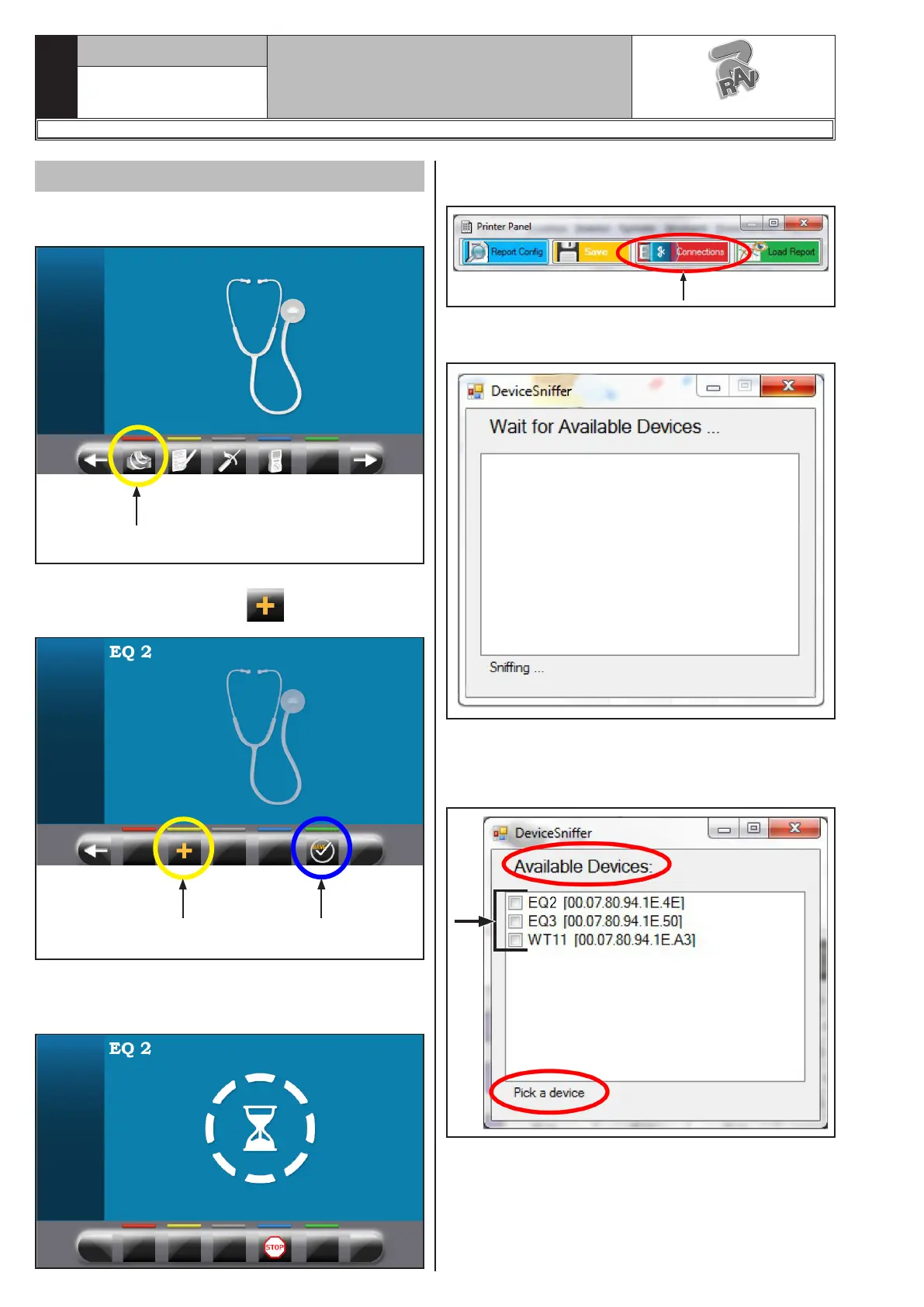
In the assistance menu of the wheel balancer, press
“Printer configuration” button (A).
A
Then choose the identifier (name) of the wheel balancer
[EQ1..EQ9] by pressing the “ ” (B) button.
B C
Finally press OK (C) which places the machine in “Wait-
ing for connection with PC” mode (see the following
screen page).
Now work from the PC and run the research of the
connectible machines:
Press “Connections” button to open the screen page of
the available devices that is illustrated here as follows.
Wait for a few seconds...
At the end the system posts up the list of the found
connectible devices: some of them can already be con-
nected.
1297-M058-00
G3.150 - GP3.150 - G3.150S - GP3.150S - G3.150WS - GP3.150WS - G3.150WSPLUS - GP3.150WSPLUS - G3.150SA - G3.150WSA
RAVAGLIOLI S.p.A.



 To Next Page