Install RS1™ with DirecSteer
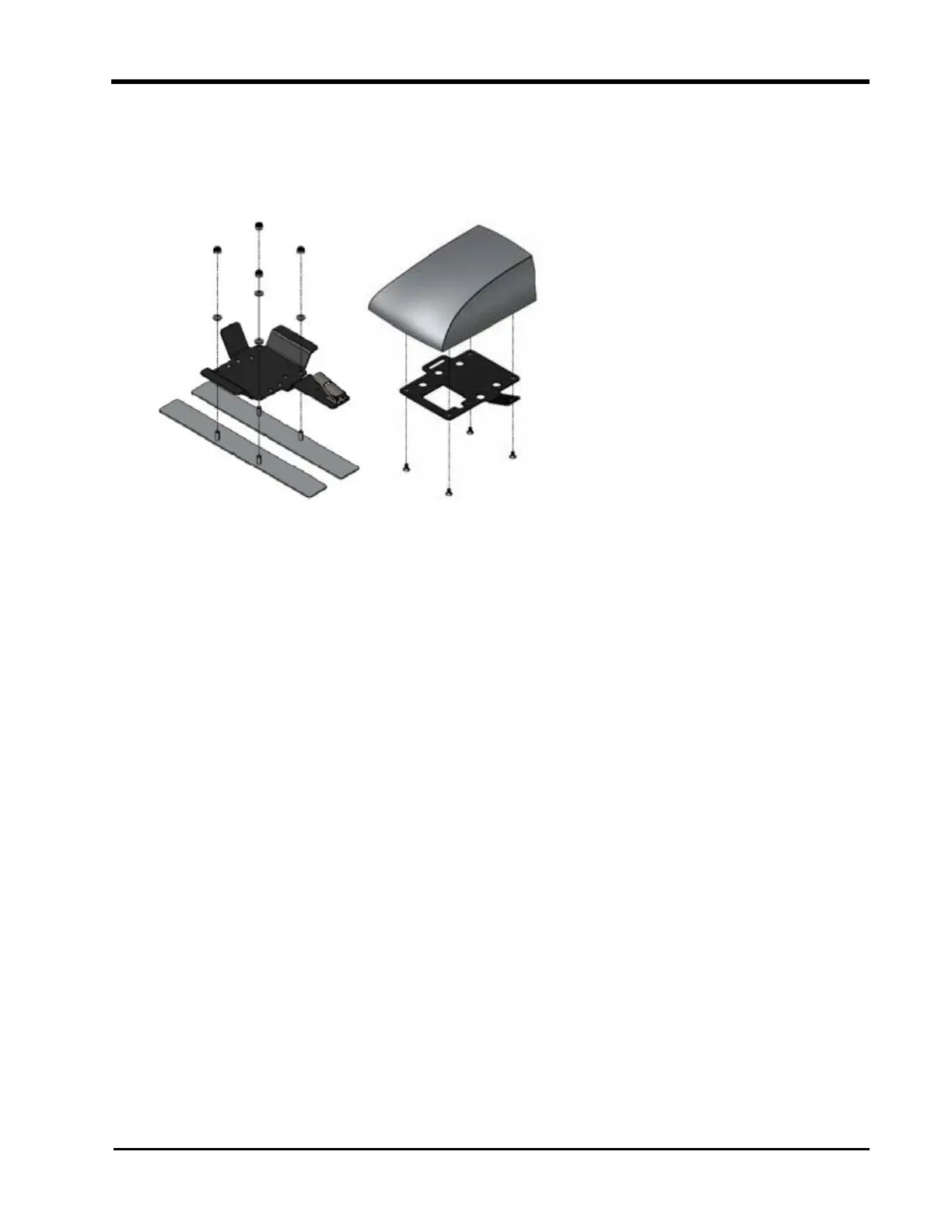
Assemble the Mounting Brackets
1. Use the supplied hardware to secure the RS1™ bottom bracket assembly (P/N 116-
0159-802) to the adhesive strips.
2. Mount the latch plate (P/N 107-0172-531) to the RS1™ using the provided screws.
Note: The bottom mounting bracket will adhere to the roof of the tractor. The latch
plate stays mounted to the RS1™.
3. Secure the RS1™ latch plate to the fixed base plate using the latch.
Prepare the Roof
1. Select a location on the cab roof to mount the RS1™. Consider all of the following
mounting requirements for best functionality of RS1™:
l
RS1™ must mounted at least 50 cm [20 in.] from other GNSS, cellular, or radio
antennas or equipment.
l
Align the RS1™ on the center line of the tractor in front of the rear axle or toward
the front of the cab.
l
RS1™ is mounted with the connectors facing toward the rear of the tractor.
2. Thoroughly clean the selected location.
37



 To Next Page
 Loading...





