5
2. MOUNTING THE CONSOLE AND CABLING
l) Mount the Console to a secure support inside the cab of the vehicle.
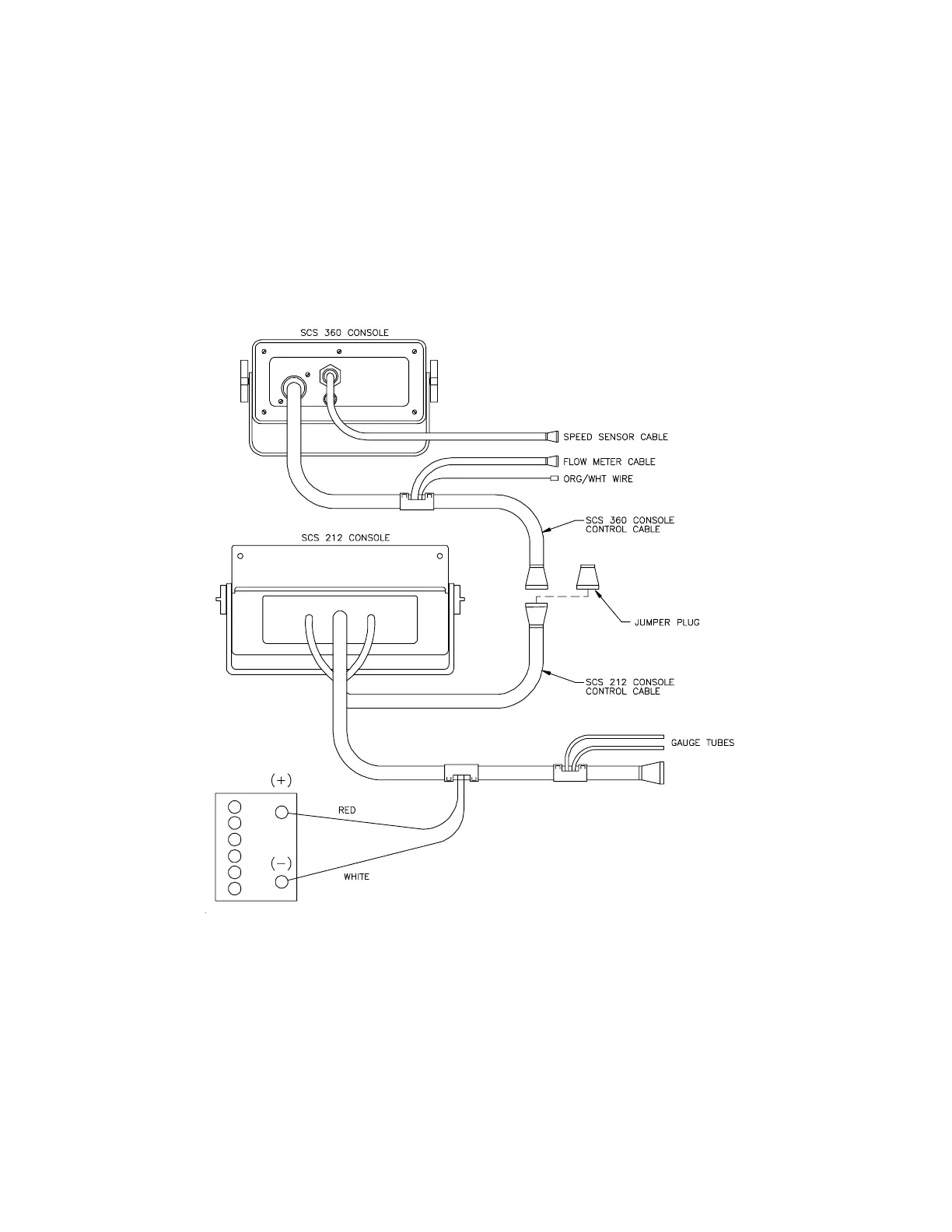
2) Remove the Jumper Plug on the SCS 212 Console Control Cable. Connect the 2'
SCS 360 Console Control Cable to the SCS 212 Console Control Cable and the other
end of the SCS 360 Console Control Cable to the back of the SCS 360 Console. (See
Figure 4).
3) Run the 24' Flow Control Cable out of the vehicle cab and connect with the Flow
Meters.
4) Turn MASTER ON/OFF switch OFF and route the Red and White battery wires to a
12-volt battery. Attach the White wire to the NEGATIVE (-) terminal and the Red
wire to the POSITIVE (+) terminal. (DO NOT CONNECT WIRES TO THE STARTER). Secure
the battery wires with plastic cable ties. DO NOT tie the battery wires close
to the existing battery leads or other electrical wiring. (See Figure 5 on page
6).
5) Connect the Speed Sensor Cable to the plug in the back of the Console.
6) Installation of the system is now complete.
FIGURE 4



 To Next Page
 Loading...





