Using the CncGcoder
®
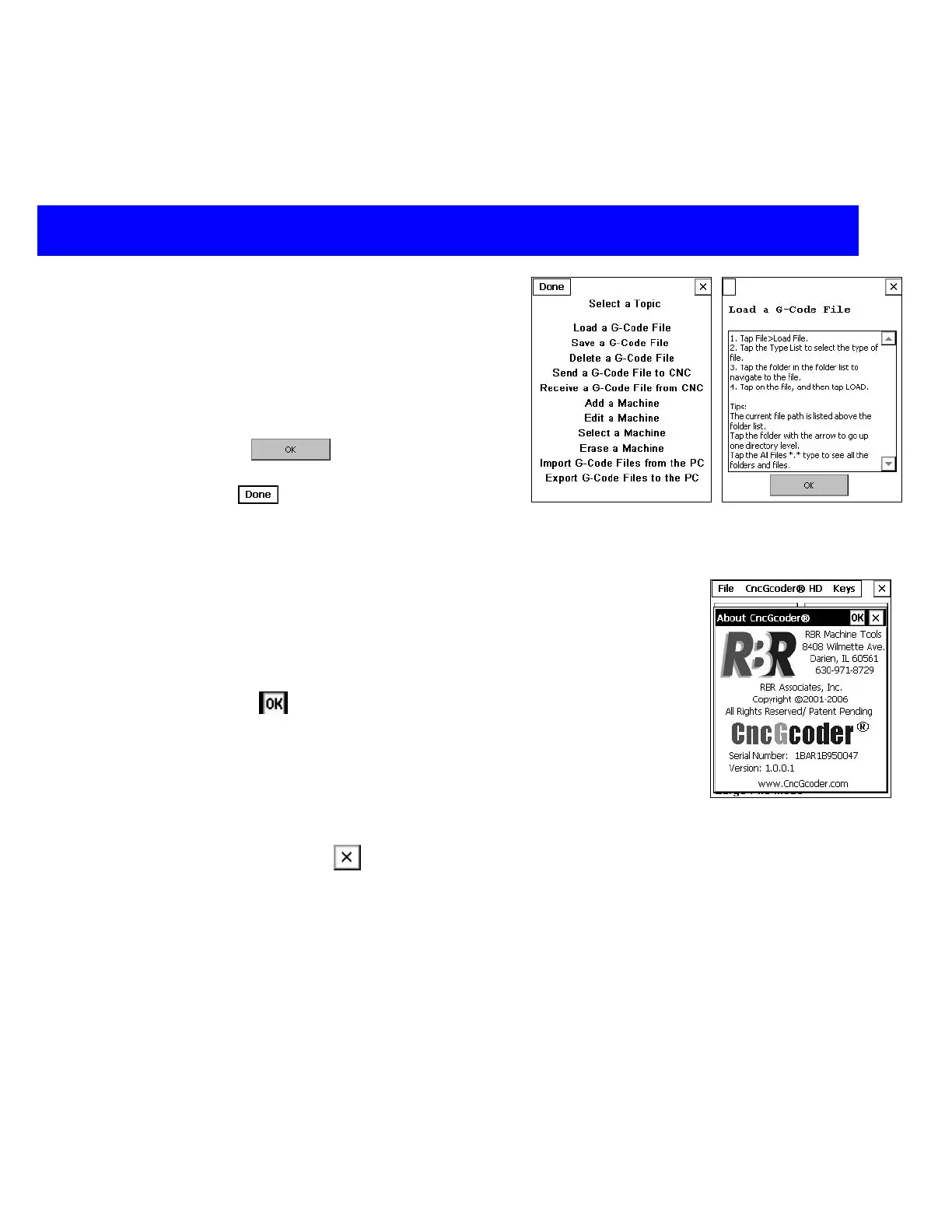
On-Screen Help
A quick program reference guide is available in the
CncGcoder
®
.
Select CncGcoder® HD>Program Help from the
menu bar on the main screen to view the help
topics available.
Tap on a topic to view more information.
Select the OK
button to return to the
topic list.
Select Done
on the menu bar to return to the
main screen.
About CncGcoder
®
Screen
The CncGcoder
®
HD version and serial number can be found on the
About CncGcoder
®
screen.
1. Select CncGcoder
®
HD>About CncGcoder
®
from the menu bar.
2. Tap OK
to return to the previous screen.
Exit Program
1. Make sure the G-Code program is saved. (See Saving a File)
2. Tap on the Close
icon in the upper right-hand corner of the
screen.
CncGcoder® HD Manual
19


 To Next Page