35
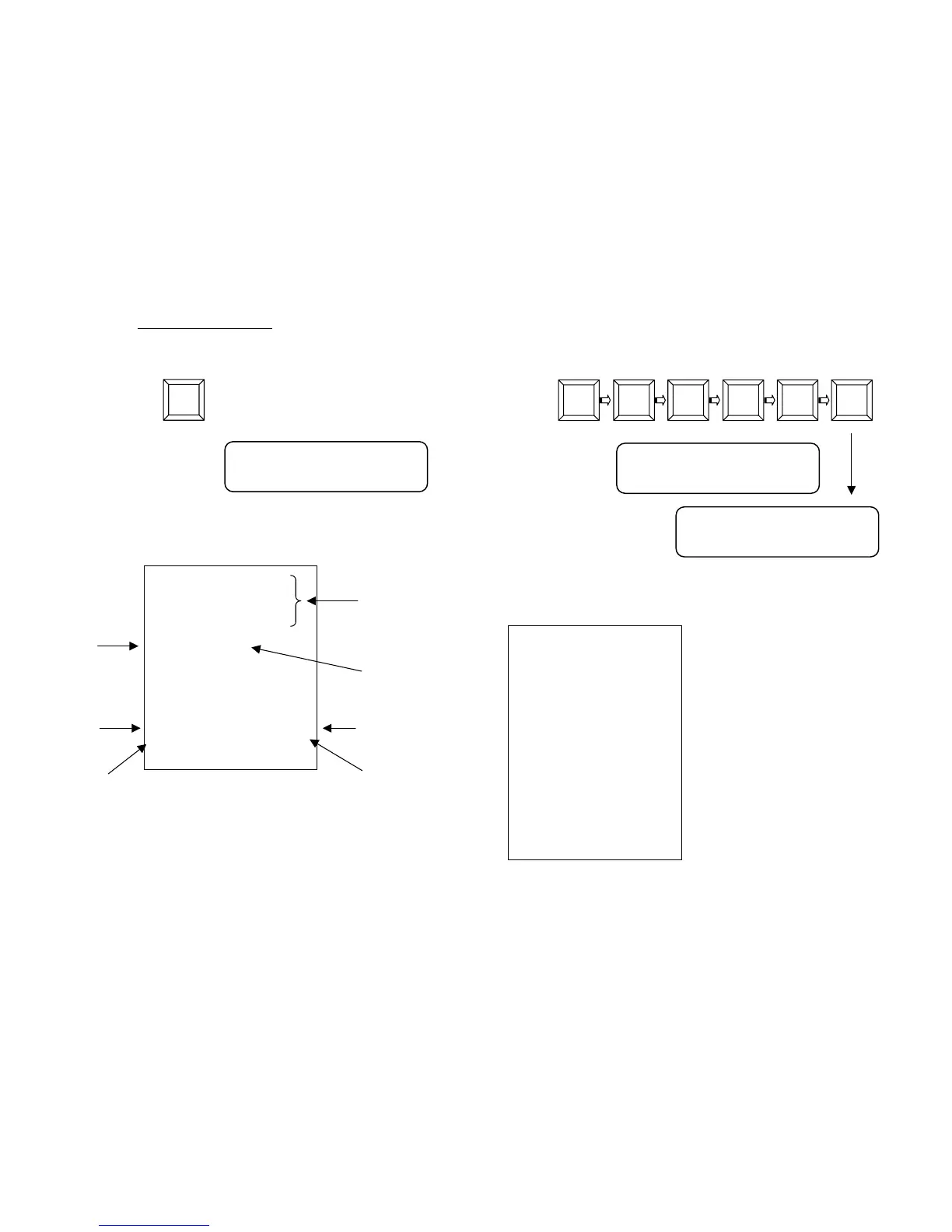
To sell an article carrying a pre set price press directly the department
key. The memorised price will be displayed.
Example, Department 2 (with set price 50.00)
Enter:
On display:
To close the receipt, press CASH.
The receipt will be the following:
RCH S.P.A.
VIA CENDON, 39
SILEA (TV)
P.IVA 00193390267
DEPART. 02 F 50.00
-----------------
SUB-TOTAL F 50.00
TOTAL 50.00
CASH 50.00
CLK#1 PC#1
N.0001 16/01/05 12:07
GM GD 72000001
HEADING
(6 lines max)
DATE & TIME
RECEIPT No.
CLERK’S
NAME
DEPARTMENT
DESCRIPTION
NUMBER OF
PIECES
DEPT 02
50,00
VAT TYPE
DEP
2
36
7.3 MULTIPLE QUANTITIES RECORDING
To record multiple quantities enter X/ after entering the quantity to
multiply. Example 3 articles costing 15.00 each at the department 1
Enter:
On display:
To close the receipt, press the key CASH.
The receipt will be the following:
Note: the multiple quantities may be
associated both to a department and
to a PLU and consist at maximum of
two integers and three decimals.
NOTE: the maximum value that may be entered is 99.
3 1 00
X
5
DEP
1
RCH S.P.A.
VIA CENDON, 39
SILEA (TV)
P.IVA 00193390267
3 X 15.00
DEPART. 01 F 45.00
-----------------
SUB-TOTAL F 45.00
TOTAL 45.00
CASH 45.00
CLK#1 PC#3
N.0002 16/01/05 12:09
GM GD 72000001
REG 3X
15,00
DEPT 01
45,00


 To Next Page