38 | P a g e
Temperature indication display
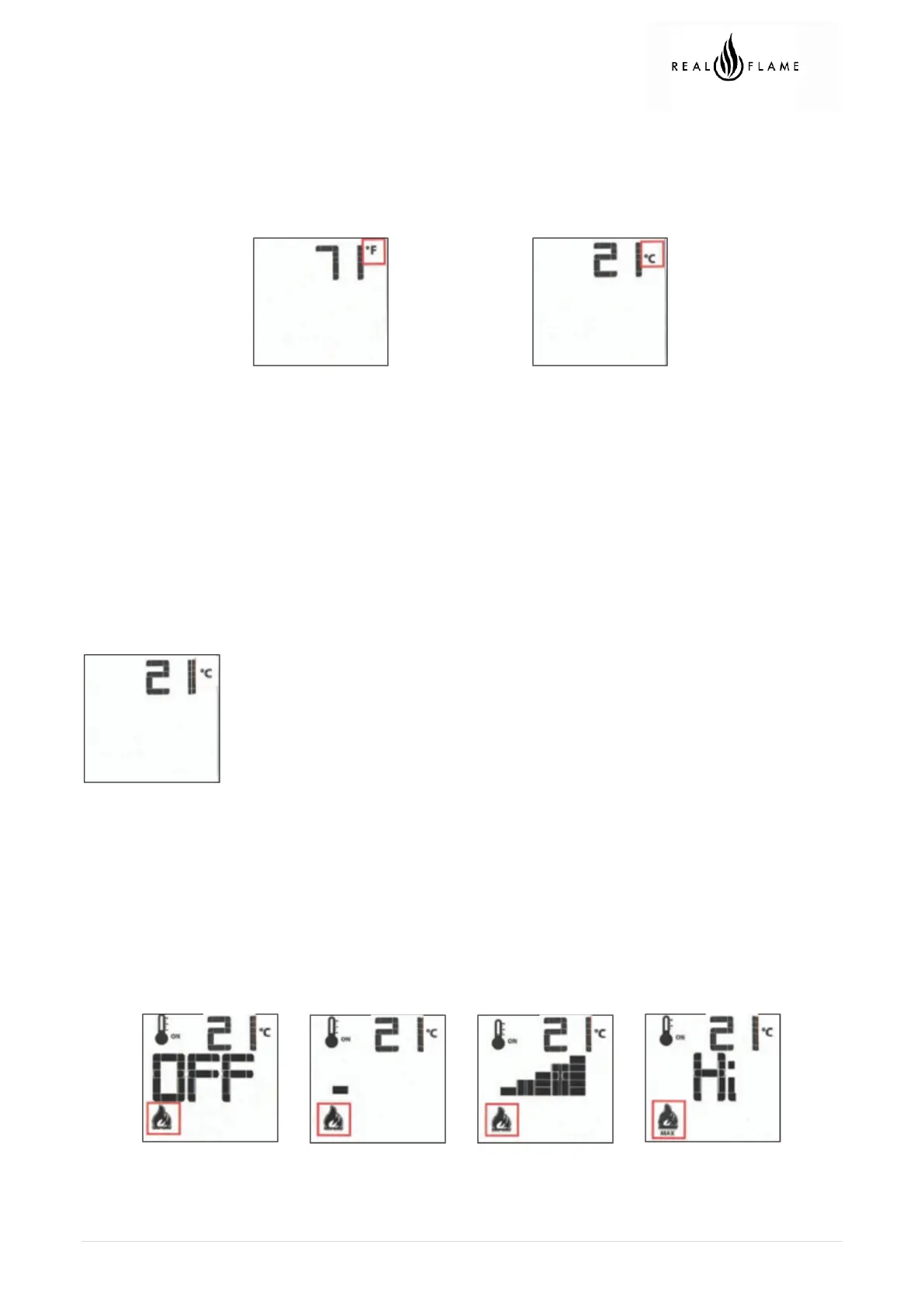
With the system in the OFF position, press the thermostat key and the mode key at the same time. Look at
the LCD screen on the transmitter to verify that a C or F is visible to the right of the room temperature
display.
Remote control display in Farenheit Remote control display in Celcius
Turn on the appliance
With the system OFF, press the ON/OFF key on the transmitter. The transmitter display will show some
other active icons on the screen. At the same time the receiver will activate the appliance. A single “beep”
from the receiver will confirm reception of the command.
Turn off the appliance
With the system ON, press the ON/OFF key on the transmitter. The transmitter LCD display will only show
the room temperature. At the same time the receiver will turn off the appliance. A single “beep”
from the receiver confirms reception of the command.
Remote control display
Remote flame control
The proflame has six (6) flame levels. With the system ON, and the flame level at the maximum in the
appliance, pressing the down arrow key once will reduce the flame height by one step until the flame is
turned off.
The up arrow key will increase the flame height each time it is pressed. If the up arrow key is pressed while
the system is on but the flame is off, the flame will come on in the high position. A single “beep” will confirm
reception of the command.
Flame off Flame Level 1 Flame Level 5 Flame Level Maximum


 To Next Page