12 | Installation
5.7 CHARGE PROFILE SELECTION — ORANGE WIRE
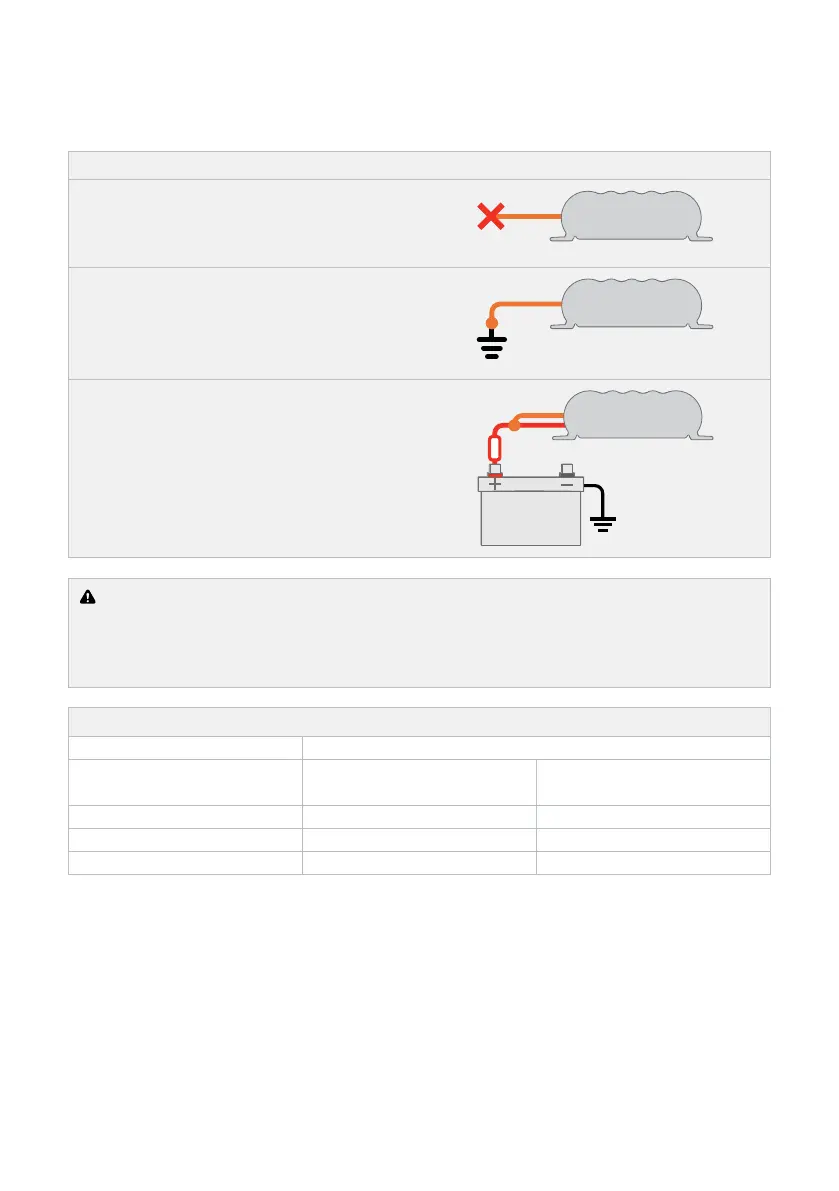
Connect the ORANGE wire to set the Maximum output voltage to suit your selected Charge Profile.
Figure 8: Setting the Maximum Voltage (ORANGE wire)
PROFILE A
Leave the ORANGE wire disconnected to set
the Maximum voltage to 14.6 V*.
PROFILE B
Connect the ORANGE wire to Common
Ground to set the Maximum voltage to
15.0 V*.
PROFILE C
Connect the ORANGE wire to the RED wire
(Input source positive) to set the Maximum
voltage to 15.4 V*.
CAUTION: Check the manufacturer’s data for your battery and ensure that the Maximum
voltage of the Charging Profile you select does not exceed the manufacturer’s recommended
maximum charging voltage. If the Maximum voltage is too high for your battery type, select
another Charging Profile.
Table 3: Charge Profile Selection
Auxiliary Battery Location
Maximum Battery Voltage
Specification
Cabin Install
(25°C / 75°F)
Engine Bay Install
(50°C / 120°F)
14.6 V A A
15.0 V B A
15.4 V C B
*Voltages Specified are ±100 mV.



 To Next Page