Installation — Mounting | 15
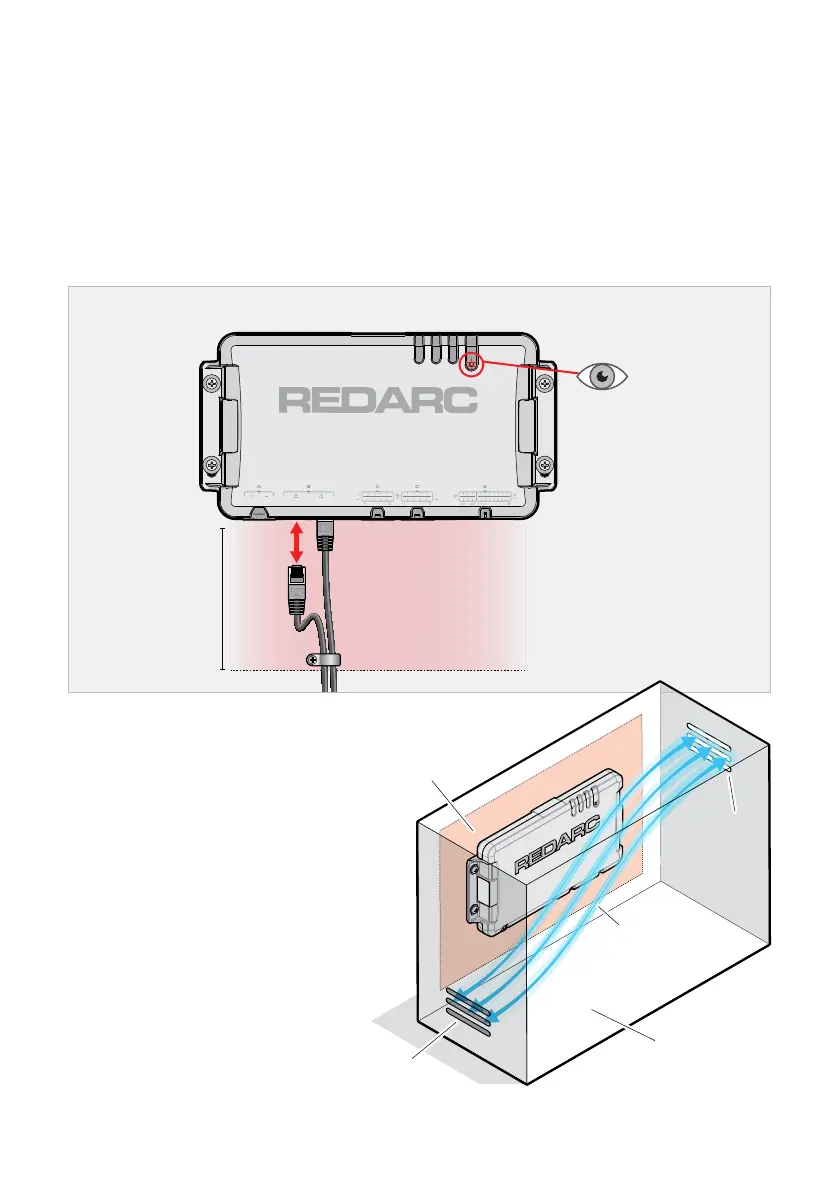
MOUNTING CLEARANCES
Leave at least 100 mm (4") of clearance around the connections on the TVMSRogue for the
wiring looms to be connected and disconnected.
Allow clearance for strain-relief and cable management once wiring is complete. See 'Strain-
Relief and Cable Management'(page32) for further information.
Make sure the Status LED is easily visible for troubleshooting.
Allow clearance on all sides of the Main Unit for air flow. For more information, see 'Mounting in
EnclosedSpaces'.
Mount in a location that has adequate clearance
Clearance for
connector/hand access
and cable management.
LED is
visible
≈ 100 mm (4")
MOUNTING IN
ENCLOSEDSPACES
If installing TVMSRogue in an enclosed
space, make sure there is adequate
venting. Two vents should ideally be
positioned at the top and bottom of the
enclosure for cross-flow of air.
Allow at least 50 mm (2") clearance on all
sides of the Main Unit for air flow.
≈ 50 mm (2")
all sides
Air cross-ow
Vent
Vent
Enclosed
space


 To Next Page