System Configuration | 35
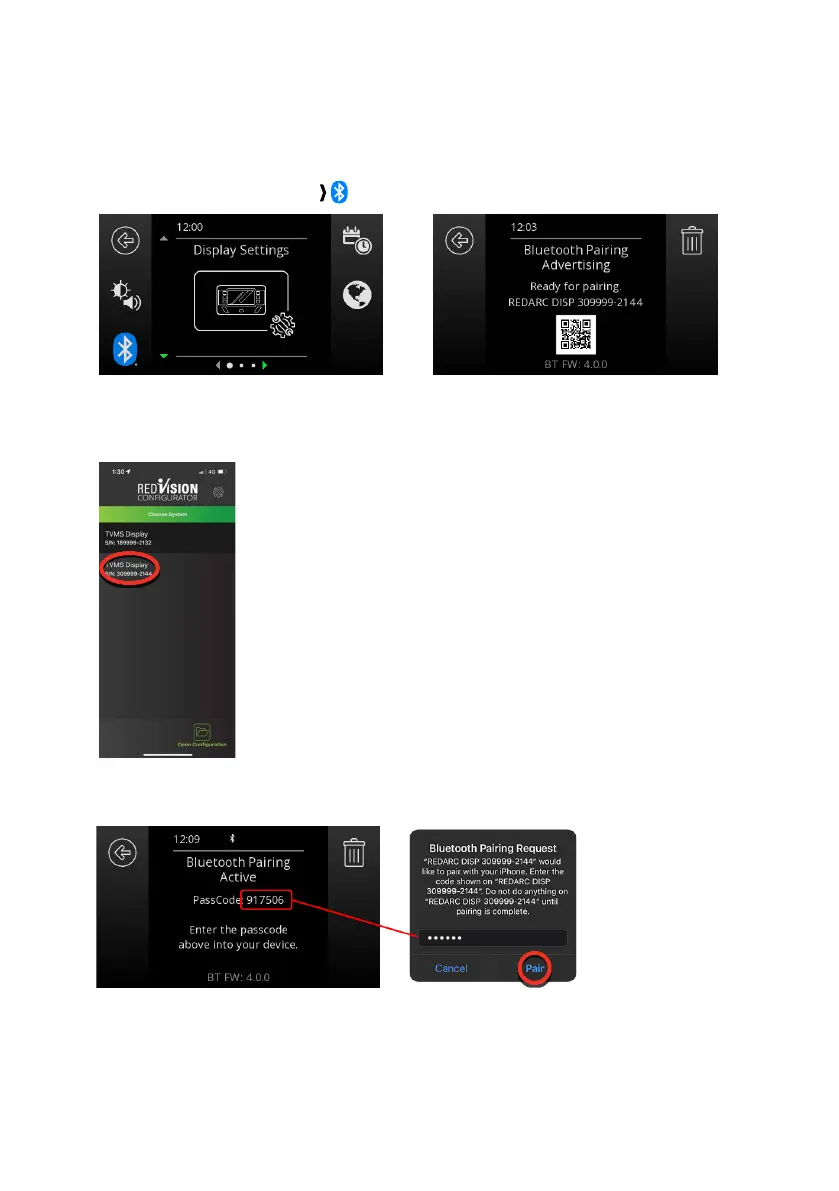
PAIR THE CONFIGURATOR APP TO THE DISPLAY
1. Make sure Bluetooth
®
is enabled on your smartphone, then open the Configurator App. Note,
some smartphones also require Location Services to be enabled.
2. On the RedVision Display, navigate to Display Settings.
3. Press the Bluetooth
®
SoftKey ( ) to display the Bluetooth Pairing Advertising screen.
In the Choose System screen in the App, select the system that matches the number on the
RedVision Display that you want to configure.
4. Enter the Passcode shown on the Display into the input field, then tap Pair.
Once the Display is successfully connected, the Configuration Main Menu in the App will open.


 To Next Page