Setting Alert Mode
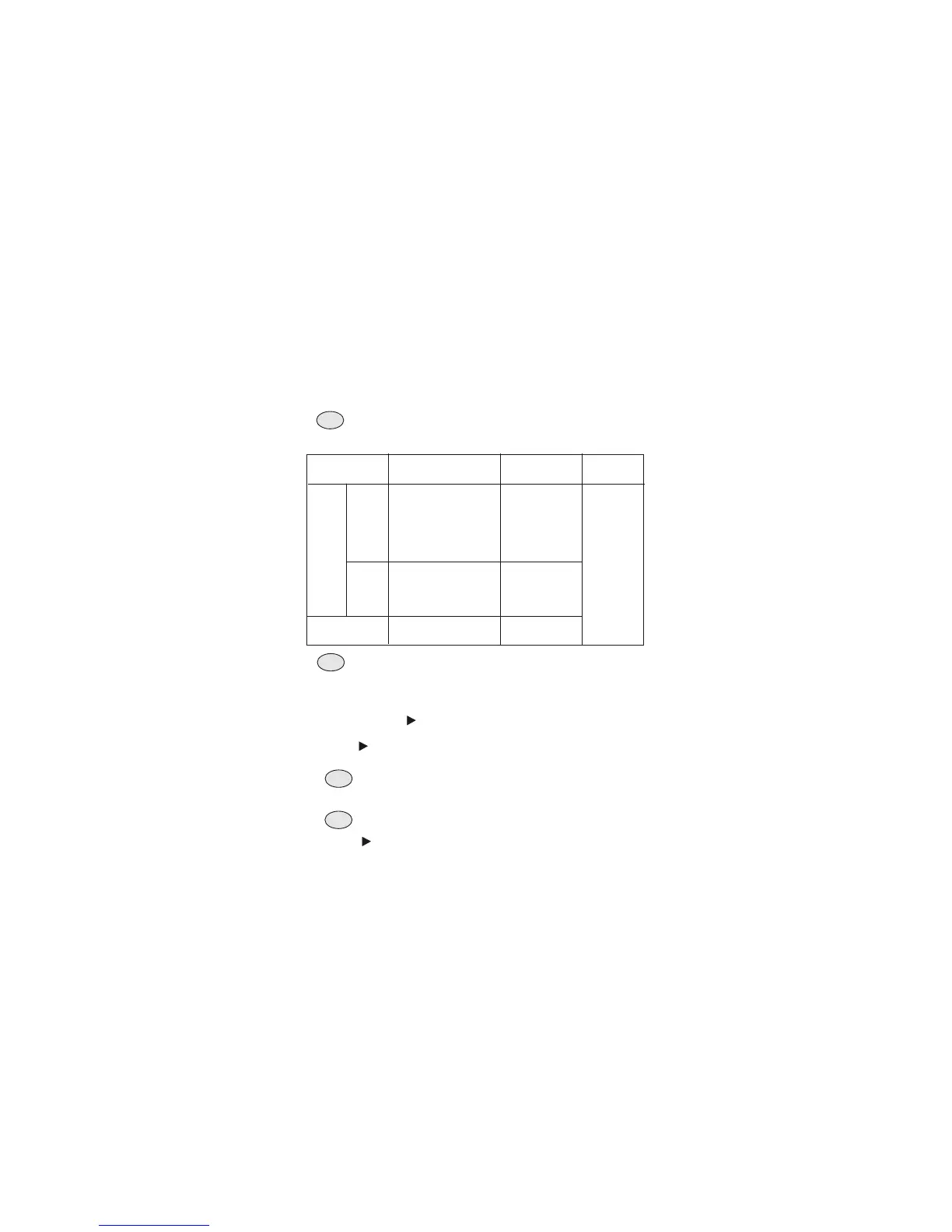
Alert Option Table:
You Hear:
Alert Option:
ALARM OUT
Socket:
You See:
Alert
Enable
VOICE
Alert Disable
8 seconds sire, then,
voice broadcast the
message (maximum
15 minutes) or until
you press STOP key.
Activates for
8 seconds
LCD
displays
event alert
message
and
Effective
Time.
5 minutes siren or
until you press
STOP key.
No siren and
voice broadcast
Activates for 5
minutes or until
you press
STOP key.
SIREN
Not
activate
At the VOICE option, after voice broadcast, the radio
will return to the previous state.
The Alert Option Table below describes how the radio will
respond in both visual and audio upon receiving alerts. .
Alert Enable and VOICE options are preset by default.
If you are satisfied with this setting, skip this section.
1. Press and hold PROG key for 2 seconds to enter program
menu page. Skip this step if it is now in program menu.
2. Keep pressing key to the menu page P4.
3. Press ENTER key to select.
4. Press key to select the alert option either Alert Enable
or Alert Disable..
6. Press key to select either VOICE or SIREN option.
7. Press ENTER key to confirm and complete this section.
If Alert Disable is selected, this section is completed.
Press PROG key will leave this section without update.
5. Press ENTER key to confirm.
- 9 -
Info
Hint
Note
Hint



 To Next Page