57
19. Operation of the built-in HD camera
Thequadrocopterhasabuilt-inHDcamera,whichisalignedforwardsinthedirectionofight.Usingthiscamera,you
cansavevideosandphotosontoamicroSDmemorycard(notincluded)duringight.Tostartandstopvideorecord-
ing or the taking of photographs, press the push buttons for the video/photo function (see Figure 1, no. 10 and 11).
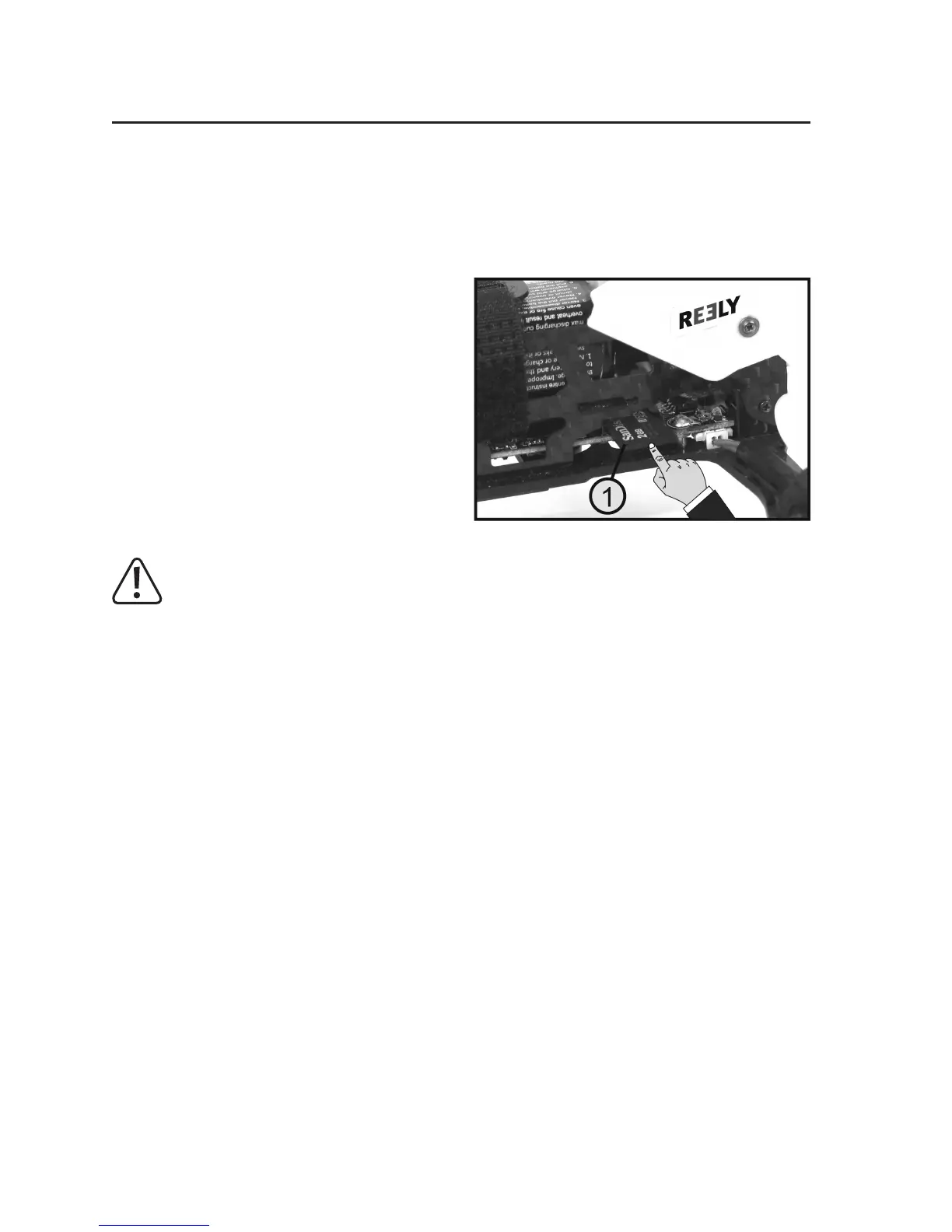
a) Inserting/removing the memory card
The memory card (class 10 with max. 32 GB) is slid into
the card slot on the right side until the limit stop as shown
in Figure 18.
The contacts of the memory card must face downwards.
As the card slot does not have a lock, the card can be
easily slid out of the card slot. It is best to use a pair of
tweezers for this.
Attention, important!
Pay attention to whether the blue LED on the video transmission module (see Figure 19, no. 3) remains on
whenthequadrocopterisswitchedon.IftheblueLEDashesafterthequadrocopterisswitchedon,no
memory card has been inserted or the inserted memory card is not recognised.
AlsomakesurethatthememorycardonlyisonlyformattedwiththeFAT/FAT32lesystem(standardon
newlypurchasedmemorycards)andnotwith,e.g.,theNTFSlesystem.
Figure 18


 To Next Page