EasyManua.ls Logo

Remington iLIGHT Elite IPL7000 - User Manual

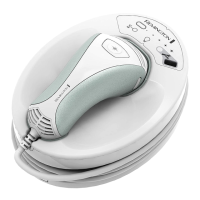
Remington iLIGHT Elite IPL7000
40 pages
Print Icon
To Next Page IconTo Next Page
Loading...
1
Hair Removal Use and Care Guide
IPL7000

Questions and Answers

Remington iLIGHT Elite IPL7000 Specifications

General IconGeneral
Model NumberIPL7000
TechnologyIntense Pulsed Light (IPL)
Light SourceXenon Flash Lamp
Skin Tone SensorYes
Energy Levels5
Pulse Count150, 000 flashes
Treatment Levels5
Corded/CordlessCorded
Warranty2 years
TypeHair Removal System
Treatment AreasBody, Face

Summary

Who Should Use the Device

Who Should Not Use the Device

Important Safety Information

Emphasizes the importance of reading safety information before using the device.

Do Not Use on Dark Skin

Warns against using the device on dark skin, as it may absorb excess light energy causing adverse reactions.

Do Not Use on Tattoos or Dark Spots

Prohibits use on tattoos, moles, nipples, genitals, and other dark or pigmented areas.

Do Not Use Near Eyes or Eyebrows

Advises against use near eyes, eyebrows, or eyelashes to prevent severe, permanent injury.

Do Not Use on Male Face, Head, or Neck

Explicitly prohibits device use on any part of the male face, head, or neck.

General Warnings and Precautions

General Warnings

Highlights critical warnings, including not flashing in explosive environments and keeping away from children.

Keep Out of Reach of Children

Stresses that the device, with its cords, poses a choking hazard and must be kept away from children.

Age Restriction

Mandates that users must be 18 years of age or older to operate the device safely.

Light Sensitivity Warning

Warns against use for individuals with photosensitivity or taking light-sensitizing medications.

Power Cord Safety

Advises positioning the device for easy power cord disconnection in case of fire.

General Precautions

Lists precautions such as avoiding use on skin with makeup, or on damaged, irritated, or recently treated skin.

Do Not Use on Skin with Makeup

Instructs users to clean the intended treatment area before use and avoid applying makeup.

Do Not Flash Same Spot Multiple Times

Warns against flashing the same spot multiple times per session to prevent skin swelling or discoloration.

Treatment Frequency

Recommends treating any specific area no more than once every two weeks for safety and effectiveness.

Do Not Use on Damaged Skin

Prohibits use on skin with open wounds, cold sores, sunburns, or after recent skin resurfacing.

Do Not Use on Irritated Skin

Advises against use on irritated or swollen skin, which can increase light sensitivity and risks.

Do Not Use with History of Cold Sores

Warns that treatment may trigger cold sores in individuals with a history of outbreaks.

Hair Removal Only

States the device is exclusively intended for hair removal purposes and not for other uses.

Permanent Hair Removal

Warns that results are permanent; avoid areas where future hair growth is desired.

Do Not Flash Non-Skin Materials

Warns against flashing the device on non-skin materials to prevent potential damage.

Do Not Use Near Water Sources

Prohibits use near water sources like bathtubs or showers to prevent electrocution risks.

Risks Associated with Device Use

Serious Eye Injury Risk

Warns about the severe risk of eye injury from IPL devices and recommends using safety eyewear.

How IPL Technology Works

Getting to Know Your Device

What to Expect During and After Treatment

Operating Instructions

Preparation Before Operation

Introduces operating the iLIGHT® Elite Hair Removal System after understanding safety and warnings.

Step 1: Prepare Treatment Area

Instructs to prepare the treatment area by cleaning, shaving, and drying it thoroughly.

Step 2: Plug In and Turn On

Guides on plugging in the device and turning it on using the power button.

Step 3: Conduct Skin Tone Test

Details the process of conducting a skin tone test using the device's tester for safety.

Skin Tone Test Results Interpretation

Explains the outcomes of the skin tone test, including when the device is locked or unlocked.

Suitable Skin Tone Confirmation

Describes the positive outcome of the skin tone test, indicated by a green light and unlocked device.

Step 4: Change Energy Level

Instructs how to adjust the energy level from 1 to 5 based on comfort and effectiveness.

Step 5: Test a Patch of Skin

Guides on performing a patch test at different energy levels to determine suitability and comfort.

Step 6: Treat Your Skin

Explains how to flash the device on the skin, ensuring proper contact and coverage.

Warning: Avoid Repeated Flashing

Warns against flashing the same spot repeatedly to avoid skin irritation or discoloration.

Device Overheating Handling

Advises on handling device overheating, suggesting a cool-down period and indicating readiness with a beep.

Step 7: Treatment Tracking

Explains how to track treatment sessions using cards or a mobile app, and monitoring flash count.

Treatment Regimen

Troubleshooting Common Issues

Warranty Information

Related product manuals