STARTING, STOPPING THE ENGINE
3
Driving - 161
During a system update via
the multimedia system it
will not be possible to start
the vehicle.
Waitfortheupdatetobecomplet-
ed before starting the vehicle.
For more information on system
updates,pleaserefertothemulti-
media instructions.
"Hands-free" starting with the
luggage compartment open
Inthiscase,thecardshouldnotbelo-
cated in the luggage compartment, to
prevent the risk of loss.
Accessories function
(switching on the ignition)
Once you have gained access to your
vehicle,youmayusesomeofitsfunc-
tions (radio, navigation, wipers, etc.).
To use the other functions, with the
card in the passenger compartment,
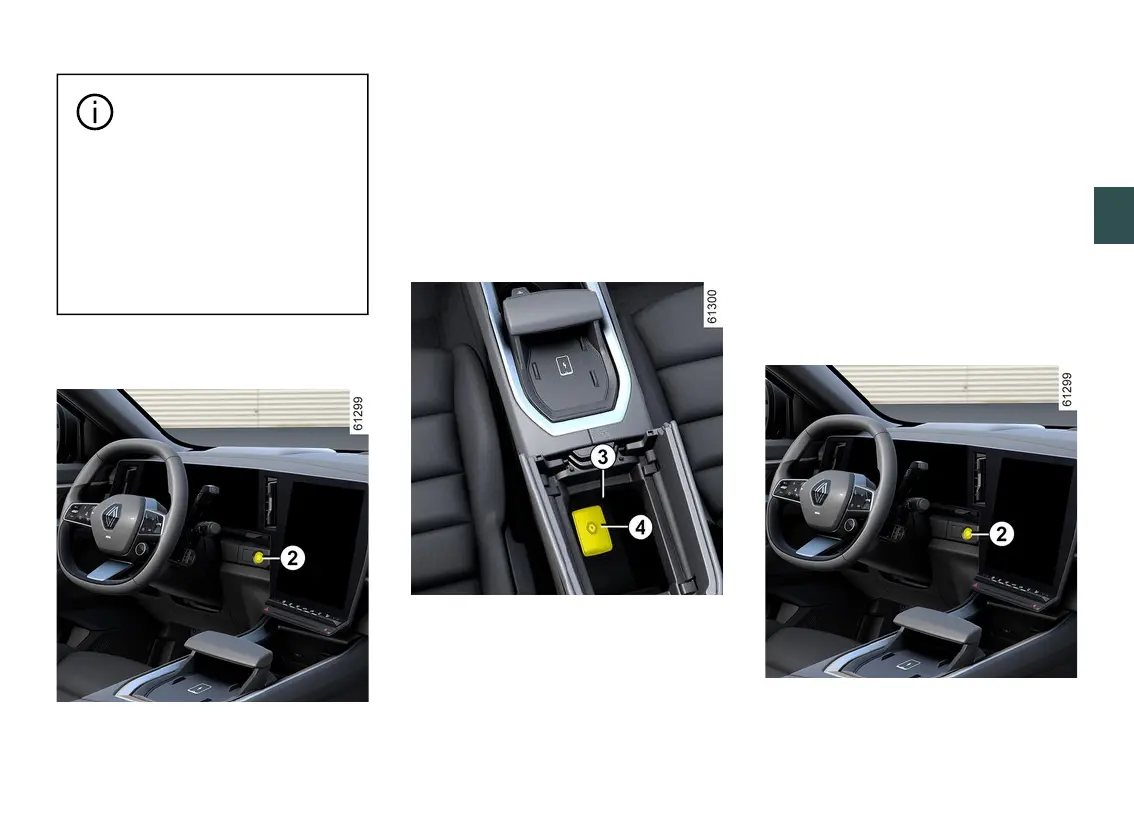
press the button
2
without pressing
the pedals.
The "Place card in zone + START"
message appears on the instrument
panel.
Press the brake pedal, then place the
card
4
(button side) on the placement
area
3
. Press the button
2
to start the
vehicle. The message goes out.
Operating faults
In certain cases, the hands-free card
may not work:
– when the card battery is flat, etc.;
– when near to appliances operating
on the same frequency as the card
(monitor, mobile phone, video game,
phone charger, etc.);
– thevehicleislocatedinahighelec-
tromagnetic radiation zone.
Conditionsforstoppingtheen-
gine
The vehicle must be stationary, with
the lever in P position. The READY
messageisdisplayedontheinstru-
ment panel.



 To Next Page