ADDITIONAL DRIVING AID FUNCTIONS
3
Driving - 211
Ensure that zone
C
around the radars
on each side of the rear bumper are
not obstructed (by dirt, mud, snow,
etc.).
If one of the radars is obscured, the
"Side radars without visibility" message
is displayed on the instrument panel.
Clean the area where the sensors are
located.
Warning light
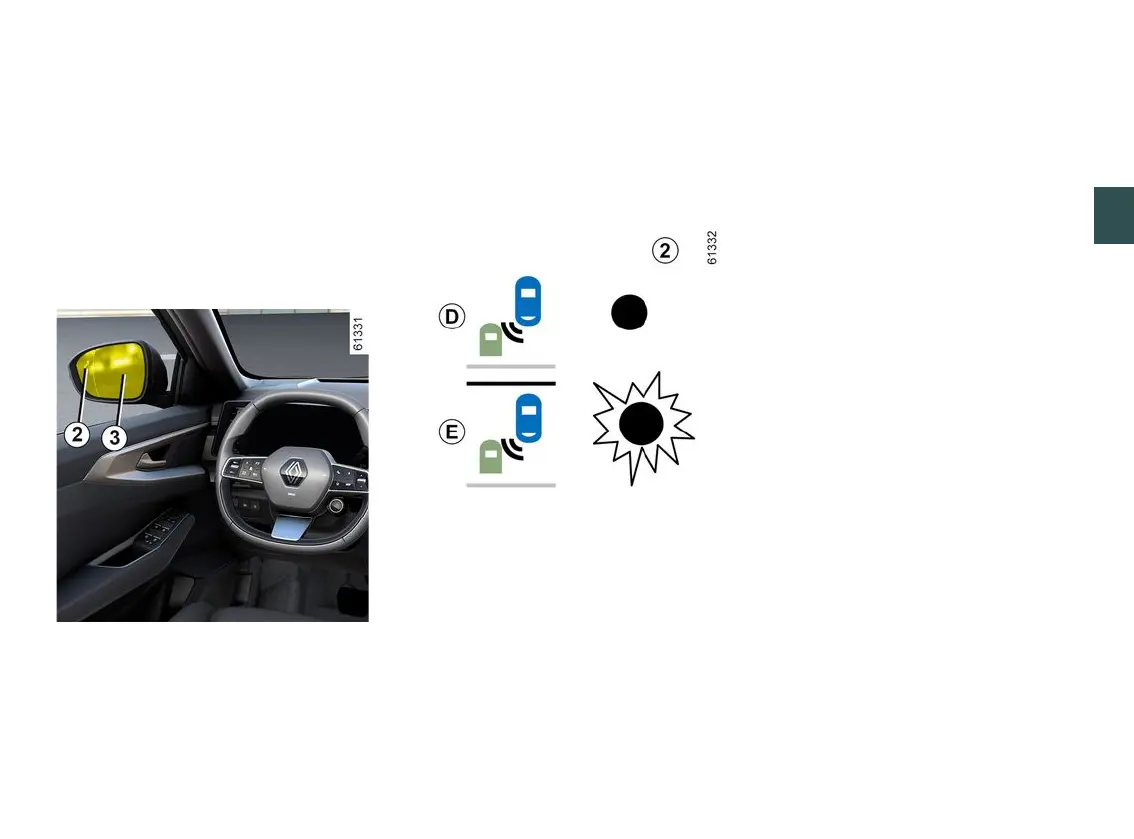
2
A warning light
2
is located on each
door mirror
3
.
Note:
– clean the
3
rearviewmirrorsregu-
larly, so that the indicator lights
2
can
be seen properly;
– if you overtake another vehicle, the
warning light
2
will only come on, if
that vehicle remains for a long enough
period in your vehicle's blind spot area
A
.
Display
D
First warning: direction indicator not
activated, the warning light
2
indi-
cates that a vehicle is detected in the
blind spot area and/or that a vehicle is
rapidly approaching from the rear in an
adjacent lane.
Display
E
Direction indicator activated, the
2
warninglightflasheswhenthefunc-
tion detects a vehicle in the blind spot
warningareaand/oravehicleisrapid-
ly approaching from the rear on the
side towards which you will turn the
wheel.
If you cancel the direction indicator, the
function will return to the initial warning
(display
D
).
Conditions for non-function
– When driving on a road with tight
bends;
– in reverse.
If the vehicle is equipped with a towbar
recognised by the system, the "Trailer:
blindspotwarningoff"messageisdis-
playedontheinstrumentpaneltoin-
formyouthatthefunctionisnotopera-
tional. For information on the range of
equipment adapted to your vehicle, we
advise you to consult an approved
Dealer.
Operating faults
If the system detects a fault, the
"CheckSideradars"messageisdis-
played on the instrument panel.
Consult an approved dealer.



 To Next Page