ADAPTIVE CRUISE CONTROL
3
Driving - 253
Thisfunctionisanaddi-
tional driving aid.
Itcanundernocircum-
stances replace the
driver's responsibility to respect
speed limits and safe distances or
to be vigilant.
Thedrivermustalwaysbeincon-
trol of the vehicle.
The driver must always adapt
theirspeedaccordingtothesur-
roundings and traffic conditions.
Use the Stop and Go adaptive
cruise control function outside
built-up areas, on wide roads
with visible lines.
Thecruisecontrolmayhavelimit-
ed operation on very winding or
slipperyroads(blackice,aqua-
planing, gravel) or during bad
weather (fog, rain, side winds,
etc.)
There is a risk of accidents.
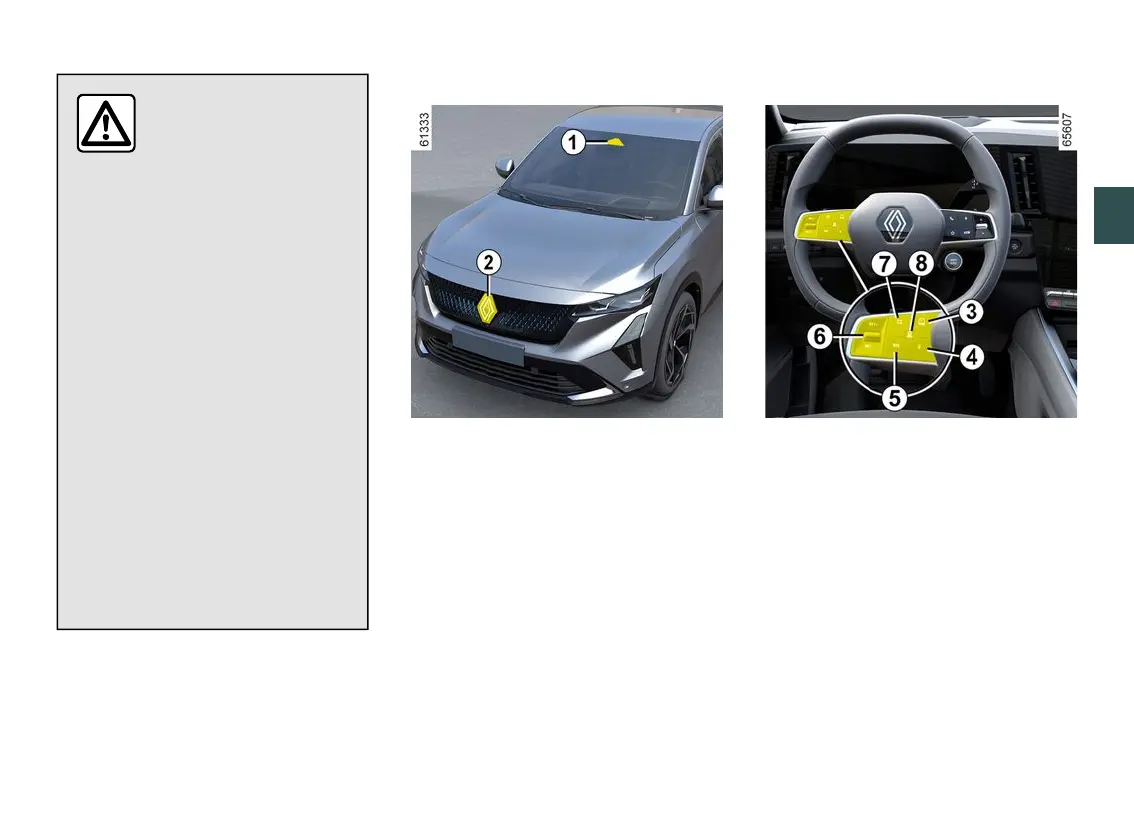
Location of the camera
1
Makesurethewindscreenisnotob-
scured (by dirt, mud, snow, etc.).
Location of the radar
2
Ensure that the radar protection plate
is not obstructed (dirt, mud, snow, a
badly fitted number plate), impacted,
modified (including painting) or hidden
by any accessory fitted on the front of
the vehicle (on the grille or logo, etc.).
Controls
3.
Switch for selecting/deselecting the
driving aids, depending on the vehicle:
– the Active driver assist;
– Adaptive Cruise Control;
– cruise control;
– speed limiter;
– Off.
4.
Put the function on standby (with
cruising speed stored) (0).
5.
Recall the stored cruising speed
(RES).
6.
– Upwards:activates,increasescruis-
ing speed or stores the current speed
(SET/+).



 To Next Page