ADAPTIVE CRUISE CONTROL
3
254 - Driving
– Downwards: activates, decreases
cruising speed or stores the current
speed (SET/-).
7.
Pop-up button (depending on the
vehicle): adapts the speed setpoint to
detected speed limits 🡺229
8.
Adjusting the following distance.
Depending on the vehicle,
youcanlinkthecruisecon-
trol function to the "Road
sign detection" function 🡺229 by
pressing the switch
7
.
The radar and camera
zones must be kept
clean and free of any
tamperinginordertoen-
sure the proper operation of the
system.
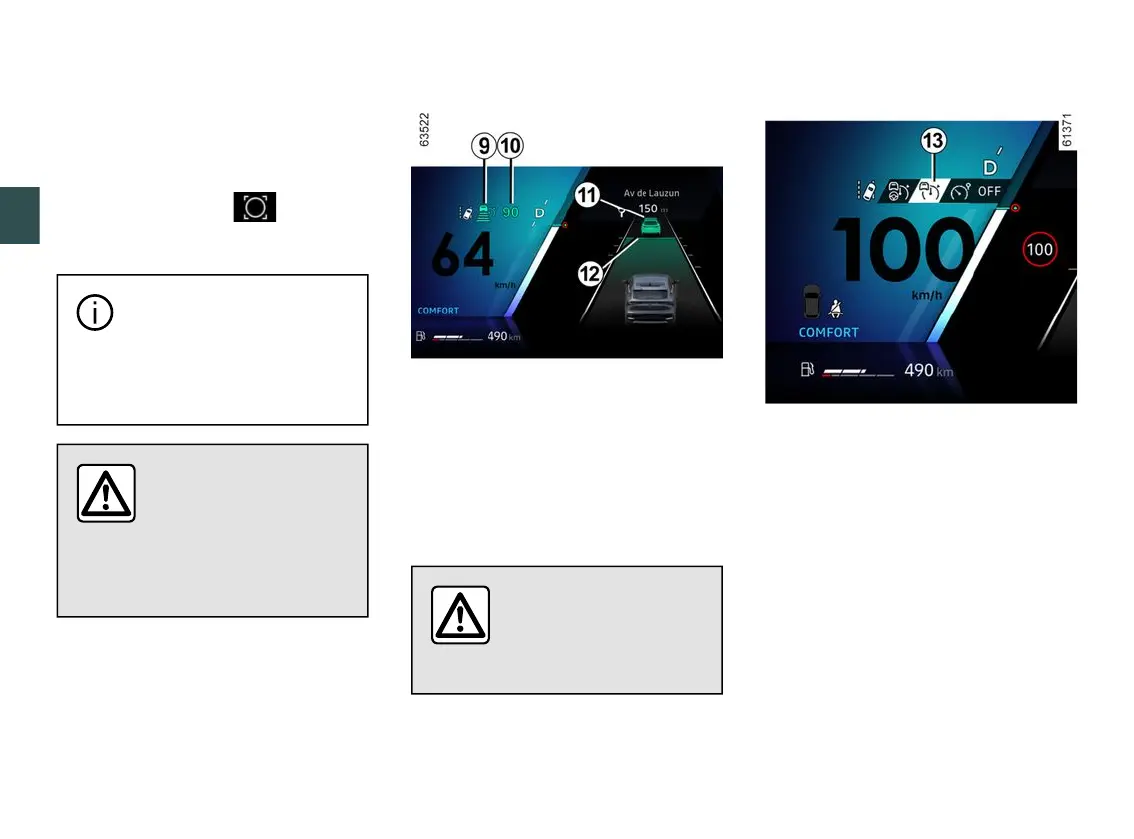
Displays
9.
Stop and Go adaptive cruise control
warning light.
10.
Stored cruising speed.
11.
Vehicle in front.
12.
Stored safe distance
Important: you should
keep your feet near the
pedals at all times to
prepare for any event.
Switching on
Press switch
3
to select the adaptive
cruise control
13
. The
9
warning light
appears in grey. The "Adaptive Cruise
Controlready:SETtoactivate"mes-
sage appears on the instrument panel
accompanied by dashes to indicate
thatthecruisecontrolfunctionisinop-
eration and waiting to store a cruising
speed.
This function cannot be activated
when:
– the parking brake is applied;
– the driver's seat belt is not fastened;
– one or more doors are incorrectly
closed;
– the "Hands-free parking" function is
already activated.



 To Next Page