ADAPTIVE CRUISE CONTROL
3
Driving - 255
The "Adaptive Cruise Ctl unavailable"
messageisdisplayedontheinstru-
ment panel.
Activating cruise control
Whilethevehicleisstationaryormov-
ing at a steady speed, push the control
6
upwards (SET/+) or downwards
(SET/-): the function is activated and
the current speed is stored.
The minimum cruising speed is 19
mph (30 km/h).
The cruising speed
10
replaces the
dashes and cruise control is confirmed
by the appearance of the cruising
speed in green and warning light
9
.
If you try to activate the function when
the vehicle is travelling over 112 mph
(180km/h),the"Speedinvalid"mes-
sage will be displayed and the function
will remain deactivated.
Once a cruising speed is memorised
andthecruisecontrolfunctionisac-
tive,youmayliftyourfootofftheaccel-
erator pedal.
Note: if your vehicle speed is lower
thanabout19mph(30km/h),thefunc-
tion uses a default cruising speed of
19mph(30km/h).Thevehiclewillac-
celerate until it reaches the stored
cruising speed.
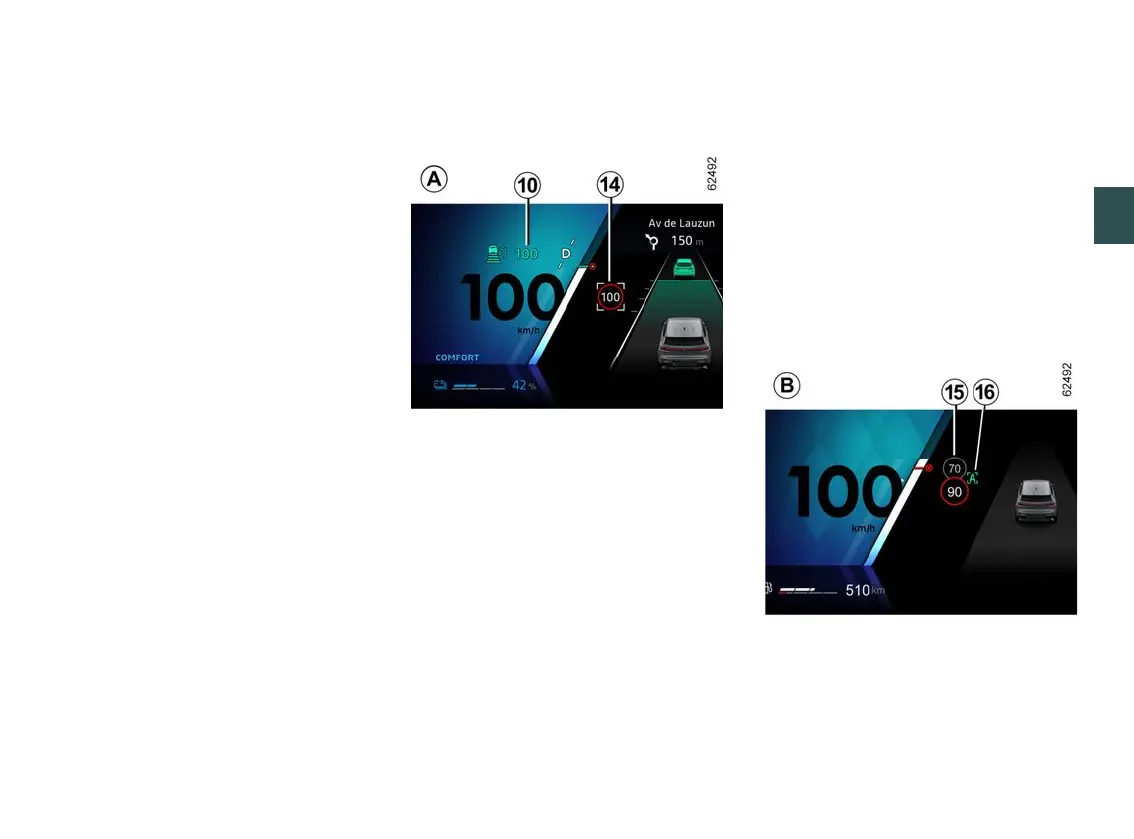
Activating cruise control with
speed limit sign recognition
(display
A
)
(depending on the vehicle)
If the vehicle is equipped with the
"Road Sign Detection" 🡺229function,
press the contextual button
7
to adapt
the vehicle's speed to the
14
speed
limits detected by the camera.
When passing the sign, the cruising
speed
10
adoptsthevalueofthede-
tected speed
14
.
Adjustment
You can choose to apply to cruising
speed
10
asystematicspeeddevia-
tion in relation to the detected speed
limits
14
.
From the multimedia screen, in the
"Vehicle" World, select "Drivingassis-
tance". Then, on the "Speedmanage-
ment" menu, activate the "Adjust
speed limitations" field and select the
desired difference (from -6 mph (10
km/h) to +6 mph (10 km/h), above 30
mph (50 km/h)).
Activating cruise control with
advancespeedlimitsignrecog-
nition (display B)
(depending on subscription)
Usingthecamera,the"Roadsignde-
tection" function 🡺229 and the map
associated with the subscription, the
systemanticipatestheautomaticad-



 To Next Page