ADAPTIVE CRUISE CONTROL
3
256 - Driving
justment of the vehicle speed until the
next sign is identified
15
.
Activation/deactivation
From the multimedia screen, in the
"Vehicle" World, select "Drivingassis-
tance". Then, from the "Comfort"
menu, select "Speed limit adaptive
cruise control".
The letter "A"
16
is displayed on the
instrumentpaneltoconfirmtheactiva-
tion of the cruise control with advance
speed limit sign recognition.
Note:
– you can also activate/deactivate the
function by pressing and holding the
pop-up button
7
;
– insomecases(ifthereisasignifi-
cant difference between the vehicle
speed and limited speed), the system
may request that you validate the
speed manually be pressing the pop-
up button
7
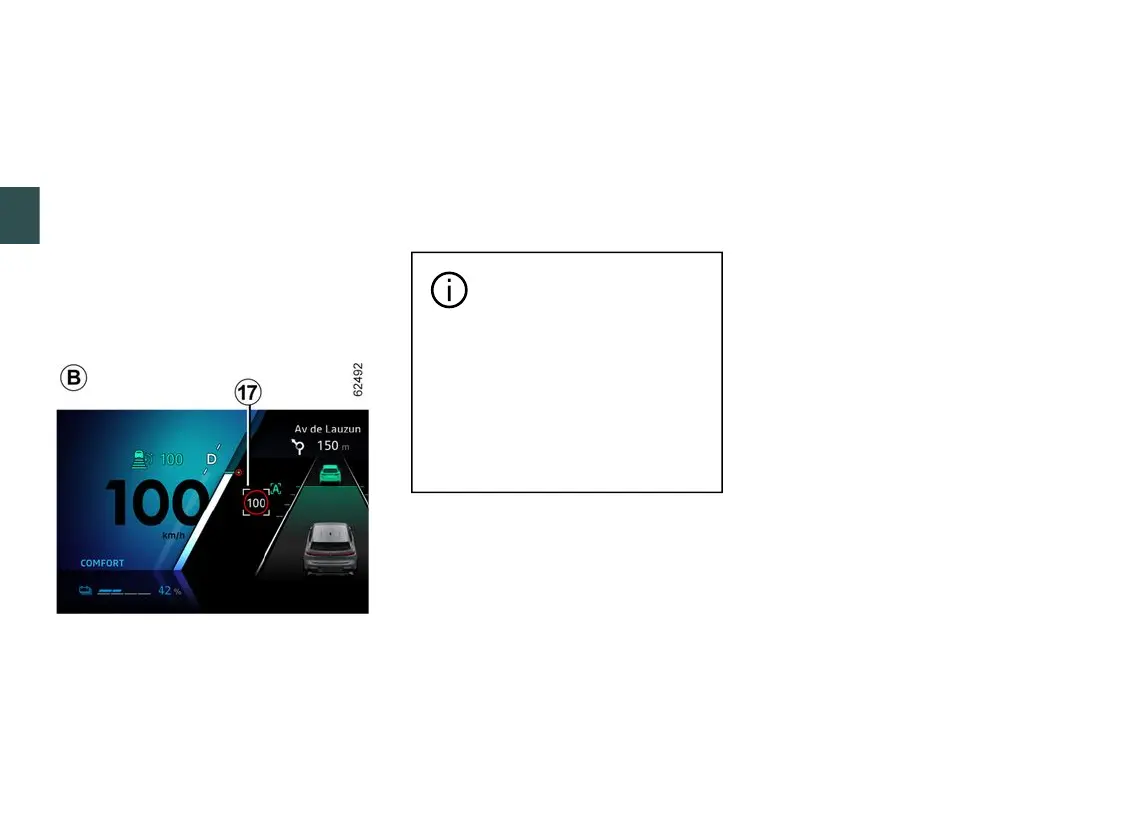
: the white square
17
is
displayed around the indicated speed
to inform you.
Cruise control with advance
speed limit sign recognition
isassociatedwithasub-
scription.Ifthereisnosubscrip-
tion,thisfunctioncannotbeacti-
vated.
To manage the subscription,
please refer to the multimedia
instructions.
Operation
Withthefunctionactivated,thefollow-
ingspeedsaredisplayedontheinstru-
ment panel:
– cruising speed
10
;
– the current speed limit detected by
the system on the section of road on
which the vehicle is travelling
14
;
– the speed detected by the system on
the next road section or speed limit
zone
15
.
The detected speed
15
is taken into
account by the system. The vehicle
speedadjustsgradually,untilitbe-
comes the cruising speed
10
, without
any action from the driver. The speed
indicated on
15
is displayed on
14
whenpassingthesignorzoneidenti-
fied.
The driver must always stay vigilant
regarding the speed applied by the
system and remains responsible for
the vehicle speed.
When the function is not activated or
the subscription is no longer active, the
operation is identical to setting the
cruising speed with speed limit sign
recognition (display
A
).
Activating cruise control with
advance recognition of the road
layout (display
C
)
(depending on subscription)



 To Next Page