PARKING AIDS
3
284 - Driving
Fortherearviews,themul-
timedia screen
5
shows a
reverse image of the rear
view as in a rear view mirror.
In front view or rear
view: when manoeuvring
on a slope, objects
shown on the multimedia
screen may be closer or further
away than they seem.
Take this into account in order
to correctly assess the dis
tance before any manoeuvre.
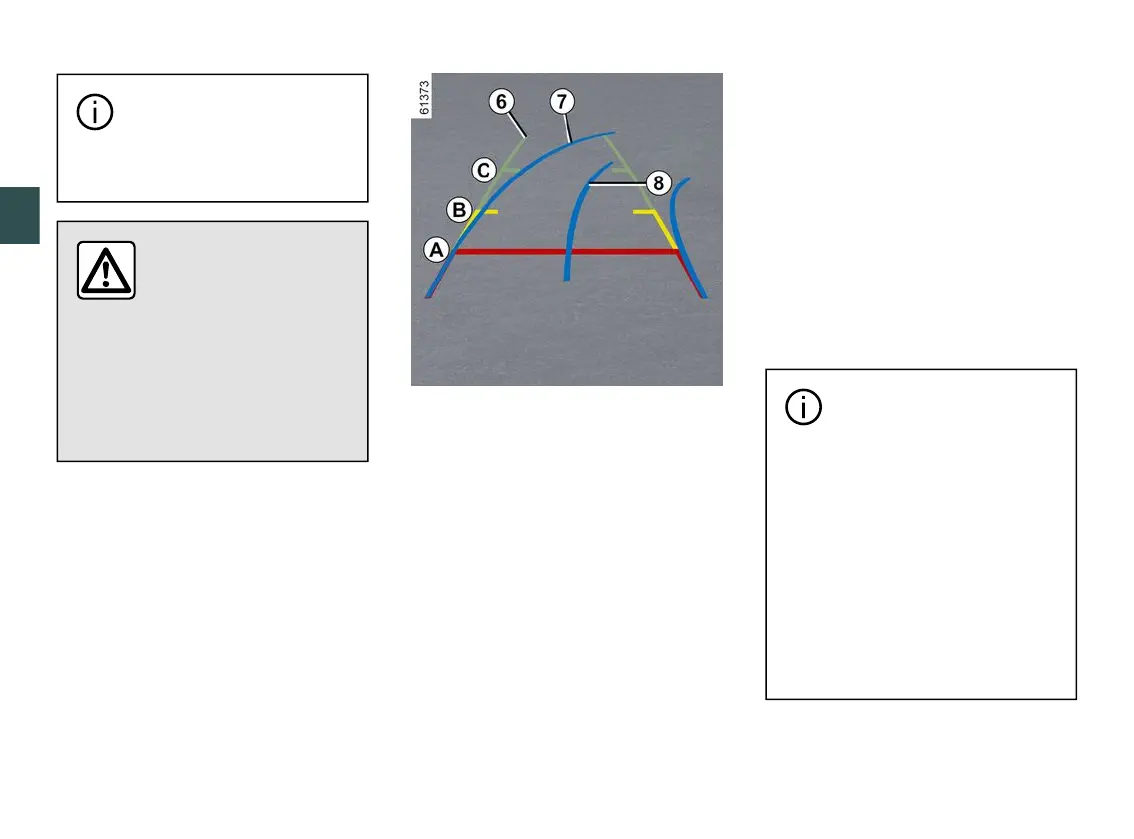
The "front" or "rear" view transmitted to
the multimedia screen
5
is displayed
with one, two or three guide lines
6
,
7
and
8
.
This system is initially used with the
aidofseveralgauges(mobilefortra-
jectory and fixed for distance).
Fixed guide lines
6
The fixed gauge includes coloured
markers
A
,
B
and
C
indicating the
distance behind the vehicle:
–
A
(red)atapproximately30cen-
timetres from the vehicle;
–
B
(yellow)atapproximately70cen-
timetres from the vehicle;
–
C
(green) at approximately 150
centimetres from the vehicle.
Moving guide line
7
Thisisshowninblueonthemultime-
dia screen
5
. It indicates the vehicle
trajectory according to the position of
the steering wheel in the front and the
rear view.
Trailer guide line
8
Thisisshowninblueonthemultime-
dia screen
5
.Thisindicatesthetrajec-
tory of the trailer towbar in relation to
the steering wheel position.
Itallowsthedrivertopositionthetow-
bar as close as possible to the trailer's
towing head.
The front, rear and side
viewguidelinesarearepre-
sentation projected onto flat
ground; this information must not
betakenintoaccountwhensu-
perimposed on a vertical object or
an object on the ground.
Objects displayed on the edge of
themultimediascreenmayap-
pear distorted.
In very bright light (snow, vehicle
insunshine,etc.),thecameravi-
sion may be adversely affected.



 To Next Page