AIR VENTS, HEATING AND AIR CONDITIONING
4
Your comfort - 307
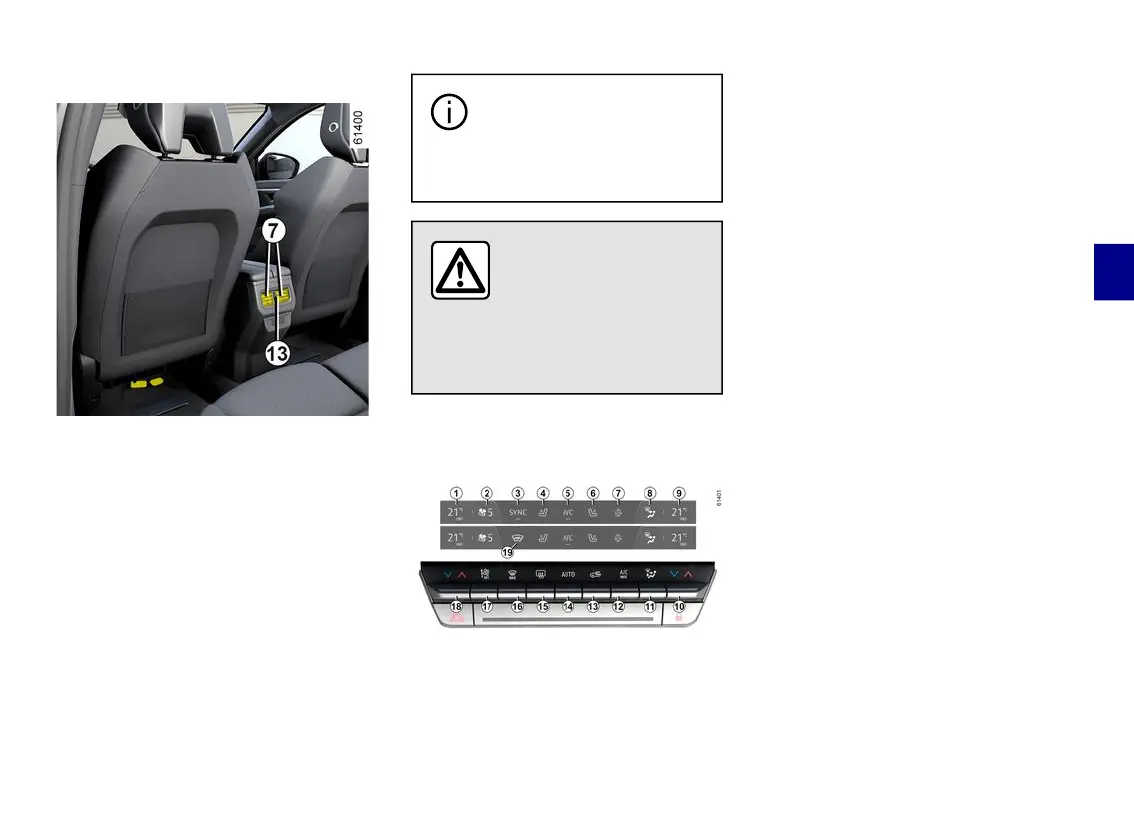
Rear seats
(depending on the vehicle)
Direction
To direct the air flow, turn the air vents
7
using the tabs.
Air flow
To check the flow of the air vents
7
turn the knob
13
accordingtothede-
sired opening:
– to the right: maximum air flow;
– to the left: closed.
Do not attach any objects
totheairvents(e.g.tele-
phone mounting).
Risk of damage.
Do not add anything to
thevehicle’sventilation
circuit (for example, to
remove bad odours).
There is a risk of damage or of
fire.
Automatic climate control
The controls
1.
Driver'sheatingtemperatureindica-
tor.
2.
Ventilation speed indicator.
3.
Activationcontrolforthe"Synchro-
nisation" SYNC function (configuration
A
).
4.
Driver'sheatedseatactivationcon-
trol.
5.
Air-conditioning activation control.
6.
Passenger's heated seat activation
control.
7.
Heated steering wheel activation
control.
8.
Passengercompartmentairdistrib-
ution indicator.
9.
Passengerheatingtemperaturein-
dicator.
10.
Adjustingthepassenger'sairtem-
perature.
11.
Passengercompartmentairdistri-
bution adjustment.
12.
Activation control for the "A/C
MAX" function.
13.
Air recirculation.
14.
Air-conditioning activation control
in AUTO mode.
15.
De-icing/demisting of the rear
screen and, depending on the vehicle,
the rear view mirrors.
16.
"Clear View" function.
17.
Adjusting the ventilation speed
and stopping the system.
18.
Adjust the driver's air temperature
andtheactivationcontrolforthe"Syn-
chronisation"SYNCfunction(configu-



 To Next Page