AIR VENTS, HEATING AND AIR CONDITIONING
4
308 - Your comfort
ration
B
).
19.
Heatedwindscreenactivationcon-
trol (configuration
B
).
Activating the system
Whenthevehicleisstarted,thesys-
tem returns to the last programme
used.
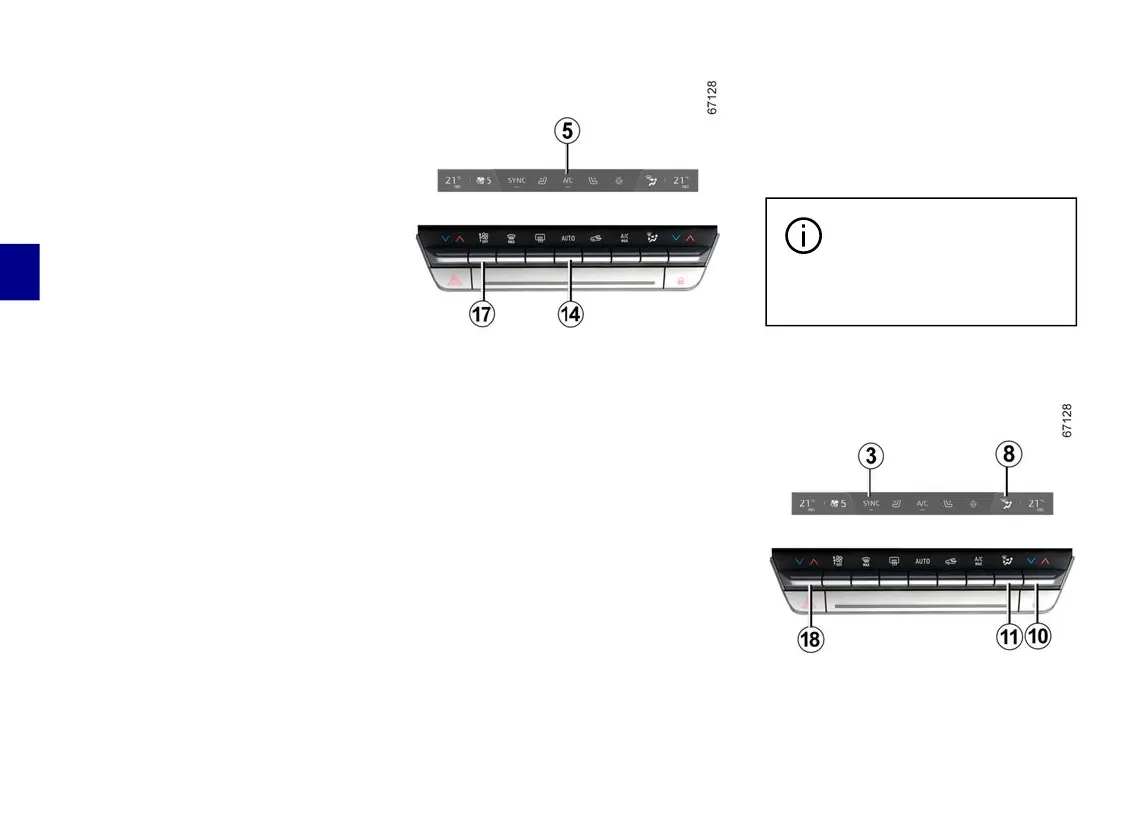
Press the control
14
to activate the
system or set the control
17
tothede-
sired ventilation speed.
Stopping the system
Press the control
17
until it reaches
theOFF».
Switching the air conditioning on or
off
Inautomaticmode,thesystemman-
ages activation of the air conditioning.
Youwillstillbeabletoactivateorde-
activate the system by pressing the
control
5
.
Automatic mode
The automatic climate control system
guarantees comfort in the passenger
compartmentandgoodvisibility(ex-
ceptintheeventofextremecondi-
tions),whileoptimisingfuelconsump-
tion.
The system controls the ventilation
speed, air distribution, air recirculation,
andstartingandstoppingtheaircondi-
tioning and air temperature.
This mode consists of a choice of
three programmes:
AUTO: optimises the selected comfort
level according to exterior conditions.
Press the button
14
.
SOFT:enablesthedesiredtempera-
tureleveltobeobtainedmoresmooth-
ly and silently. Press button
14
then
press downwards again to activate
SOFT mode.
FAST: increases the air flow in the
passenger compartment. This mode is
recommended in particular to optimise
comfort in the rear seats. Press button
14
thenpressupwardsagaintoacti-
vate FAST mode.
Whentheairconditioningstartsinau-
tomatic mode, the system returns to
the last programme used.
Anyactiononabuttonoth-
er than the AUTO button
deactivates automatic
mode.
Adjusting the distribution of air in
the passenger compartment
Press
11
one or more times to select
the air distribution. The air distribution
selected
8
isdisplayedonthemulti-



 To Next Page