AIR VENTS, HEATING AND AIR CONDITIONING
4
Your comfort - 309
media screen. The positions are in the
following order:
All the air is then directed to the
windscreen and front side window
demisting vents.
Theairflowisdistributedbe-
tween front side window demisting
vents, the windscreen demisting vents
and the footwells.
Theairflowisdistributedbe-
tween the front side window demisting
vents, the windscreen demisting vents,
the dashboard air vents and the
footwells.
The air flow is mainly directed to
the dashboard air vents.
The air flow is directed towards
the dashboard vents and towards the
footwells.
The air flow is directed mainly
towards the footwells.
Adjusting the air temperature
There are two types of settings:
– independentadjustmentofthepas-
senger compartment;
– adjusting using the SYNC function to
synchronise the passenger side with
the driver's side.
Independent adjustment of the pas
senger compartment
Use controls
10
and
18
to adjust the
left-handandright-handsideindepen-
dently.
Adjusting using the SYNC
Press SYNC
3
on your multimedia
screen or, depending on vehicle, on
control
10
or
18
and then SYNC to
synchronise the temperature on the
passenger side with that on the driver's
side.
To exit this function, press again on
SYNC or adjust the temperature on the
passenger side.
Adjusting the ventilation fan speed
In automatic mode, the system uses
the most suitable amount of air to
reachandmaintainthedesiredcom-
fort level.
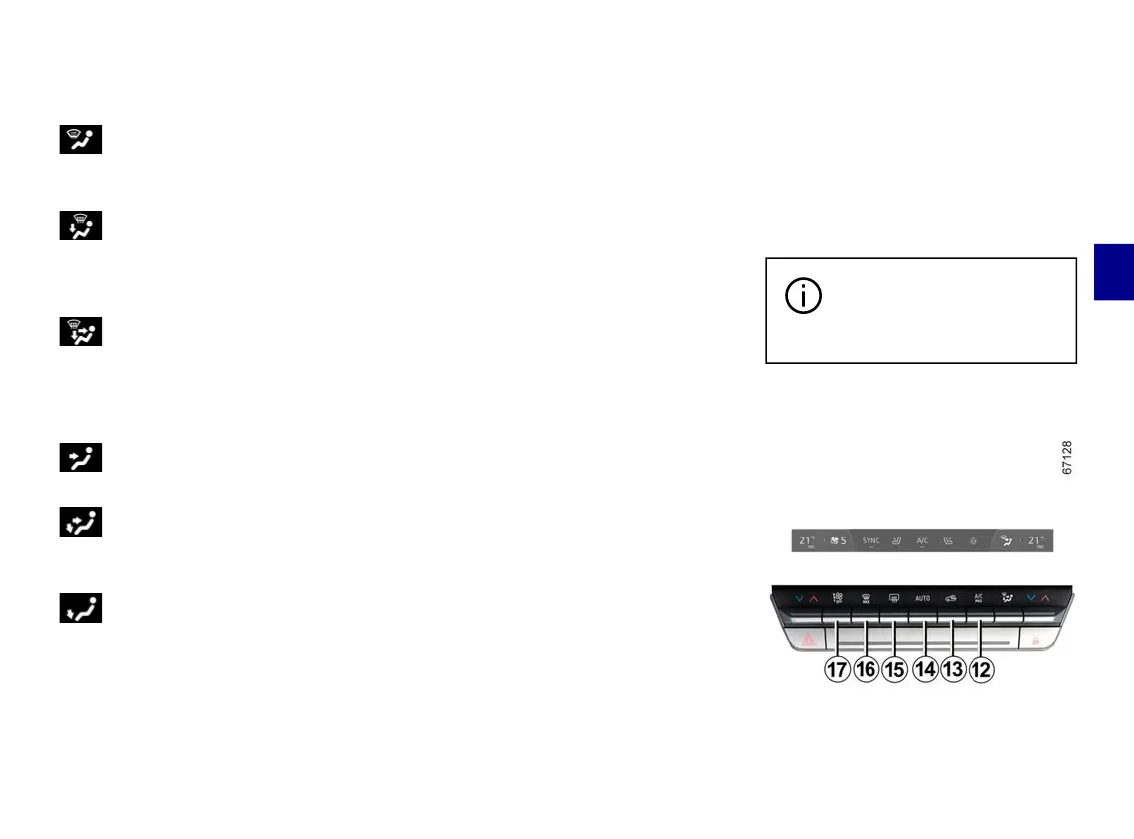
Youwillstillbeabletoadjusttheventi-
lation speed by pressing the control
17
to increase or reduce the ventilation
speed.
"Clear View" function
Press the button
16
and the built-in
warning light comes on.
This function quickly de-mists the
windscreen, rear screen, front side
windows and door mirrors (depending
onthevehicle).Itautomaticallyacti-
vates the air conditioning and rear
screen de-icing functions.
To exit this function, press button
14
or
16
.
Somebuttonshaveanop-
erating light indicating their
operative state.
Rearscreende-icinganddemist-
ing



 To Next Page